
Apple Patents a Camera-First System for Building Personalized Avatars
Setting up a digital avatar usually means picking features from a long menu that barely looks like you. Apple's new patent describes a system where your camera does the choosing, and you only tweak what you want to change.
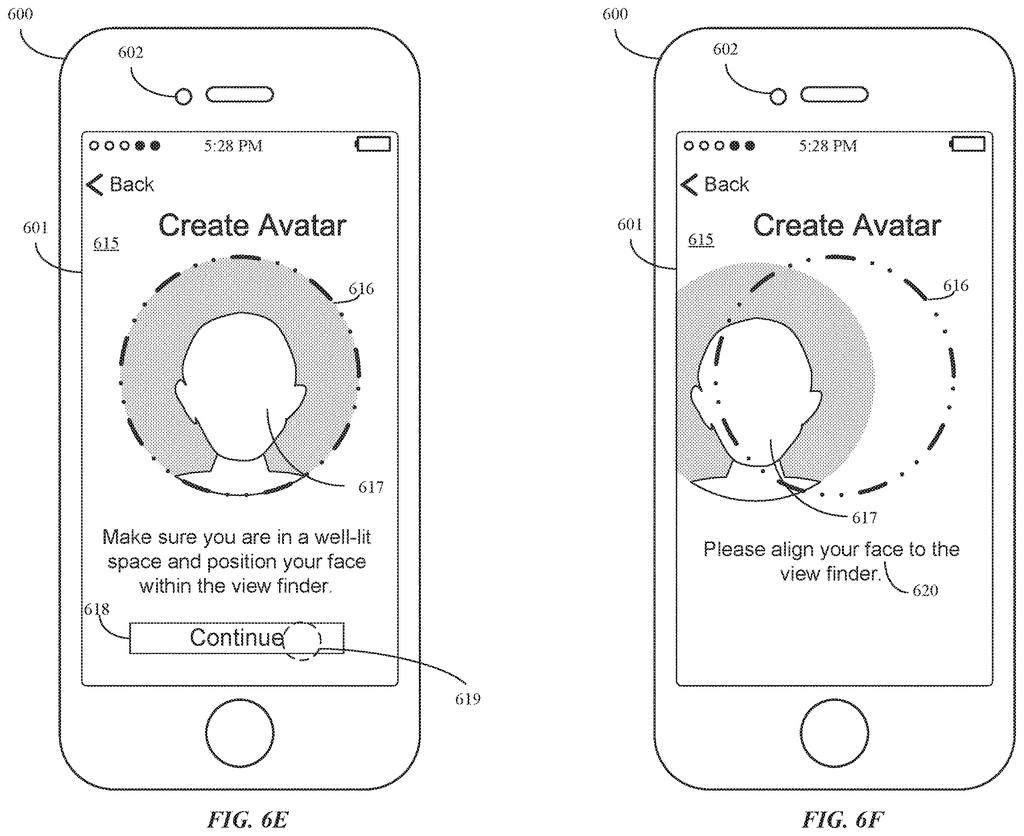
How Apple's avatar setup reads your face for you
Setting up a digital look-alike on your phone today is mostly guesswork: you scroll through nose shapes and hair colors hoping something resembles you. Apple's new patent describes a system that has your camera scan your face first, then automatically select the features that match what it sees.
Here's the interesting part: the avatar shown on screen doesn't automatically use the camera's best guess for every feature. Instead, your phone might show you the avatar with a default look for, say, your eye color, while a small indicator points to what the camera thinks is the better match. Tap that indicator and the avatar updates to reflect what your camera actually captured.
The editing side works with gestures too. Swipe or tap on a specific part of the avatar and the phone responds based on what you touched and how you moved. It's designed to feel like you're sculpting a face, not filling out a form.
capturing, with the one or more cameras, image data of a user; selecting, based on the captured image data of the user, a first option for a physical feature of the user; concurrently displaying, via the display: a user-specific avatar generated based on the captured image data of the user …
Translation: The device takes your photo and automatically guesses your physical features to build an initial digital avatar.
How the camera pick and the avatar update work together
The patent covers an electronic device (phone, tablet) with a camera, display, and processor working together across three main tasks.
First, guided capture. When you go to create an avatar, the camera collects image data of your face and the system analyzes it to select a "first option" for each physical feature: your hair texture, skin tone, face shape, and so on. The system is doing the initial legwork instead of leaving you to scroll through dozens of options blind.
Second, a split display. Here's the technically interesting choice: the avatar shown on screen during setup intentionally displays a predetermined option (a default) for a feature, not the camera's detected match. Alongside it, the interface shows an indicator pointing to what the camera actually recommended. This is deliberate. The user has to actively tap to accept the camera's suggestion, keeping the human in control rather than auto-applying every detection result.
- Camera detects your feature and selects a best match
- Avatar shows a default, not the match, so nothing changes without your input
- An indicator labels the camera's recommendation
- You tap to apply it; the avatar updates immediately
Third, gesture-based editing. After the avatar is created, edits respond to the type of gesture used and the specific feature being touched, letting the interface behave differently depending on context.
… an avatar editing interface updates a user avatar in response to gestures and based on the type of gesture and the avatar feature that is selected for editing.
Translation: You can intuitively tweak your digital character using simple hand gestures on the screen.
What this means for Memoji and messaging personalization
For everyday users, the clearest payoff is that setup becomes faster and less frustrating. You get a starting point that already reflects your actual face, instead of spending ten minutes picking from abstract silhouettes. The gesture editing layer also means adjustments feel more direct, like nudging a slider than navigating a sub-menu.
For Apple, this feeds into its existing Memoji system and could matter more as avatars show up in more places: FaceTime, Messages, Vision Pro environments. Apple's long bet on avatar-based communication means this kind of foundational plumbing work compounds over time. The more natural avatar creation feels, the more likely people are to actually use these features rather than skipping them during device setup.
That makes this Apple's 413th filing in our Apple coverage since May, a set that includes ideas like matching room acoustics and sharing content between nearby devices.
The split-screen setup, where your avatar holds a default look while a separate hint points to what the camera recommends, hands you control at the cost of an extra step. That trade is defensible. But it assumes you notice the hint at all, and most people move through setup screens quickly without reading them.
If you miss the indicator, the experience reads as broken: the camera scanned your face and the avatar still looks nothing like you. The design puts the burden of attention on the exact moment when attention is lowest.
The gesture-based editing could redeem some of that friction if it makes adjustments feel direct and physical rather than buried in menus. Whether it does depends entirely on execution, and the filing does not show its hand there.
Get our take in your Top Stories
Liked this breakdown? Add Patentlyze as a preferred source on Google, and our plain-English take shows up more often in your Top Stories the next time Apple patent news breaks.
There are more where this came from
We read every patent application Big Tech publishes and send you the ones worth knowing. Plain English, free, every week.
The drawings
42 drawing sheets from US 2026/0281543 A1 · click any drawing to enlarge


Show the other 34 sheets


Want this weekly breakdown for a company we don't cover? Patentlyze Pro →
Be the first to weigh in