
Apple · Filed Jun 10, 2026 · Published Oct 8, 2026

Apple Patents Floating Controls for Moving and Resizing Virtual Objects by Looking and Pinching

Choosing whether to move, spin or resize a virtual object could come down to a glance at the right option, then a pinch and a hand movement.
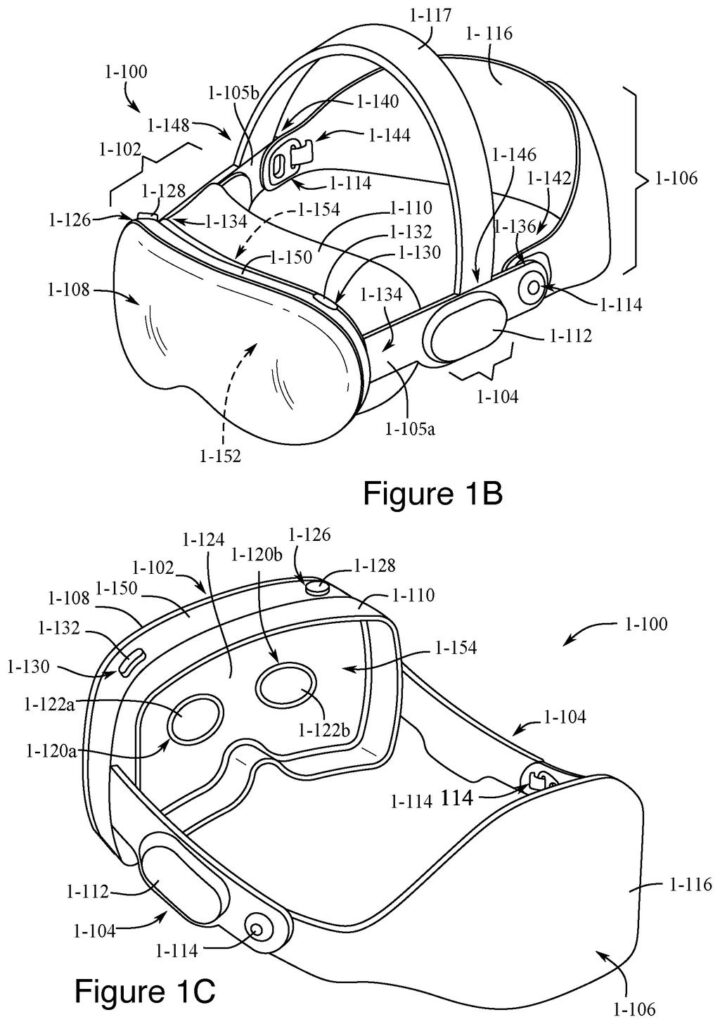
Apple's headset seen from the front and back, with sensors that follow your hands and watch where you look. Drawing from patent filing US 2026/0310304 A1.
Apple's headset seen from the front and back, with sensors that follow your hands and watch where you look.
See all 59 drawings from this filing ↓
Publication number US 2026/0310304 A1 US20260310304A1
Applicant Apple Inc.
Filing date Jun 10, 2026
Publication date Oct 8, 2026
Inventors William D. LINDMEIER, Tony KOBAYASHI, Alexis H. PALANGIE, Carmine ELVEZIO, Matthew J. SUNDSTROM
US classification 345/156
Status when we published Waiting for an examiner (Jun 28, 2026)
Parent application is a Continuation of 19092989 (filed 2025-03-27)
Document 21 claims

What Apple's look-and-pinch object controls do

Moving things around in a headset is harder than it sounds. Apple's own filing calls many current approaches cumbersome, tedious and error-prone, because sliding, spinning and resizing a virtual object can each call for a different input you have to remember.

The patent proposes a simple pattern. When you look at a virtual object and hold part of your body, such as a hand, in a certain pose, a small set of options appears, one for each way of handling the object. You look at the one you want, pinch to select it, then move your hand. The direction and distance of your hand's movement set the direction and amount of change in the object.

Once you have chosen, you can look away and the action carries on. The options can also follow your hand or the object around, and they disappear when you stop holding that pose.

From the filing · CLAIM 1
… manipulating the virtual object according to the first input mode in accordance with one or more parameters of the second input; and in accordance with a determination that the first input was detected while the attention of the user was directed to the second representation of the second input mode, manipulating the virtual object according to the second input mode …

Translation: The system changes how it moves the object depending on which control you looked at first.

How a glance picks the way you move an object

The core of the filing is a screen layout. A virtual object appears alongside two or more small on-screen choices, each standing for a different way of manipulating it (the claims name moving, rotating and scaling, which means resizing). The system tracks your attention, which the filing mostly treats as where you are looking, though it can also be where a handheld device is pointing.

Choosing takes two steps:

  • Select: a selection input, such as a pinch or a button press on a handheld device, happens while your attention is on one of the choices. That locks in the mode.
  • Act: a second input, such as a hand movement, changes the object in that mode. Bigger movements make bigger changes, and the direction of the movement sets the direction of the change.

The filing adds some forgiving details. Once you have chosen, the change continues even if your gaze drifts away. If your gaze leaves the choice before your selection finishes, the system still counts it when the selection ends within a short time limit, and ignores it if it ends later.

The options appear only when you look at the object while a part of your body, such as a hand, is in a particular pose. The description also covers direct input (reaching out to the object itself) and indirect input (looking at it while gesturing from wherever your hand happens to be).

From the filing · THE ABSTRACT
In some embodiments, a computer system manipulates a virtual object based on input from a hand of a user and/or a handheld device.

Translation: The device tracks your hand movements or a controller to let you interact with virtual items.

Why this could make headset editing less fiddly

If you wear a headset, the practical payoff is fewer steps and fewer mistakes when you handle 3D things like a product model, a room layout or a piece of art. A look picks the action, a pinch confirms it, and your hand supplies the movement. Because the choices appear only while you need them, your view stays uncluttered.

The filing describes a head-mounted device with eye-tracking and hand-tracking cameras, and it says cutting the number of inputs saves effort and battery. Interaction rules like these shape whether spatial computing feels natural, and small fixes in them add up to the difference between a device you reach for daily and one that feels like work.

Apple's 40th filing we've tracked since May on our eye and hand controls watchlist follows a food tracker patent and arm-sensitive glasses.

Editorial take

This one sits close to shippable. Nothing in the filing needs new hardware: it relies on eye tracking, hand tracking and a display, all of which the document describes as ordinary parts of a headset. The work is software, a menu that appears when you look at an object and raise a hand, plus rules for what a pinch and a drag then mean.

The shortest route to a product is a system update for a headset that already follows your eyes and hands. What has to come first is tuning. The claims spend real effort on edge cases, like what happens if your eyes drift off the menu mid-choice, and that detail decides whether this feels natural or fiddly. The paperwork traces back to 2022 filings, so the idea has had years to mature.

Expect a small quality-of-life upgrade. If it works, you will mostly notice that moving a 3D object stops feeling like work.

Get our take in your Top Stories

Liked this breakdown? Add Patentlyze as a preferred source on Google, and our plain-English take shows up more often in your Top Stories the next time Apple patent news breaks.

There are more where this came from

We read every patent application Big Tech publishes and send you the ones worth knowing. Plain English, free, every week.

The drawings

59 drawing sheets from US 2026/0310304 A1 · click any drawing to enlarge

Person holding a tablet device, drawing sheet 1 from US 2026/0310304 A1
Sheet 1 Person holding a tablet device
Headset front and rear views, drawing sheet 2 from US 2026/0310304 A1
Sheet 2 Headset front and rear views
Headset frame and strap pieces, drawing sheet 3 from US 2026/0310304 A1
Sheet 3 Headset frame and strap pieces
Exploded view of headset layers, drawing sheet 4 from US 2026/0310304 A1
Sheet 4 Exploded view of headset layers
Internal screen and sensor parts, drawing sheet 5 from US 2026/0310304 A1
Sheet 5 Internal screen and sensor parts
Front glass and display layers, drawing sheet 6 from US 2026/0310304 A1
Sheet 6 Front glass and display layers
Disassembled headset sensors and frame, drawing sheet 7 from US 2026/0310304 A1
Sheet 7 Disassembled headset sensors and frame
Sensor and camera positions, drawing sheet 8 from US 2026/0310304 A1
Sheet 8 Sensor and camera positions
Show the other 51 sheets
Apple Patents Floating Controls for Moving and Resizing Virtual Objects by Looking and Pinching patent drawing, sheet 9
Sheet 9
Apple Patents Floating Controls for Moving and Resizing Virtual Objects by Looking and Pinching patent drawing, sheet 10
Sheet 10
Apple Patents Floating Controls for Moving and Resizing Virtual Objects by Looking and Pinching patent drawing, sheet 11
Sheet 11
Apple Patents Floating Controls for Moving and Resizing Virtual Objects by Looking and Pinching patent drawing, sheet 12
Sheet 12
Apple Patents Floating Controls for Moving and Resizing Virtual Objects by Looking and Pinching patent drawing, sheet 13
Sheet 13
Apple Patents Floating Controls for Moving and Resizing Virtual Objects by Looking and Pinching patent drawing, sheet 14
Sheet 14
Apple Patents Floating Controls for Moving and Resizing Virtual Objects by Looking and Pinching patent drawing, sheet 15
Sheet 15
Apple Patents Floating Controls for Moving and Resizing Virtual Objects by Looking and Pinching patent drawing, sheet 16
Sheet 16
Apple Patents Floating Controls for Moving and Resizing Virtual Objects by Looking and Pinching patent drawing, sheet 17
Sheet 17
Apple Patents Floating Controls for Moving and Resizing Virtual Objects by Looking and Pinching patent drawing, sheet 18
Sheet 18
Apple Patents Floating Controls for Moving and Resizing Virtual Objects by Looking and Pinching patent drawing, sheet 19
Sheet 19
Apple Patents Floating Controls for Moving and Resizing Virtual Objects by Looking and Pinching patent drawing, sheet 20
Sheet 20
Apple Patents Floating Controls for Moving and Resizing Virtual Objects by Looking and Pinching patent drawing, sheet 21
Sheet 21
Apple Patents Floating Controls for Moving and Resizing Virtual Objects by Looking and Pinching patent drawing, sheet 22
Sheet 22
Apple Patents Floating Controls for Moving and Resizing Virtual Objects by Looking and Pinching patent drawing, sheet 23
Sheet 23
Apple Patents Floating Controls for Moving and Resizing Virtual Objects by Looking and Pinching patent drawing, sheet 24
Sheet 24
Apple Patents Floating Controls for Moving and Resizing Virtual Objects by Looking and Pinching patent drawing, sheet 25
Sheet 25
Apple Patents Floating Controls for Moving and Resizing Virtual Objects by Looking and Pinching patent drawing, sheet 26
Sheet 26
Apple Patents Floating Controls for Moving and Resizing Virtual Objects by Looking and Pinching patent drawing, sheet 27
Sheet 27
Apple Patents Floating Controls for Moving and Resizing Virtual Objects by Looking and Pinching patent drawing, sheet 28
Sheet 28
Apple Patents Floating Controls for Moving and Resizing Virtual Objects by Looking and Pinching patent drawing, sheet 29
Sheet 29
Apple Patents Floating Controls for Moving and Resizing Virtual Objects by Looking and Pinching patent drawing, sheet 30
Sheet 30
Apple Patents Floating Controls for Moving and Resizing Virtual Objects by Looking and Pinching patent drawing, sheet 31
Sheet 31
Apple Patents Floating Controls for Moving and Resizing Virtual Objects by Looking and Pinching patent drawing, sheet 32
Sheet 32
Apple Patents Floating Controls for Moving and Resizing Virtual Objects by Looking and Pinching patent drawing, sheet 33
Sheet 33
Apple Patents Floating Controls for Moving and Resizing Virtual Objects by Looking and Pinching patent drawing, sheet 34
Sheet 34
Apple Patents Floating Controls for Moving and Resizing Virtual Objects by Looking and Pinching patent drawing, sheet 35
Sheet 35
Apple Patents Floating Controls for Moving and Resizing Virtual Objects by Looking and Pinching patent drawing, sheet 36
Sheet 36
Apple Patents Floating Controls for Moving and Resizing Virtual Objects by Looking and Pinching patent drawing, sheet 37
Sheet 37
Apple Patents Floating Controls for Moving and Resizing Virtual Objects by Looking and Pinching patent drawing, sheet 38
Sheet 38
Apple Patents Floating Controls for Moving and Resizing Virtual Objects by Looking and Pinching patent drawing, sheet 39
Sheet 39
Apple Patents Floating Controls for Moving and Resizing Virtual Objects by Looking and Pinching patent drawing, sheet 40
Sheet 40
Apple Patents Floating Controls for Moving and Resizing Virtual Objects by Looking and Pinching patent drawing, sheet 41
Sheet 41
Apple Patents Floating Controls for Moving and Resizing Virtual Objects by Looking and Pinching patent drawing, sheet 42
Sheet 42
Apple Patents Floating Controls for Moving and Resizing Virtual Objects by Looking and Pinching patent drawing, sheet 43
Sheet 43
Apple Patents Floating Controls for Moving and Resizing Virtual Objects by Looking and Pinching patent drawing, sheet 44
Sheet 44
Apple Patents Floating Controls for Moving and Resizing Virtual Objects by Looking and Pinching patent drawing, sheet 45
Sheet 45
Apple Patents Floating Controls for Moving and Resizing Virtual Objects by Looking and Pinching patent drawing, sheet 46
Sheet 46
Apple Patents Floating Controls for Moving and Resizing Virtual Objects by Looking and Pinching patent drawing, sheet 47
Sheet 47
Apple Patents Floating Controls for Moving and Resizing Virtual Objects by Looking and Pinching patent drawing, sheet 48
Sheet 48
Apple Patents Floating Controls for Moving and Resizing Virtual Objects by Looking and Pinching patent drawing, sheet 49
Sheet 49
Apple Patents Floating Controls for Moving and Resizing Virtual Objects by Looking and Pinching patent drawing, sheet 50
Sheet 50
Apple Patents Floating Controls for Moving and Resizing Virtual Objects by Looking and Pinching patent drawing, sheet 51
Sheet 51
Apple Patents Floating Controls for Moving and Resizing Virtual Objects by Looking and Pinching patent drawing, sheet 52
Sheet 52
Apple Patents Floating Controls for Moving and Resizing Virtual Objects by Looking and Pinching patent drawing, sheet 53
Sheet 53
Apple Patents Floating Controls for Moving and Resizing Virtual Objects by Looking and Pinching patent drawing, sheet 54
Sheet 54
Apple Patents Floating Controls for Moving and Resizing Virtual Objects by Looking and Pinching patent drawing, sheet 55
Sheet 55
Apple Patents Floating Controls for Moving and Resizing Virtual Objects by Looking and Pinching patent drawing, sheet 56
Sheet 56
Apple Patents Floating Controls for Moving and Resizing Virtual Objects by Looking and Pinching patent drawing, sheet 57
Sheet 57
Apple Patents Floating Controls for Moving and Resizing Virtual Objects by Looking and Pinching patent drawing, sheet 58
Sheet 58
Apple Patents Floating Controls for Moving and Resizing Virtual Objects by Looking and Pinching patent drawing, sheet 59
Sheet 59
Browse all the drawings 59 drawing sheets
Patent filing page

Source. Full patent text and figures from the official USPTO publication PDF.
Reader comments

Be the first to weigh in

Start the discussion

Real name or a handle, either is fine. Comments are read by a person before they appear, so allow a little time. Keep it about the filing.