
Apple · Filed Jan 28, 2026 · Published Oct 15, 2026

Apple Files Patent for a Headset Menu That Decides Where Your Apps Open

When you launch an app in a mixed-reality headset, where does the window go? A new Apple patent application says it opens a set distance from wherever the home menu was floating.
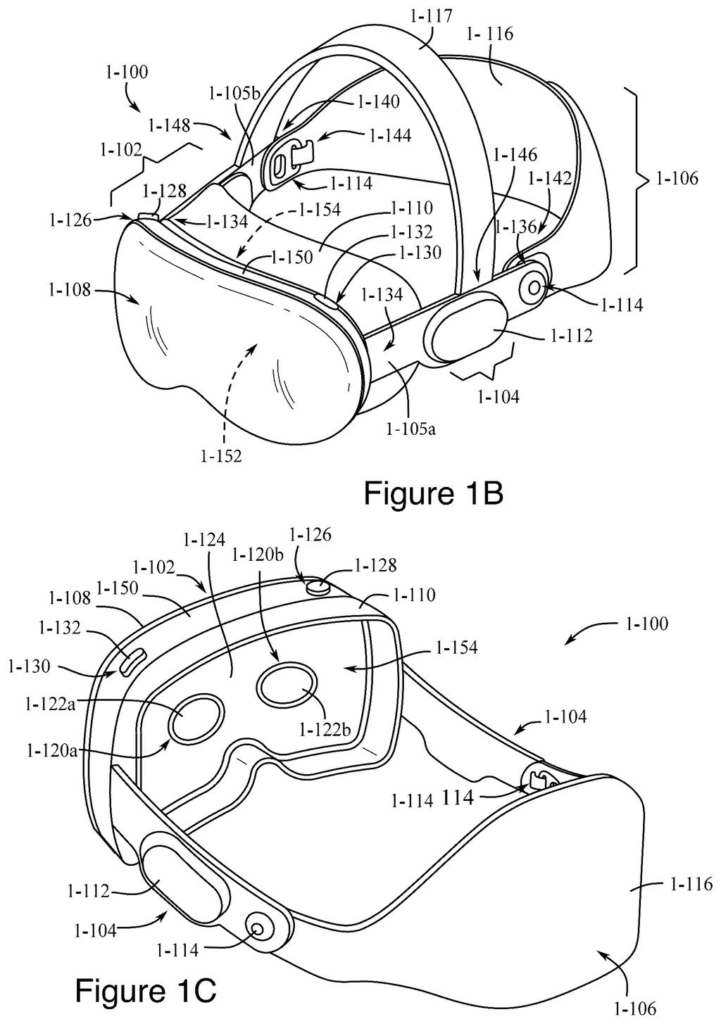
A headset viewed from the front and rear, showing the external cameras, lenses, and head straps. Drawing from patent filing US 2026/0319633 A1.
A headset viewed from the front and rear, showing the external cameras, lenses, and head straps.
See all 141 drawings from this filing ↓
Publication number US 2026/0319633 A1 US20260319633A1
Applicant Apple Inc.
Filing date Jan 28, 2026
Publication date Oct 15, 2026
Inventors Jonathan Ravasz, Christopher D. McKenzie
US classification 345/156
Examiner FIGUEROA-GIBSON, GLORYVID (Art Unit 2628)
Status when we published Waiting for an examiner (Jul 9, 2026)
Parent application is a Continuation of 18664073 (filed 2024-05-14)
Document 24 claims

What Apple's app-placement rule actually does

You're wearing a mixed-reality headset, you glance up a little, and a floating grid of app icons appears in front of you. You pinch Notes, and the window has to land somewhere. If it opens too far to the side or down by your feet, you spend the first few seconds hunting for it.

Apple's filing answers with a simple rule: the app opens at the same fixed distance and direction from wherever the menu was. Call up the menu high and off to your left, and the app appears in the same relative spot, behind and a bit below it. Call it up somewhere else, and the app follows. The menu is the anchor.

The filing also covers the awkward cases, like keeping a window from sinking through the floor and deciding when a fresh menu should appear if you've turned your head a lot.

From the filing · CLAIM 1
displaying, via the one or more display generation components, a home menu user interface at a respective location; while displaying the home menu user interface at the respective location, detecting a first user input for launching an application from the home menu user interface …

Translation: The headset shows your app menu and waits for you to pick an app to open.

How the menu's position decides the window's spot

The core claim has three steps. The headset shows a home menu (the floating grid of app icons) at some spot in the 3D room around you. You pick an app. The system then opens that app's window at a fixed spatial offset (a set distance and direction) from the menu's position. A different menu position means a different window position, but the relationship between the two stays the same.

The dependent claims add detail:

  • The window can be centered on the menu along an axis, sit behind the menu from your point of view, or open at a height below it.
  • If the offset would push part of the window through the floor, the window is shifted up so it doesn't intersect that lower surface.
  • Apps opened from a notification or from a call (a real-time communication session) are also placed relative to a related location, such as the menu or the people in the call.

The menu has its own rules. If you bring it back after moving your head by less than a threshold (measured by sideways movement or tilt), it reappears in the same spot. Move more and it shows up in a new place. When your head tilts above horizontal, the menu angles toward you in proportion to the tilt. Below horizontal, its angle doesn't depend on how far down you look.

Once the window opens, you can still drag it elsewhere.

From the filing · THE ABSTRACT
if the home menu user interface was in a first home menu location, displaying the application user interface at a first application location that has a respective spatial offset from the first home menu location …

Translation: The new app opens at a fixed distance from wherever your menu happened to be floating.

Why windows that open in reach matter for headsets

If you've worn a headset, you know the small annoyance: a window opens somewhere awkward, and you drag it into reach before you can do anything. A rule that ties each app to the spot where you just opened the menu removes that chore. It also makes the result predictable, because the window shows up roughly where your eyes and hands already are.

The filing's own stated goal is to place both the menu and the app at ergonomically favorable positions without manual adjustments, and it links this to less fatigue and fewer inputs. The application is a continuation of an earlier one that traces back to provisional filings from 2023 and 2024, so basic navigation like this has been under design work for a while.

Apple's 93rd filing we've tracked in our Apple AR glasses watchlist since May builds on earlier applications like one on fit detection and one on posture-based views.

Editorial take

The trade is flexibility for predictability. Apps always open somewhere you can roughly guess, but the system picks the spot, and that spot is only as good as wherever you happened to summon the menu. Call the menu up while glancing at an awkward corner of the room, and your app inherits that corner.

The floor rule reveals the cost plainly. The offset has to bend whenever a window would sink below ground level, so the promise of consistent placement already has a built-in exception. A menu that stays anchored through small head movements feels stable, but one that stays anchored through large ones can end up behind you.

These are small prices in a device where windows float in open air and nobody wants to chase them across a room. The trade reads as worth it, but just barely, and you would only notice this design if it were missing.

Get our take in your Top Stories

Liked this breakdown? Add Patentlyze as a preferred source on Google, and our plain-English take shows up more often in your Top Stories the next time Apple patent news breaks.

There are more where this came from

We read every patent application Big Tech publishes and send you the ones worth knowing. Plain English, free, every week.

The drawings

141 drawing sheets from US 2026/0319633 A1 · click any drawing to enlarge

Person holding a handheld screen, drawing sheet 1 from US 2026/0319633 A1
Sheet 1 Person holding a handheld screen
Headset views showing straps and lenses, drawing sheet 2 from US 2026/0319633 A1
Sheet 2 Headset views showing straps and lenses
Detached headset frame and strap, drawing sheet 3 from US 2026/0319633 A1
Sheet 3 Detached headset frame and strap
Exploded view of headset parts, drawing sheet 4 from US 2026/0319633 A1
Sheet 4 Exploded view of headset parts
Internal hardware layers of headset, drawing sheet 5 from US 2026/0319633 A1
Sheet 5 Internal hardware layers of headset
Front glass and screen layers, drawing sheet 6 from US 2026/0319633 A1
Sheet 6 Front glass and screen layers
Sensor parts inside headset, drawing sheet 7 from US 2026/0319633 A1
Sheet 7 Sensor parts inside headset
Camera positions across headset front, drawing sheet 8 from US 2026/0319633 A1
Sheet 8 Camera positions across headset front
Show the other 52 sheets
Apple Files Patent for a Headset Menu That Decides Where Your Apps Open patent drawing, sheet 9
Sheet 9
Apple Files Patent for a Headset Menu That Decides Where Your Apps Open patent drawing, sheet 10
Sheet 10
Apple Files Patent for a Headset Menu That Decides Where Your Apps Open patent drawing, sheet 11
Sheet 11
Apple Files Patent for a Headset Menu That Decides Where Your Apps Open patent drawing, sheet 12
Sheet 12
Apple Files Patent for a Headset Menu That Decides Where Your Apps Open patent drawing, sheet 13
Sheet 13
Apple Files Patent for a Headset Menu That Decides Where Your Apps Open patent drawing, sheet 14
Sheet 14
Apple Files Patent for a Headset Menu That Decides Where Your Apps Open patent drawing, sheet 15
Sheet 15
Apple Files Patent for a Headset Menu That Decides Where Your Apps Open patent drawing, sheet 16
Sheet 16
Apple Files Patent for a Headset Menu That Decides Where Your Apps Open patent drawing, sheet 17
Sheet 17
Apple Files Patent for a Headset Menu That Decides Where Your Apps Open patent drawing, sheet 18
Sheet 18
Apple Files Patent for a Headset Menu That Decides Where Your Apps Open patent drawing, sheet 19
Sheet 19
Apple Files Patent for a Headset Menu That Decides Where Your Apps Open patent drawing, sheet 20
Sheet 20
Apple Files Patent for a Headset Menu That Decides Where Your Apps Open patent drawing, sheet 21
Sheet 21
Apple Files Patent for a Headset Menu That Decides Where Your Apps Open patent drawing, sheet 22
Sheet 22
Apple Files Patent for a Headset Menu That Decides Where Your Apps Open patent drawing, sheet 23
Sheet 23
Apple Files Patent for a Headset Menu That Decides Where Your Apps Open patent drawing, sheet 24
Sheet 24
Apple Files Patent for a Headset Menu That Decides Where Your Apps Open patent drawing, sheet 25
Sheet 25
Apple Files Patent for a Headset Menu That Decides Where Your Apps Open patent drawing, sheet 26
Sheet 26
Apple Files Patent for a Headset Menu That Decides Where Your Apps Open patent drawing, sheet 27
Sheet 27
Apple Files Patent for a Headset Menu That Decides Where Your Apps Open patent drawing, sheet 28
Sheet 28
Apple Files Patent for a Headset Menu That Decides Where Your Apps Open patent drawing, sheet 29
Sheet 29
Apple Files Patent for a Headset Menu That Decides Where Your Apps Open patent drawing, sheet 30
Sheet 30
Apple Files Patent for a Headset Menu That Decides Where Your Apps Open patent drawing, sheet 31
Sheet 31
Apple Files Patent for a Headset Menu That Decides Where Your Apps Open patent drawing, sheet 32
Sheet 32
Apple Files Patent for a Headset Menu That Decides Where Your Apps Open patent drawing, sheet 33
Sheet 33
Apple Files Patent for a Headset Menu That Decides Where Your Apps Open patent drawing, sheet 34
Sheet 34
Apple Files Patent for a Headset Menu That Decides Where Your Apps Open patent drawing, sheet 35
Sheet 35
Apple Files Patent for a Headset Menu That Decides Where Your Apps Open patent drawing, sheet 36
Sheet 36
Apple Files Patent for a Headset Menu That Decides Where Your Apps Open patent drawing, sheet 37
Sheet 37
Apple Files Patent for a Headset Menu That Decides Where Your Apps Open patent drawing, sheet 38
Sheet 38
Apple Files Patent for a Headset Menu That Decides Where Your Apps Open patent drawing, sheet 39
Sheet 39
Apple Files Patent for a Headset Menu That Decides Where Your Apps Open patent drawing, sheet 40
Sheet 40
Apple Files Patent for a Headset Menu That Decides Where Your Apps Open patent drawing, sheet 41
Sheet 41
Apple Files Patent for a Headset Menu That Decides Where Your Apps Open patent drawing, sheet 42
Sheet 42
Apple Files Patent for a Headset Menu That Decides Where Your Apps Open patent drawing, sheet 43
Sheet 43
Apple Files Patent for a Headset Menu That Decides Where Your Apps Open patent drawing, sheet 44
Sheet 44
Apple Files Patent for a Headset Menu That Decides Where Your Apps Open patent drawing, sheet 45
Sheet 45
Apple Files Patent for a Headset Menu That Decides Where Your Apps Open patent drawing, sheet 46
Sheet 46
Apple Files Patent for a Headset Menu That Decides Where Your Apps Open patent drawing, sheet 47
Sheet 47
Apple Files Patent for a Headset Menu That Decides Where Your Apps Open patent drawing, sheet 48
Sheet 48
Apple Files Patent for a Headset Menu That Decides Where Your Apps Open patent drawing, sheet 49
Sheet 49
Apple Files Patent for a Headset Menu That Decides Where Your Apps Open patent drawing, sheet 50
Sheet 50
Apple Files Patent for a Headset Menu That Decides Where Your Apps Open patent drawing, sheet 51
Sheet 51
Apple Files Patent for a Headset Menu That Decides Where Your Apps Open patent drawing, sheet 52
Sheet 52
Apple Files Patent for a Headset Menu That Decides Where Your Apps Open patent drawing, sheet 53
Sheet 53
Apple Files Patent for a Headset Menu That Decides Where Your Apps Open patent drawing, sheet 54
Sheet 54
Apple Files Patent for a Headset Menu That Decides Where Your Apps Open patent drawing, sheet 55
Sheet 55
Apple Files Patent for a Headset Menu That Decides Where Your Apps Open patent drawing, sheet 56
Sheet 56
Apple Files Patent for a Headset Menu That Decides Where Your Apps Open patent drawing, sheet 57
Sheet 57
Apple Files Patent for a Headset Menu That Decides Where Your Apps Open patent drawing, sheet 58
Sheet 58
Apple Files Patent for a Headset Menu That Decides Where Your Apps Open patent drawing, sheet 59
Sheet 59
Apple Files Patent for a Headset Menu That Decides Where Your Apps Open patent drawing, sheet 60
Sheet 60

Sheets 61 to 141 are in the full USPTO filing.

Browse all the drawings 141 drawing sheets
Patent filing page

Source. Full patent text and figures from the official USPTO publication PDF.
Reader comments

Be the first to weigh in

Start the discussion

Real name or a handle, either is fine. Comments are read by a person before they appear, so allow a little time. Keep it about the filing.