
Samsung Patents a Way to Open Apps by Pushing 3D Icons Into the Screen
Instead of tapping a flat icon on a flat screen, Samsung is working on a system where you push a floating 3D icon inward with your finger to launch an app, the way you might press a physical button in the air.
What Samsung's depth-push app icon actually does
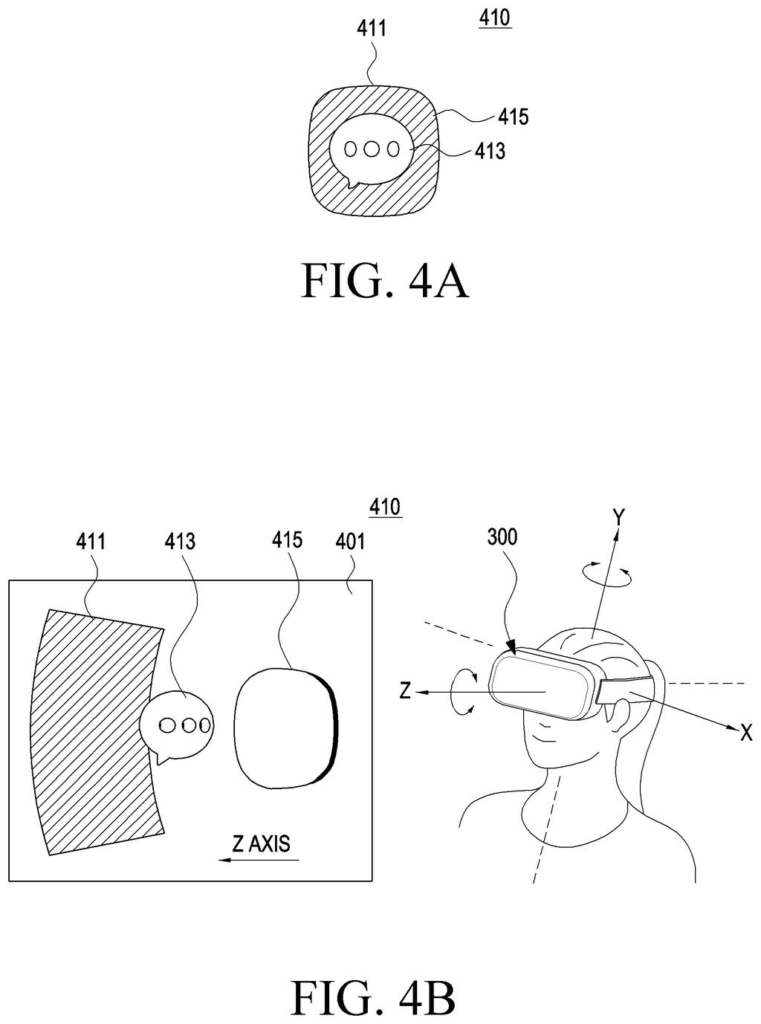
You're wearing AR glasses and your home screen is floating in front of you. The app icons aren't flat squares; each one is a small window hanging in space, with the app's logo sitting inside it at a different depth.
To open an app, you don't tap the icon, you push your finger toward it, into the screen's depth. The glasses track your finger movement in that forward direction and treat it as the launch command. It's a gesture that maps to something physically intuitive: pressing a button.
While the app is running, the icon and the app window can both stay visible at once. Samsung's patent describes a system that can update visual effects on the window layer separately from the app layer while they coexist, so the whole thing behaves like a layered physical object, not just a picture on a flat pane of glass.
display a three-dimensional graphic object corresponding to an application through the at least one display, wherein the three-dimensional graphic object includes a second graphic object indicative of the application and a third graphic object indicative of at least a part of an area including a content to be displayed by the application; …
Translation: The device shows a 3D app icon made of multiple layers representing the app and its content.
How the finger gesture triggers the depth-direction input
The patent describes a wearable display (think AR glasses) that renders app icons as three-dimensional graphic objects in virtual space. Each icon has two layers: a second graphic object (the app's logo or symbol) and a third graphic object (a virtual window panel that previews or contains the app's content area).
The camera on the device tracks the user's finger movement. The key interaction is detecting motion in the depth direction, meaning movement toward or into the virtual window rather than a side-to-side or up-down swipe. When that inward push is detected on the second graphic object, the device launches the application.
Once the app is running, the system handles a second type of input. If the user interacts again with either the icon layer or the window layer, the device can independently change visual effects on the window panel while keeping the app's execution screen visible. That separation between icon-layer effects and app-content effects is what the independent claim centers on.
- The icon is a composite 3D object, not a single flat image
- Launch is triggered by depth-direction finger movement, not a tap
- Post-launch, icon and app window can display simultaneously with separate visual states
- A camera handles finger-tracking without requiring a physical controller
… based on detecting the movement of the user's finger to select the second graphical object in a depth direction of the virtual window of the first graphical object, display an execution screen of the application.
Translation: Pushing an icon deeper into the virtual space opens the app.
What this means for AR headset home screens
For most of computing history, pressing an app icon meant tapping a 2D surface. When the screen itself becomes a 3D space (as in AR and mixed-reality headsets), that model breaks down. Samsung's approach tries to replace the tap with a gesture that actually uses the extra dimension, giving users a physical metaphor (pushing a button) rather than forcing them to learn an arbitrary new command.
If this makes it into a shipping product, it could shape how AR home screens feel to use. The parallel display of icon and app window also hints at a multitasking model where launching an app doesn't erase your spatial context, which matters a lot when your entire environment is the interface.
Samsung's 55th filing we've tracked in the AR glasses race since May builds on work like flat apps on 3D displays and eye-tracked AR lenses.
The core pieces this patent describes already exist in devices people can buy: a camera that tracks fingers, a screen that layers graphics, and software that reads small hand movements. No exotic new hardware is called out in the document. The shortest path to a real product is mostly a software and design problem.
The trickier gap is whether holding your finger up and pushing it forward, repeatedly, throughout a day, will feel natural enough for people to keep doing it. The patent defines how the system should respond to that gesture, but says nothing about how to stop your arm from getting tired or your hand from drifting off target.
That gap is worth taking seriously, because it is the same one that has slowed every previous headset from becoming something people wear past the first week. Samsung has described a clever interaction idea here; turning it into a habit people actually form is a different challenge entirely.
There are more where this came from
We read every patent application Big Tech publishes and send you the ones worth knowing. Plain English, free, every week.
The drawings
37 drawing sheets from US 2026/0288300 A1 · click any drawing to enlarge


Want this weekly breakdown for a company we don't cover? Patentlyze Pro →
Be the first to weigh in