
A New Apple Patent Lets You Drag a Caller's Avatar and Shared Content Together
In a shared headset room, dragging a movie screen closer to you pushes it farther from your friend. Apple's patent fixes that by letting you move your friend's avatar instead, with the shared content riding along.
What Apple's avatar-and-shared-object move does
Two people are watching a movie together in headsets, each sitting in their own living room. The movie screen floats in the air, and one friend's avatar (the 3D stand-in for a person) stands beside it. The screen happens to hang far from you.
Apple's patent filing describes a fix. If you pinch and drag your friend's avatar toward you, the shared movie screen comes along with it. A private window that only you can see, like an email, stays right where it was. If you grab that private window instead, only the window moves.
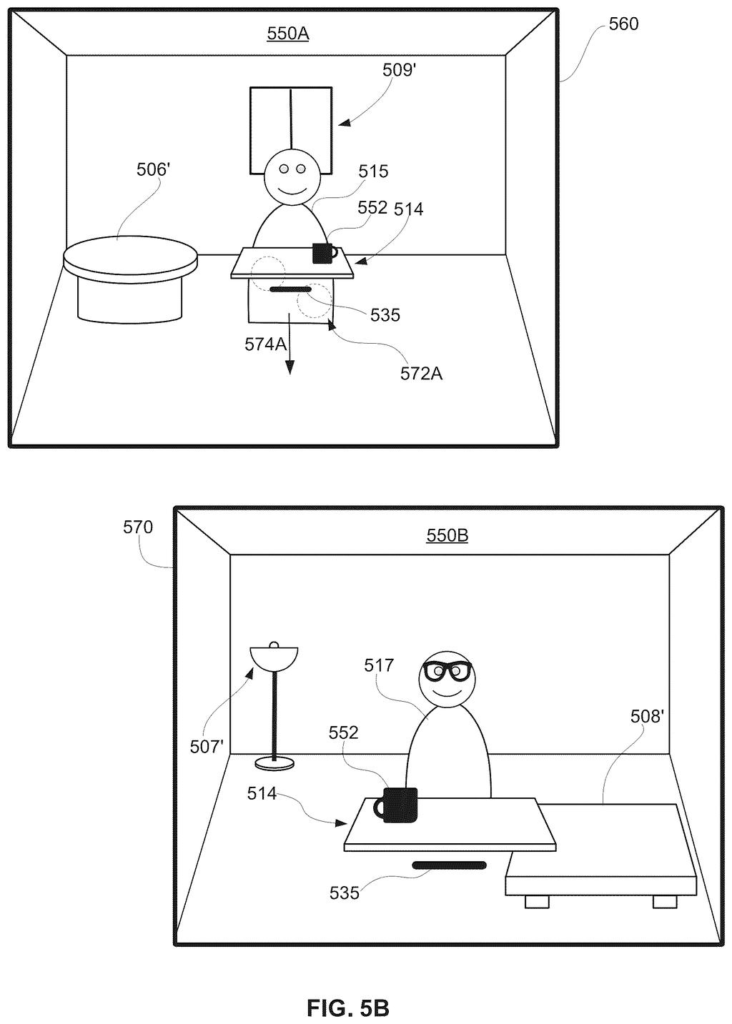
On your friend's end, the shared content does not jump around. Your avatar simply shifts position. That keeps both of you looking at the same scene without a tug of war over where things belong.
… moving the visual representation and the first shared object in accordance with the first input, without moving the first unshared object …
Translation: Dragging the caller's avatar automatically brings along any shared content while leaving private items behind.
How the headset sorts shared from private items
The claims cover a device, such as a headset, that is in a communication session (a shared call in a 3D space) with another person's device. It displays three things: an avatar of the other person, a shared object that both people see, and an unshared object, such as a private app window. When a hand input arrives, the device decides what you meant to grab.
- Grab the avatar: the avatar and the shared object move together, and the private object stays put.
- Grab the private object: only that object moves. The avatar and shared object stay.
- While you move the avatar and shared object, a disc-shaped platform (a "planar element") appears beneath them and travels with them. It is hidden when you move a private object.
The input is described as a pinch gesture held while the hand moves. The claims add some guardrails: if you try to drop the avatar on a spot occupied by a real-world object, the move is restricted. The avatar keeps its facing while being dragged. When the shared content is video, an avatar dropped within a set distance or angle of your viewpoint turns to face the video.
The description also covers the other person's side. Their device shows your avatar moving while the shared content stays still, and it can fade your avatar's hands during the drag so it does not look like you are reaching at them. When a session starts, the device scans the room to build an occupancy map (a record of where objects and open space are) and places the other person's avatar about 1.5 meters away, shifting it if something is in the way.
… identify a placement location in the three-dimensional environment at which to display a virtual object representing a user of the second electronic device …
Translation: The device scans your room to figure out where to place the remote user's virtual avatar.
What this means for Apple headset video calls
If you ever share a virtual room with someone, you will end up rearranging it. In a shared space, pulling a screen toward you can push it away from the other person, because both of you see one fixed layout. This filing gives you one gesture that fixes your view without breaking theirs, and it keeps your private windows from being dragged around with it.
It also shows how much social detail goes into a shared room. The description covers fading an avatar's hands during a drag so it does not look like you are grabbing at someone, and automatically avoiding placing a person inside your coffee table. Small touches like these decide whether a headset call feels awkward or natural.
Apple's 94th filing we've tracked in our Apple AR glasses watchlist since May builds on ideas like where apps open in a headset and fit detection for headsets.
Almost nothing here needs new hardware. The filing lists hand tracking, eye tracking and depth cameras as the sensors involved, and headsets already carry those. What remains is software logic: sort what you grabbed into shared or private, then move the right group.
The shortest route to a product is a software update to an existing shared-room feature, as long as that feature already has avatars, shared apps and private windows. The patent assumes all three exist first. It is also a continuation of an application first filed in early 2023, so this piece of the design has been in the works for a few years.
Rearranging a shared room is a chore everybody in a headset call will hit within minutes, so a clean answer is worth having. This one looks easy to build and easy to explain, which is a good sign for a feature you want people to use without thinking about it.
Get our take in your Top Stories
Liked this breakdown? Add Patentlyze as a preferred source on Google, and our plain-English take shows up more often in your Top Stories the next time Apple patent news breaks.
There are more where this came from
We read every patent application Big Tech publishes and send you the ones worth knowing. Plain English, free, every week.
The drawings
29 drawing sheets from US 2026/0319632 A1 · click any drawing to enlarge


Show the other 21 sheets


Want this weekly breakdown for a company we don't cover? Patentlyze Pro →
Be the first to weigh in