
Samsung Files Patent for an AI Chatbot Memory That Asks Before It Forgets
Samsung's patent application describes a chatbot that cleans out its own saved notes, then shows you the list and lets you tap Keep on anything you want to protect.
What Samsung's chatbot memory cleanup does
Ever asked an AI assistant a question and gotten an answer built on some stale note you saved a year ago? That is the risk when a chatbot keeps piling up notes, web pages, emails and videos to pull answers from. The pile keeps growing, and on a phone, storage runs out.
Samsung's patent application describes a cleanup routine. The assistant tracks how old each saved item is, how often it gets used, and whether you gave its answers a thumbs up or thumbs down. Items that score badly get lined up for deletion.
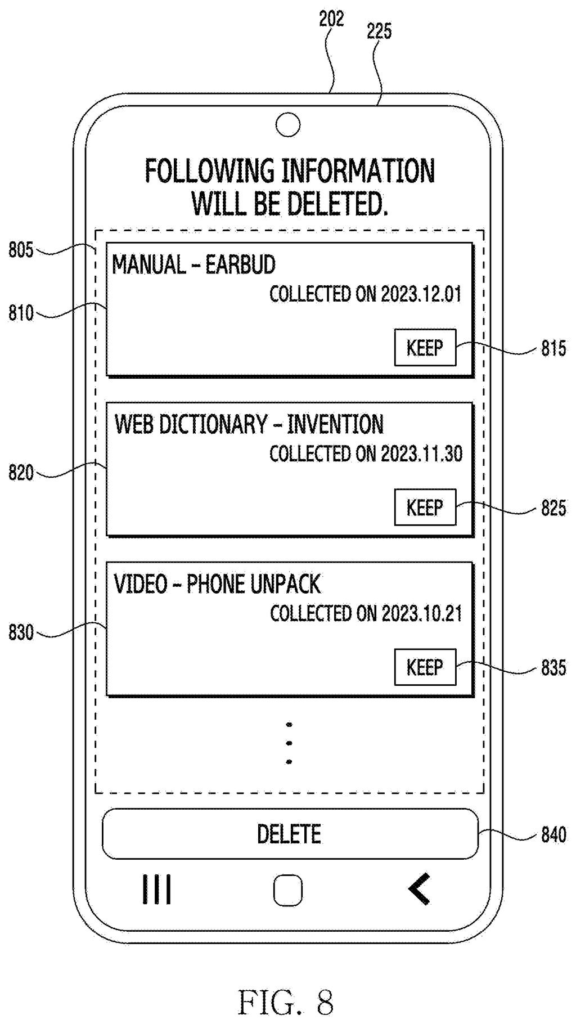
Before anything is erased, you see a list of cards. There is one Delete button for the whole batch and a Keep button on every item. Tap Keep, and that item is protected from future cleanups.
detect a request for generating a natural language sentence with respect to at least one prompt sentence, in response to the request, generate a response message corresponding to the at least one prompt sentence by using a database in which information is accumulated …
Translation: The system answers user questions by looking up stored information to write a reply.
How old, unused notes get scored for deletion
The system answers questions using a pattern called retrieval-augmented generation (RAG), where an AI model looks things up in a separate store of saved information instead of relying only on what it learned in training. That store can hold memos, emails, images, videos and web pages, and it grows over time.
To keep it from swelling, each saved item carries two key settings, which is what the claims center on. One says whether the item should be deleted. The other records whether you pressed a button to forbid deletion. The delete setting comes from a score based on:
- When the item was added
- When it was last used in an answer
- How often it is used
- Thumbs up or thumbs down feedback on answers built from it
When an item's score passes a preset threshold, it is flagged. At a reserved moment, a screen lists the flagged items as cards, each with a Keep button, plus one Delete button for the rest. Tapping Keep sets a protective tag so the item is skipped next time.
The description adds that cleanup can be held off when the battery is low, and triggered when free storage drops or the database passes a set size. The model that writes answers is never retrained; only the saved information changes.
… a first attribute indicating whether to delete the information, and a second attribute indicating whether an input for prohibiting the deletion of the information is received through a screen displayed on the display by using the first attribute.
Translation: The software decides whether to erase memories or asks the user on screen to save them.
Why your phone's AI may ask before forgetting
If you use an AI assistant that remembers your notes and files, this kind of cleanup decides what it knows about you and how much room it takes on your device. The patent application describes the assistant running on a phone, a tablet, a watch, a ring, headphones or a car, all places where storage is limited.
The filing also ties cleanup to answer quality. Removing outdated or unhelpful items can reduce the chance of wrong answers, and the thumbs up or down buttons you already tap become a way to teach the assistant what to keep. The Keep button puts you in charge of what stays.
Samsung's 27th filing we've tracked since June in our AI assistants that remember you watchlist builds on text replies tied to contacts and voice memory shared across devices.
You would notice this the first time your assistant stops quoting an outdated note, or the first time a screen asks whether to dump three old items. Both are small, practical wins. The Keep button is the best part, because it gives you a veto over what the assistant forgets.
Most people will never think about a database. They will think about whether the assistant gets facts wrong and whether it fills up their phone. A review screen answers both worries in a way anyone can follow.
The catch is effort. If the list pops up too often, people will tap Delete on everything or ignore it. The filing says only that the list appears at a reserved moment, so the benefit depends on Samsung getting that timing right.
Get our take in your Top Stories
Liked this breakdown? Add Patentlyze as a preferred source on Google, and our plain-English take shows up more often in your Top Stories the next time Samsung patent news breaks.
There are more where this came from
We read every patent application Big Tech publishes and send you the ones worth knowing. Plain English, free, every week.
The drawings
14 drawing sheets from US 2026/0320020 A1 · click any drawing to enlarge


Show the other 6 sheets


Want this weekly breakdown for a company we don't cover? Patentlyze Pro →
Be the first to weigh in