
Apple Files Patent to Let Carriers Choose the Security Questions Before You Switch Phones
Moving your phone plan to a new phone means proving you're you, and every carrier asks for something different. Apple's patent application sketches one shared format, so the carrier decides what to ask and your phone asks it in your language.
What Apple's carrier ID check actually asks
Imagine you live in the U.S., buy a plan from a French carrier for a trip, and try to put it on your new phone. The carrier wants proof it's really you, so it asks for a login it labels Identifiant and Mot de passe. Your phone is set to English, so that could be confusing.
This Apple patent application describes a shared format for those requests. Each carrier picks what it needs: a login, a last name and billing zip code, a QR code from an email, or even a live ID check. Every item carries a standard number, so your phone can show it as plain User ID and Password in your own language.
Your phone sends the answers back, the carrier checks them, and only then does the plan install or move. If something is wrong, you're told which answer to fix.
providing, to the wireless device, a user challenge message that specifies a requirement for user-specific data to verify user authority to perform the cellular wireless service procedure for the wireless device …
Translation: The server asks the phone for personal details to prove you are allowed to switch carriers.
How a carrier's checklist reaches your phone
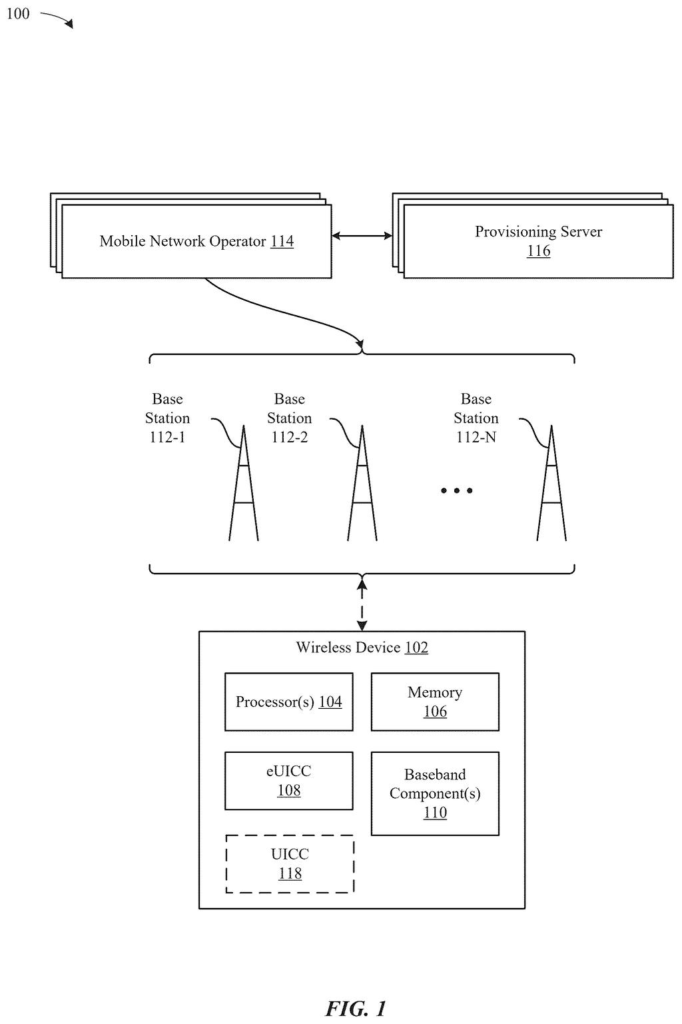
The filing covers a message exchange between three parties: your phone, the carrier's provisioning server (the computer that hands out the eSIM, the digital SIM that replaces a physical card), and the carrier's backend system (where your account records live). After the phone and server confirm each other's identity, the server sends a user challenge, a list of what the carrier wants to see.
Each item on the list carries a few fields:
- A label written by the carrier.
- A standard type mask, a number code (001 for user name, 002 for password, in the filing's example) kept by a neutral group.
- A data type, such as text, password, photo ID or QR scan.
- A yes or no flag for whether the phone must hash the answer (scramble it so the plain value never travels).
- An optional error code.
Your phone uses the type mask to look up its own wording, so a French label can appear in English. It collects your answers, hashes them if required, and sends them back. The server passes them to the backend, which compares them with its records. A positive reply lets the download or plan transfer go ahead.
If an answer is wrong, the backend flags the failing type mask and the phone asks again. The filing says a device policy can require re-entering more fields than the one that failed. The claims cover both the server side and the phone side, including transfers between two phones.
… electronic subscriber identity module (eSIM) download and installation to the wireless device or transfer of a cellular wireless service from the wireless device to another wireless device …
Translation: This covers setting up a digital eSIM or moving your active phone service to a new device.
Why switching phones could get less fiddly
Today, carriers ask for different proof before they release an eSIM or move your plan, and the filing says there is no standard set of data for it. That leaves phone makers facing a custom job for every carrier. A shared format means the screens you see could look familiar and speak your language, whichever carrier is asking.
For carriers, it keeps control: they choose the checks, including ones that local identity rules require, like a passport number or a live ID check using your camera. For Apple, the phone side handles the screens, the camera and the scrambling of your answers. Anyone who has been stuck mid-setup while changing phones or carriers is the audience for this fix.
Apple's 558th filing in our Apple coverage since May joins earlier applications like a tower-scan battery fix and a mood-sensing headset idea in the growing set of ideas we track.
Nothing here needs new hardware. The camera, the secure chip and the eSIM download already exist, so the phone side is a software update plus some new screens.
The slower part is everyone else. Carriers would have to change their ordering systems to send the new fields, and the shared list of codes needs a neutral keeper, which the filing suggests could be a standards group such as GSMA. Until that list exists, the idea cannot work across carriers.
The shortest route to a product is one carrier, one country and one check, such as the login example the filing walks through first. It is a practical fix for a clunky moment, and its success depends on carrier sign-up as much as on Apple.
Get our take in your Top Stories
Liked this breakdown? Add Patentlyze as a preferred source on Google, and our plain-English take shows up more often in your Top Stories the next time Apple patent news breaks.
There are more where this came from
We read every patent application Big Tech publishes and send you the ones worth knowing. Plain English, free, every week.
The drawings
24 drawing sheets from US 2026/0333053 A1 · click any drawing to enlarge


Show the other 16 sheets


Want this weekly breakdown for a company we don't cover? Patentlyze Pro →
Be the first to weigh in