
Microsoft Files Patent for One Shared Search Page Across Its Different Apps
Search for the same thing in two work apps and you can get different results in a different order. A new Microsoft filing describes one shared search page built to fix that.
What Microsoft's shared search page actually does
Imagine you search for a document in one work app, then run the exact same search in another. The results come back in a different order, the tabs sit on the left in one and under the search box in the other, and a click opens a new tab in one but jumps straight to the file in the other.
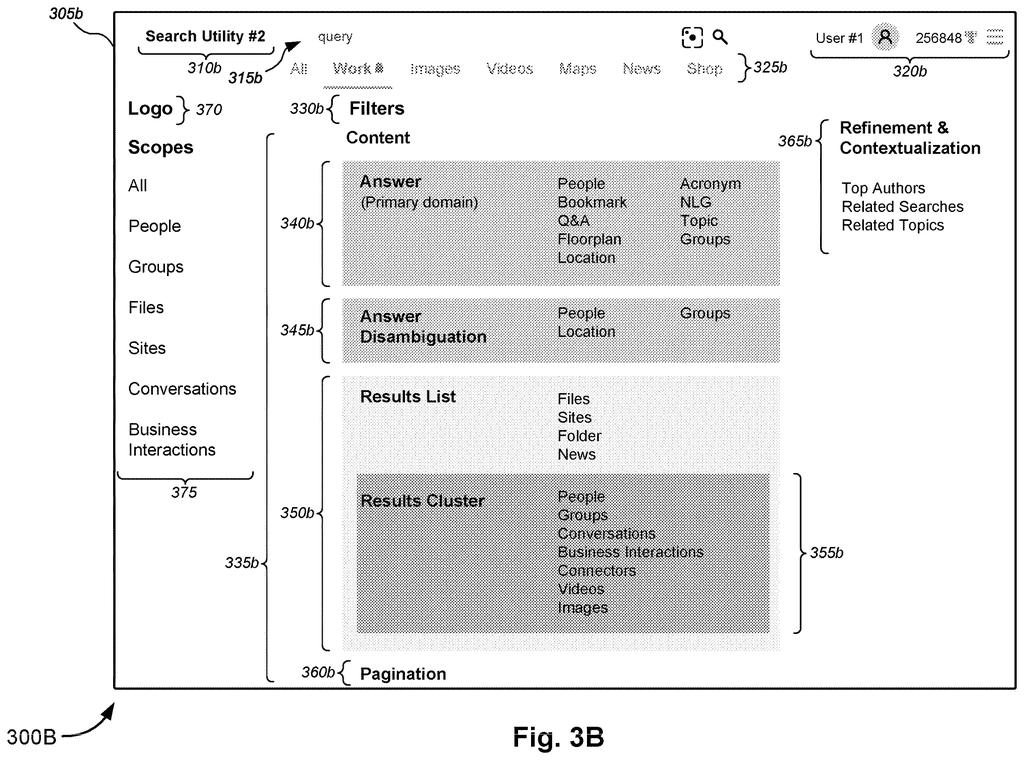
Microsoft's filing describes a single shared search results page that each app plugs into. The app keeps its own look and feel, but the machinery that builds the search, fetches the results and lays out the page is the same everywhere.
The filing also says this lets searches of your work files and the open web live in one place, so you don't hop between apps to find something.
a router configured to provide, to a first query builder among one or more query builders, a user search query received from one or more search utilities among a plurality of search utilities and to provide location information describing a view of an SERP …
Translation: A routing system takes search queries and page locations from various apps and sends them to query builders.
How one page address drives every app's search
The filing breaks a search page into a few parts that every app can share. Each app's search box (the filing calls it a search utility) hands your query to the shared system through an API (a standard way for programs to talk to each other).
- The router tracks where you are on the results page, such as the Files tab, page 2, with a word-processing file filter applied. It reads this from the page's web address.
- A query builder turns your search text plus that location into a request for data.
- A query executor runs the request, or pulls the answer from a cache (a saved copy of recent results).
- A component renderer draws the results, tabs and links on the page.
Each app tells the router which tabs it wants (the filing calls them verticals, like Files, People or News). A small translator per app converts the app's own idea of where you are into the shared one, so apps with different navigation setups still work.
The cache can also prefetch (load results ahead of time). The filing adds that a tab promoted by strong search intent can move to second place and get preloaded.
A component renderer of the shared SERP system renders one or more UX components within the first SERP, based on the search results.
Translation: A rendering tool builds the visual search elements on the shared page using the final results.
Why matching search results across apps matters
If this works as described, you would stop relearning search every time you switch apps. The same query would give the same results in the same order, with tabs and clicks behaving the same way, and you would know where a click will take you.
For Microsoft, it could also cut duplicated work: instead of each product team building and maintaining its own search logic, they plug into one shared piece. The filing names Microsoft Teams as one example of an app with its own way of handling navigation, and it describes merging web search and work search into a shared setup. It is a patent application, so none of this is a product announcement.
Microsoft's 551st filing in our Microsoft coverage since May adds to a run of cloud and security ideas, following patents on forgotten cloud apps and split-email passwords.
Sharing one search page costs each app some independence. Teams that built their own search keep their look and their tabs, but they hand over the logic that decides what shows up and in what order. If the shared piece has a bug, every app inherits it at once.
The filing also admits a small price in plain view: anything on the page that isn't recorded in the web address, like a rich answer card you have clicked into, resets when you reload. Each app also has to write its own translator so its way of tracking your position matches the shared page.
Those costs look cheap next to the payoff. Matching results across apps beats today's mismatched lists, and the trade reads as worth it. It is still plumbing, so you will notice it mainly by never noticing anything odd.
Get our take in your Top Stories
Liked this breakdown? Add Patentlyze as a preferred source on Google, and our plain-English take shows up more often in your Top Stories the next time Microsoft patent news breaks.
There are more where this came from
We read every patent application Big Tech publishes and send you the ones worth knowing. Plain English, free, every week.
The drawings
7 drawing sheets from US 2026/0329957 A1 · click any drawing to enlarge


Want this weekly breakdown for a company we don't cover? Patentlyze Pro →
Be the first to weigh in