
Microsoft Files Patent to Split the Video Work Behind Remote Desktop Sessions in Two
When you control a faraway computer from your laptop, every frame of what you see has to be squeezed and shipped over the internet. A new Microsoft patent application splits that squeezing into two stages so the final one can react to your connection.
What Microsoft's two-step remote video setup does
A designer sits at home, working on a company computer that is actually in a data center far away. Every frame she sees has to be shrunk, sent over the internet, and unpacked on her laptop.
In some setups, the shrinking happens in a spot that knows nothing about how good her connection is. If her Wi-Fi hiccups, the server keeps producing sharp, heavy video anyway, and she gets stutter and lag.
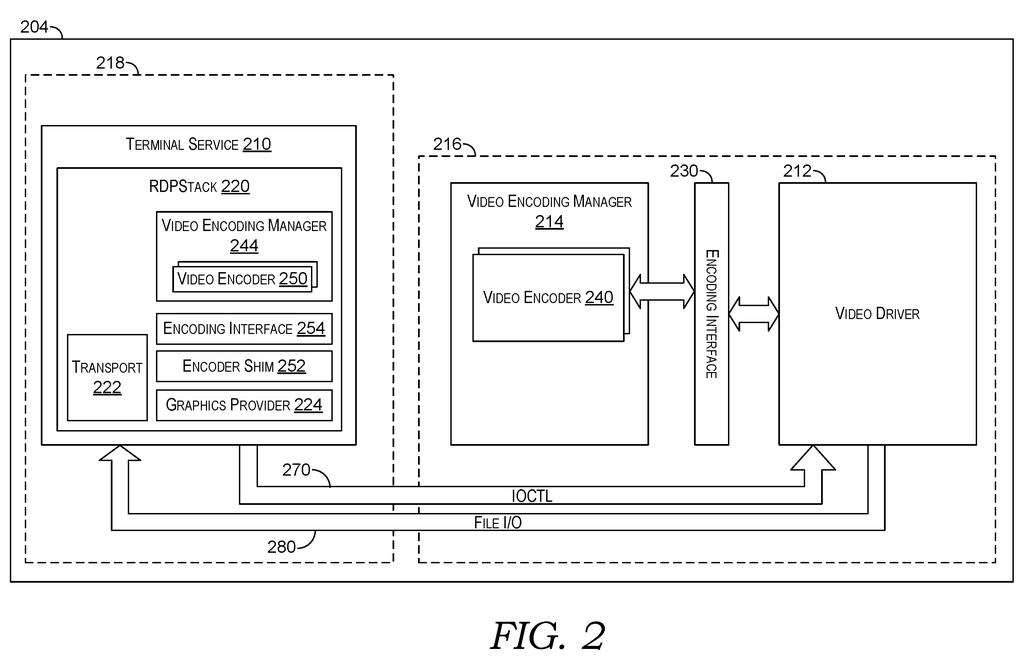
Microsoft's filing splits the job in two. A first step, a quick color cleanup, happens close to the graphics chip. The final compression happens in the part of the server that manages the connection, which is the part that can tell when the network is struggling. The idea is that your video can adjust on the fly while the server avoids wasting effort on frames the network cannot carry.
providing a representation of graphical data to a first video encoder associated with a video driver of a remote desktop server; encoding, via the first video encoder, the graphical data to generate base-encoded graphical data; …
Translation: The server uses a first encoder in the video driver to do an initial compression of the screen graphics.
How the driver hands off frames without copying
Remote desktop lets you control a computer somewhere else. The server captures what is on its screen, compresses it, and sends it to your device. The patent splits that work between two parts of the server: the video driver (the software that handles what gets drawn on screen) and the RDP stack (the software that manages the connection, security, and data sending).
Here is what the claims describe, step by step:
- An encoder tied to the video driver does a base encoding, such as converting colors from RGB to YUV. YUV keeps brightness detail and trims color detail, which the eye notices less, so the data gets smaller.
- Instead of copying the huge frame around, the driver passes a texture handle, which is a pointer to the frame sitting in graphics memory.
- An encoder shim (a translator piece inside the RDP stack) hands that pointer to a second encoder.
- The second encoder does the final compression and the result is sent to your device.
The filing says the two encoders can be loaded when the session is in a direct streaming setting, where video goes straight to the client, as in media playback or graphics-heavy apps.
The description also says the shim can let one frame be color-converted while another is being compressed, and it uses a lock so two processes never touch the same frame at once.
Why your remote desktop could hold up on bad Wi-Fi
If you use remote desktop, a virtual machine, or any service that streams a computer's screen to you, the compression step is where your connection quality gets decided. The filing says that doing it near the connection software lets the system react to bandwidth drops, lag spikes, and lost data by changing things like bitrate, frame rate, and quality.
The filing also says the design cuts processor and memory use, since huge raw frames do not have to be copied between two parts of the server. That gets more important as screens get sharper, and the filing notes that HDR monitors double the data per pixel. Microsoft's own Remote Desktop Services is named as one example of a system this could apply to.
Microsoft's 558th filing in our Microsoft coverage since May adds to a run that includes cutting cloud logs selectively and reading error messages for bugs.
You would only notice this on a bad day. On hotel Wi-Fi or a shaky home connection, a remote desktop that cannot adjust keeps pushing sharp video the network cannot carry, and you get stutter and lag.
A setup that can lower quality on the fly keeps the picture moving, and that is the concrete benefit here. On a good connection you will see no difference at all.
It is a plumbing change with a payoff that shows up as less lag. Anyone who works in graphics-heavy apps over a remote link has the most to gain. This is only an application, so there is no sign yet of where, or whether, it reaches users.
Get our take in your Top Stories
Liked this breakdown? Add Patentlyze as a preferred source on Google, and our plain-English take shows up more often in your Top Stories the next time Microsoft patent news breaks.
There are more where this came from
We read every patent application Big Tech publishes and send you the ones worth knowing. Plain English, free, every week.
The drawings
6 drawing sheets from US 2026/0329606 A1 · click any drawing to enlarge


Want this weekly breakdown for a company we don't cover? Patentlyze Pro →
Be the first to weigh in