
Sony · Filed Apr 3, 2025 · Published Oct 29, 2026

Sony Files Patent for Hearing Aids That Play a Test Tone to Catch Earwax Clogs

Sony's new patent application has a hearing aid play a test tone to itself, then listen for what went wrong: a clogged earwax filter, a lost part, or a broken speaker.
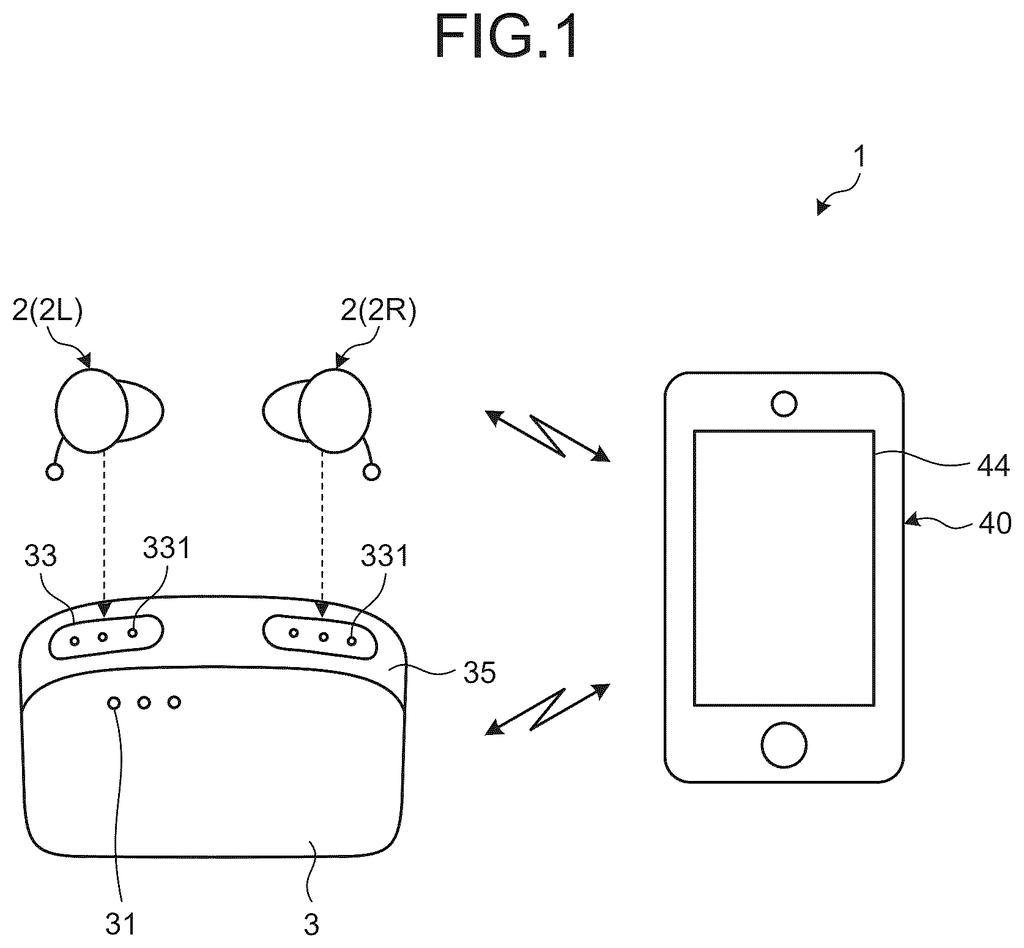
A pair of wireless hearing aids with their portable charging case and a smartphone used to manage settings and tests. Drawing from patent filing US 2026/0343153 A1.
A pair of wireless hearing aids with their portable charging case and a smartphone used to manage settings and tests.
See all 36 drawings from this filing ↓
Publication number US 2026/0343153 A1 US20260343153A1
Applicant SONY GROUP CORPORATION
Filing date Apr 3, 2025
Publication date Oct 29, 2026
Inventors OSAMU NAKAMURA, KYOSUKE MATSUMOTO, SHINPEI TSUCHIYA
US classification 381/60
Examiner YU, NORMAN (Art Unit 2693)
Status when we published Waiting for an examiner (Aug 18, 2026)
Parent application is a National Stage Entry of PCTJP2023035601 (filed 2023-09-29)
Document 22 claims

What Sony's self-testing hearing aid actually does

Every night you drop your hearing aids into their charging case, and Sony's filing imagines that moment doubling as a checkup. Each aid plays a short test sound and listens to what comes back through its own microphone.

Why bother? Hearing aids have tiny openings that earwax loves to block, plus a small filter that can clog or fall out without you noticing. If the sound that comes back is off, the device can tell something is wrong. That matters most for over-the-counter models, where no audiologist is checking your gear.

The aid can then nudge you to clean a vent, swap a filter, or call support. The alert could come through a phone app, a light on the case, or a spoken message in your ear the next time you put it in.

From the filing · CLAIM 1
an output unit that outputs a measurement sound for detecting an abnormality of the information processing apparatus; a first sound collection unit that collects the measurement sound …

Translation: The device plays a test sound and records it to check if something is wrong.

How the test tone reveals a clogged earwax filter

The claims cover an in-ear device (a hearing aid or an earphone) with three parts: a speaker that plays a measurement sound, a microphone that picks it up, and an abnormality detection unit, meaning software that judges whether the recorded sound looks healthy.

The idea is that a healthy device produces a predictable sound shape, and problems change it. In the description, the sound leaves through a small outlet (the first hole) that holds an earwax filter, and sometimes also passes through a vent (the second hole). A clogged filter, a missing filter, or a damaged speaker or microphone each reshape the recorded sound in a different way. The filing compares frequency patterns (how loud the sound is at each pitch) and uses either a weighted score or a machine-learning model (software trained on labeled examples) to rate how bad things are.

The test works best with the device out of your ear, ideally in a sealed charging case that blocks outside noise. Closing the lid can trigger the test. The claims also cover a second microphone beside the speaker, and a camera in the charger that photographs the openings.

When something is off, the device notifies you. The description suggests a spoken message in the aid, a phone alert, a colored light on the case, or an alert to a family member or caregiver.

From the filing · THE ABSTRACT
… an abnormality detection unit that detects the abnormality based on an acoustic signal collected by the first sound collection unit.

Translation: Internal computer logic analyzes the recorded sound to spot clogs or issues.

Why Sony's charging case could become a checkup

If you wear a hearing aid, a blocked filter is easy to miss. Sound just gets a little worse, and you may blame your ears. A device that checks itself every night could catch the problem for you, which matters most with over-the-counter models that have no audiologist inspecting them. The filing also points out that older wearers often have poor eyesight and may not notice a tiny missing part.

The description goes further than repair. The alert could reach a family member, a support service, or a seller that mails you a replacement filter. That turns a dull maintenance chore into a small service business. Keep in mind this is a patent application, and it names no specific product.

That makes this Sony's 24th filing we've tracked in our Audio coverage since May, a topic that already includes turning controllers into speakers and silencing unheard audio.

Editorial take

Few ideas sit this close to shippable. A hearing aid already has a speaker and a microphone, and many come with a charging case, so almost no new hardware has to exist first. The shortest path is software: a firmware update, a phone app screen, and a test routine that runs when you shut the lid.

The slow part is the data. A model that tells a clogged filter from a missing one needs plenty of recordings from real devices in real states, and each hearing aid design sounds different. The camera and extra microphones in the claims would need new hardware, so they look like later add-ons.

The payoff is easy to picture: one less thing for an older wearer to remember, and fewer failures that go unnoticed. The verdict is a modest, practical idea with a short road to a product if a company decides to build it.

Get our take in your Top Stories

Liked this breakdown? Add Patentlyze as a preferred source on Google, and our plain-English take shows up more often in your Top Stories the next time Sony patent news breaks.

There are more where this came from

We read every patent application Big Tech publishes and send you the ones worth knowing. Plain English, free, every week.

The drawings

36 drawing sheets from US 2026/0343153 A1 · click any drawing to enlarge

How the hearing aids, charging case, and phone connect wirelessly, drawing sheet 1 from US 2026/0343153 A1
Sheet 1 How the hearing aids, charging case, and phone connect wirelessly
Internal electronics powering the hearing aid and its charger, drawing sheet 2 from US 2026/0343153 A1
Sheet 2 Internal electronics powering the hearing aid and its charger
Parts inside your smartphone that communicate with the hearing aids, drawing sheet 3 from US 2026/0343153 A1
Sheet 3 Parts inside your smartphone that communicate with the hearing aids
How the speaker tip sits inside the ear canal, drawing sheet 4 from US 2026/0343153 A1
Sheet 4 How the speaker tip sits inside the ear canal
In-ear design placing the microphone and wax filter, drawing sheet 5 from US 2026/0343153 A1
Sheet 5 In-ear design placing the microphone and wax filter
Testing for earwax clogs using sound pulses, drawing sheet 6 from US 2026/0343153 A1
Sheet 6 Testing for earwax clogs using sound pulses
Sound drops and parts that detect clogs, drawing sheet 7 from US 2026/0343153 A1
Sheet 7 Sound drops and parts that detect clogs
AI analyzing recorded test tones to find clogs, drawing sheet 8 from US 2026/0343153 A1
Sheet 8 AI analyzing recorded test tones to find clogs
Show the other 28 sheets
Steps for playing a test tone to detect blocked filters, drawing sheet 9 from US 2026/0343153 A1
Sheet 9 Steps for playing a test tone to detect blocked filters
Testing two styles of hearing aids inside a closed case, drawing sheet 10 from US 2026/0343153 A1
Sheet 10 Testing two styles of hearing aids inside a closed case
A charging case that runs earwax checks behind closed doors, drawing sheet 11 from US 2026/0343153 A1
Sheet 11 A charging case that runs earwax checks behind closed doors
Built-in clamps that hold the speaker steady during testing, drawing sheet 12 from US 2026/0343153 A1
Sheet 12 Built-in clamps that hold the speaker steady during testing
Case signalling the hearing aid to begin testing, drawing sheet 13 from US 2026/0343153 A1
Sheet 13 Case signalling the hearing aid to begin testing
An app reminding you to remove the earpiece, drawing sheet 14 from US 2026/0343153 A1
Sheet 14 An app reminding you to remove the earpiece
Spoken alert warning that the sound port is blocked, drawing sheet 15 from US 2026/0343153 A1
Sheet 15 Spoken alert warning that the sound port is blocked
Phone screen prompts to replace a clogged wax guard, drawing sheet 16 from US 2026/0343153 A1
Sheet 16 Phone screen prompts to replace a clogged wax guard
Phone screens for choosing how sensitive clog alerts should be, drawing sheet 17 from US 2026/0343153 A1
Sheet 17 Phone screens for choosing how sensitive clog alerts should be
Testing earbud sound inside open and closed charging cases, drawing sheet 18 from US 2026/0343153 A1
Sheet 18 Testing earbud sound inside open and closed charging cases
Checking whether earwax blocks the earbud vent hole, drawing sheet 19 from US 2026/0343153 A1
Sheet 19 Checking whether earwax blocks the earbud vent hole
Detecting blockages using an inner microphone to track tones, drawing sheet 20 from US 2026/0343153 A1
Sheet 20 Detecting blockages using an inner microphone to track tones
Two microphones inside the case test both earbud openings, drawing sheet 21 from US 2026/0343153 A1
Sheet 21 Two microphones inside the case test both earbud openings
Earbud parts that play test tones and check audio, drawing sheet 22 from US 2026/0343153 A1
Sheet 22 Earbud parts that play test tones and check audio
Steps to find clogs in speaker filters and vents, drawing sheet 23 from US 2026/0343153 A1
Sheet 23 Steps to find clogs in speaker filters and vents
Placing a microphone in the charger to spot clogs, drawing sheet 24 from US 2026/0343153 A1
Sheet 24 Placing a microphone in the charger to spot clogs
Testing sound leaks when an earwax filter is missing, drawing sheet 25 from US 2026/0343153 A1
Sheet 25 Testing sound leaks when an earwax filter is missing
Spotting an unattached earwax filter from sound changes, drawing sheet 26 from US 2026/0343153 A1
Sheet 26 Spotting an unattached earwax filter from sound changes
Detecting general speaker faults by checking low sound volume, drawing sheet 27 from US 2026/0343153 A1
Sheet 27 Detecting general speaker faults by checking low sound volume
A case camera checks the filter for dirt, drawing sheet 28 from US 2026/0343153 A1
Sheet 28 A case camera checks the filter for dirt
Forwarding clog alerts over the internet to a caregiver phone, drawing sheet 29 from US 2026/0343153 A1
Sheet 29 Forwarding clog alerts over the internet to a caregiver phone
Ordering replacement filters automatically when a clog is found, drawing sheet 30 from US 2026/0343153 A1
Sheet 30 Ordering replacement filters automatically when a clog is found
Connecting the charger and earbuds to an analysis server, drawing sheet 31 from US 2026/0343153 A1
Sheet 31 Connecting the charger and earbuds to an analysis server
Main computer parts inside the diagnostic cloud server, drawing sheet 32 from US 2026/0343153 A1
Sheet 32 Main computer parts inside the diagnostic cloud server
Sending earbud audio data through cloud servers to businesses, drawing sheet 33 from US 2026/0343153 A1
Sheet 33 Sending earbud audio data through cloud servers to businesses
Personal and health records collected by your listening gear, drawing sheet 34 from US 2026/0343153 A1
Sheet 34 Personal and health records collected by your listening gear
Connecting headsets and screens through a phone to online services, drawing sheet 35 from US 2026/0343153 A1
Sheet 35 Connecting headsets and screens through a phone to online services
Matching device types to different levels of hearing loss, drawing sheet 36 from US 2026/0343153 A1
Sheet 36 Matching device types to different levels of hearing loss
Browse all the drawings 36 drawing sheets
Patent filing page

Source. Full patent text and figures from the official USPTO publication PDF.
Reader comments

Be the first to weigh in

Start the discussion

Real name or a handle, either is fine. Comments are read by a person before they appear, so allow a little time. Keep it about the filing.