
Microsoft Files Patent to Let Apps Turn On Your Laptop's Privacy Screen Automatically
Some laptops already have a privacy screen built in, but it only helps if you remember to switch it on. Microsoft's patent application would let your apps do that for you.
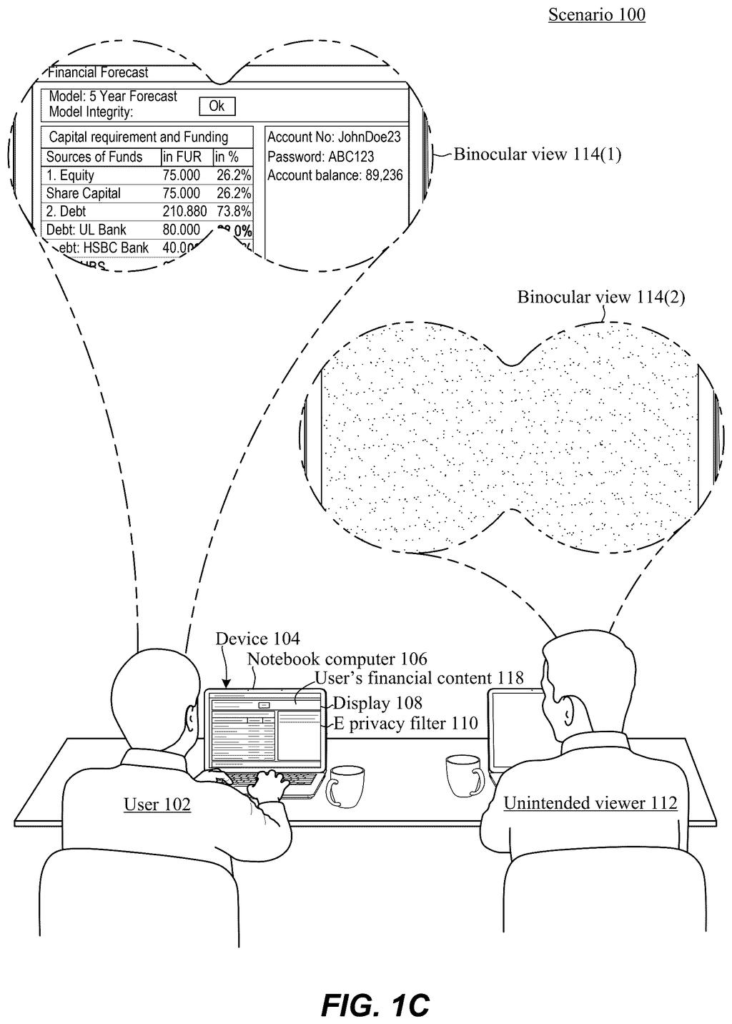
What Microsoft's privacy-screen patent does
Ever pulled up your retirement account in a coffee shop and felt a stranger reading over your shoulder? Some laptops already have a built-in privacy screen that narrows the angle you can see the display from, but you have to remember to switch it on. Most people forget, or remember only after the sensitive page is already up.
Microsoft's patent application describes a way for the laptop to tell your apps that a privacy screen is built in, and then let those apps flip it on and off themselves. A weather app could leave it off. A financial app could turn it on before showing a single dollar amount.
The same setup also works on machines with no privacy screen. The apps simply find nothing to control and carry on, so one version of the operating system covers both kinds of laptops.
… an electronic privacy filter base driver configured to identify that the display includes an electronic privacy filter that can be controlled to limit a viewing angle range of the display …
Translation: System software detects if your laptop screen has a built-in privacy guard.
How the display's privacy filter gets detected
The filing covers the plumbing between the screen and the software. Some displays contain an electronic privacy filter, a layer that limits how far to the side you can be and still read the screen (the description says about 25 or 30 degrees each way from straight on). Today, apps can't see that layer at all. The patent makes it visible to them.
The process works in a few steps:
- A base driver (a small piece of software that talks to a piece of hardware) checks whether the display has the filter. It can ask the filter's controller chip and treat silence as a "no," read the voltage on a connector pin (high means a filter controller is wired in), or ask the display's timing controller.
- If a filter is found, the base driver starts a second program, the human interface driver. It registers the filter with the operating system as a standard device, in a device list the description calls the human interface tree.
- An app looks the filter up in that list and sends an on or off command, which travels down through the drivers to the controller.
If there is no filter, the second driver never starts, so apps see nothing to control.
The filing also says the one controlling the filter can be a program on the device or something remote, such as a website in a browser.
… surface the E-privacy filter capability for control by an entity presenting content on the display.
Translation: Apps can access and control your screen's privacy mode directly.
Why this matters for coffee shop laptop work
If this works as described, your laptop could protect sensitive screens without you doing anything. Open a banking app or a confidential work document and the screen narrows its viewing angle. Open a news site and it goes back to normal. That beats a stick-on screen protector you left at home, or a built-in switch you forgot to flip.
The bigger benefit is for software makers. Once the operating system lists the filter in a standard way, any app, or even a website, can use it. The examiner's first review rejected the claims as filed, which is routine at this stage and usually followed by amendments, so nothing here is settled.
That makes this Microsoft's 573rd filing we've tracked in our Microsoft coverage since May, adding to work like fact-checking before summarizing and an AI-built answer key.
Of all the ideas a company could file, this sits close to shippable. The description treats the screen hardware as something that already exists, with layers built into the display that narrow the viewing angle. The new work is software: a driver that spots the filter and an entry in the operating system's device list.
The shortest route to a product is short. A laptop maker uses a display with the filter, an operating system update adds the two drivers, and an app developer adds a call that turns the filter on when a sensitive page opens. Nothing in the document calls for a new kind of screen.
The real hurdle is adoption. The feature only helps if apps bother to use it, and only on laptops whose makers pay for the filtered display. Even so, the idea is sensible, easy to explain, and useful to anyone who works from a coffee shop.
Get our take in your Top Stories
Liked this breakdown? Add Patentlyze as a preferred source on Google, and our plain-English take shows up more often in your Top Stories the next time Microsoft patent news breaks.
There are more where this came from
We read every patent application Big Tech publishes and send you the ones worth knowing. Plain English, free, every week.
The drawings
10 drawing sheets from US 2026/0340205 A1 · click any drawing to enlarge


Show the other 2 sheets


Want this weekly breakdown for a company we don't cover? Patentlyze Pro →
Be the first to weigh in