
Microsoft Patent Describes Auto-Migrating Struggling PC Apps to the Cloud
Imagine your laptop starts grinding under a heavy workload, and the app you're using relocates itself to a powerful cloud machine, right in the middle of your session. That's what Microsoft is working toward.
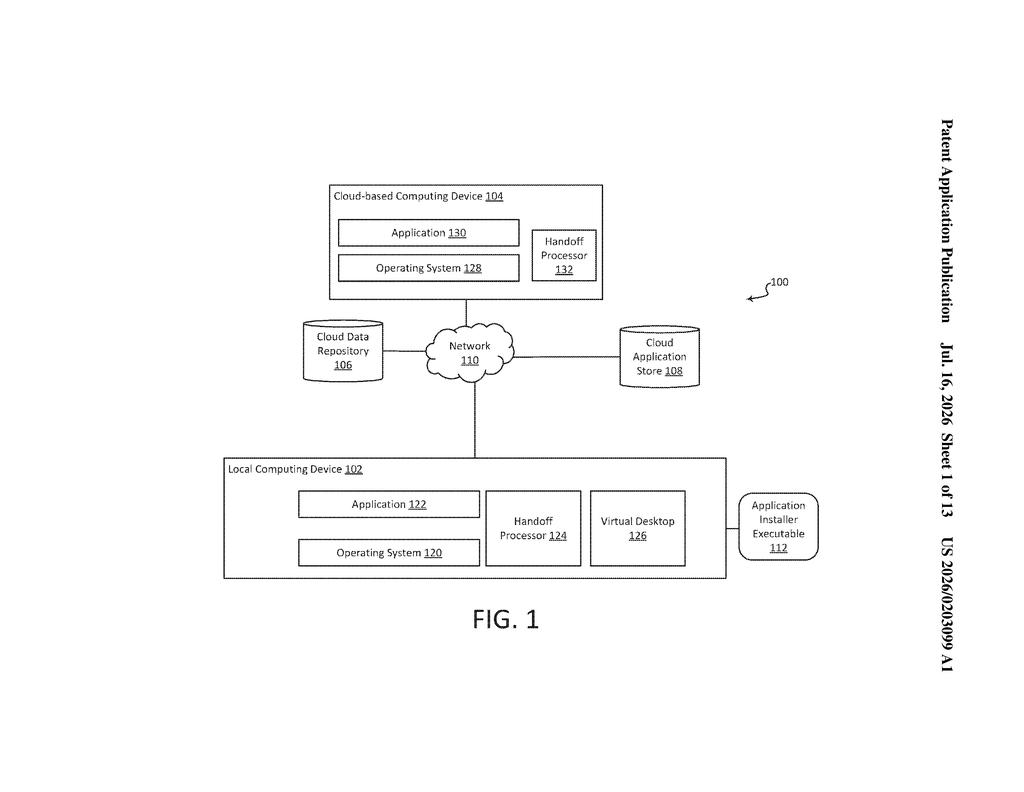
What Microsoft's app-handoff system actually does
Picture this: you're running a demanding program on your laptop and it starts to slow down, fan spinning, everything crawling. Normally you'd either wait it out or close other things to free up memory. Microsoft's patent describes a system that watches your computer's resource usage and, when things get tight, hands the app off to a cloud-based machine to keep running it for you.
The clever part is what happens when that cloud machine doesn't already have your app installed. Instead of failing or asking you to set things up manually, your local PC sends the app's installer to the cloud machine, which installs it automatically and picks up where you left off. What you see on your screen is essentially a live video feed of the app now running on that remote machine.
You keep working without interruption. Your PC's load drops. And the cloud machine does the heavy lifting until you're done.
How the handoff and remote install process works
The patent describes a two-device handoff system, where a local device (your PC, laptop, or thin client) monitors its own CPU, memory, and resource consumption. When those metrics cross a threshold, the system initiates a transfer of the running application to a cloud-based computing device.
The handoff flow works roughly like this:
- The local device checks whether the app is already installed on the cloud machine.
- If it isn't, the local device transmits the app's installer executable (the setup file) to the cloud machine.
- The cloud machine installs and launches the app automatically.
- The cloud machine generates remote desktop data (essentially a compressed visual stream of the app's interface) and sends it back to the local device for display.
This means the user's screen still shows the familiar app window, but the processing is happening on a remote server. The patent focuses on the scenario where the app isn't pre-staged in the cloud, which is the harder and more common real-world case. Pre-installing every possible app on every cloud VM in advance isn't practical, so shipping the installer on demand is the proposed workaround.
What this means for Windows and cloud PC users
For regular Windows users, this is most relevant in the context of Windows 365 and Microsoft's cloud PC push. If Microsoft bakes this into the operating system, a struggling laptop could offload demanding work to a cloud machine without you having to open a browser, log into a virtual desktop portal, or reinstall anything. The experience would be much closer to your computer just... handling it.
For businesses running fleets of thin clients or low-spec machines, this could extend the useful life of older hardware considerably. Instead of upgrading every employee's PC to handle occasional heavy tasks, the heavy lifting moves to the cloud only when needed, keeping costs lower.
This is practical infrastructure work, not a flashy consumer feature, but it solves a real problem. The specific detail about transmitting the installer executable when the app isn't already on the cloud machine is what makes this interesting: it's the step most competitor approaches skip over or assume away. Whether this ships as a polished feature in Windows 365 or stays buried in enterprise tooling is the real question.
There are more where this came from
We read every patent application Big Tech publishes and send you the ones worth knowing. Plain English, free, every week.
Want this weekly breakdown for a company we don't cover? Patentlyze Pro →
Be the first to weigh in