
Apple Files Patent for Camera Zoom Buttons That Separate Lens Zoom From Digital Zoom
Apple's filing splits your camera's zoom bar into one button per real lens and a separate button for digital zoom, so the two kinds of zoom stay apart.
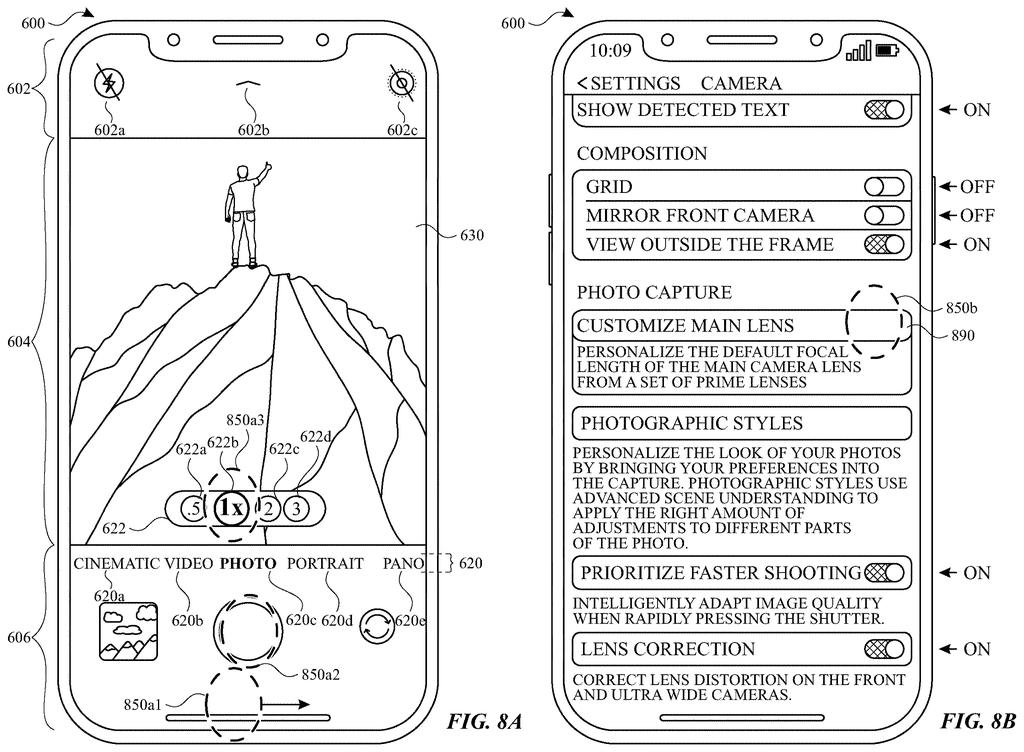
What Apple's per-lens zoom buttons actually do
Imagine you're at your kid's soccer game, thumb hovering over the zoom buttons on your phone's camera. Some of those zoom settings come from actual lenses on the back of the phone. Others are the phone cropping in digitally on a picture it already took.
Apple's patent application sorts those out on the screen. When you open the camera, you get a row of buttons: one for each lens at its natural zoom, and a separate one for digital zoom, which can draw on any of the cameras. Drag your finger and you can slide to any zoom setting across that whole range.
The filing also says digital zoom shots should come out at a resolution similar to the lens shots. And when the light gets dim and the phone switches to a low-light mode, it can move you off digital zoom and onto a real lens.
The present disclosure generally relates to camera management. In some embodiments, methods, computer systems, user interface, and techniques are provided for managing the resolution of media, managing zoom controls for capturing media …
Translation: Apple describes a system for controlling how users interact with camera zoom settings.
How the camera screen splits lens and digital zoom
The claims cover a camera screen for a phone or tablet that has at least two fixed focal length cameras (lenses with one set magnification that can't zoom on their own). When you switch into a camera mode, the screen shows three kinds of controls:
- A button for the first camera's native zoom level (the zoom it delivers with no extra image processing).
- A button for the second camera's native zoom level, which is a different one.
- A button for digital zoom, which enlarges the picture using one or more of the cameras.
The dependent claims add detail. Dragging a finger moves you through a range of zoom levels that spans all three buttons. Digital zoom shots come out at a resolution similar to the lens shots, by expanding frames the cameras captured. In some camera modes the digital button starts out selected, and in others it doesn't. One mode can show only the digital button, then reveal the lens buttons when you tap, while hiding the filter controls. These buttons are also the only controls that change the zoom level.
Low light gets its own rule. If digital zoom is selected and the phone moves into a low-light mode (because you tapped for it, or because the surrounding light falls below a threshold), the phone switches to one of the lenses' native zoom levels.
The description also covers choosing between 12 and 24 megapixel photos and video stabilization settings, but the claims here center on the zoom controls.
a first selectable control that, when selected, causes the computer system to be configured to capture media with a first native zoom level of the first fixed focal length camera …
Translation: One button activates the true optical zoom of a specific camera lens.
Why a tidier zoom bar matters on your phone
Phones now carry several rear cameras, and the zoom bar is where you choose among them. A layout that marks real lens settings apart from digital zoom, and gives you a quick way to slide between them, could make that choice faster with fewer taps. The filing says its goal is less wasted time and less wasted battery from extra button presses.
Because the claims describe a camera screen and not a new lens or sensor, any change would arrive as a software update to the camera app. The filing names iPhone and iPad as example devices, but a patent application is not a product, and nothing here says whether this layout will ever ship.
Apple's 625th filing in our Apple coverage since May adds to a run that includes a camera shake fix and app data privacy controls.
Every camera screen trades space for clarity, and this one spends a little of each. A button for every lens plus a separate digital button puts more targets in a narrow strip under your thumb, and a crowded strip invites mistaps.
The bigger cost sits in the low-light rule. If you're zoomed in digitally and the phone drops into night mode, the claims have it move you to a real lens setting, so your framing can change without you asking. A real lens is a plausible fit for dim scenes, and most people would take a slightly different crop over a muddy photo, but it is a surprise worth knowing about.
Overall the bargain reads as fair. This is routine interface housekeeping, and the costs are small next to the benefit of knowing which kind of zoom you're choosing.
Get our take in your Top Stories
Liked this breakdown? Add Patentlyze as a preferred source on Google, and our plain-English take shows up more often in your Top Stories the next time Apple patent news breaks.
There are more where this came from
We read every patent application Big Tech publishes and send you the ones worth knowing. Plain English, free, every week.
The drawings
37 drawing sheets from US 2026/0352942 A1 · click any drawing to enlarge


Show the other 29 sheets


Want this weekly breakdown for a company we don't cover? Patentlyze Pro →
Be the first to weigh in