
A New Google Patent Teaches Software to Spot Glare on Scanned Documents
A bright streak across a scanned page can hide the very words you wanted to save. Google's filing describes software that catches that streak by checking both the whole image and its shiniest patch.
What Google's glare-spotting software does
Ever snapped a photo of a receipt, only to find a white streak right across the total? That streak is glare, and it can hide exactly the words you wanted to keep.
Google's filing describes software that checks for it automatically. It looks at the whole picture and gives it a rough score for how likely glare is. Then it zooms in on the shiniest patch it can find and measures things like color and brightness there. A final step weighs both and answers yes or no: does this image have glare?
The filing says combining the two views helps even with pages that are mostly white, where glare is hard to spot. It also describes an optional step that could offer to reduce the glare once it has been found.
a glare segmentation neural network that generates, from data derived from the image, a glare map that identifies one or more glare areas of the image, each glare area being a proper subset of an area of the image and determined to include a glare component caused by a glare reflection being present in the glare area …
Translation: An AI network maps out the exact spots where light is bouncing off the document.
How the two glare checks get combined
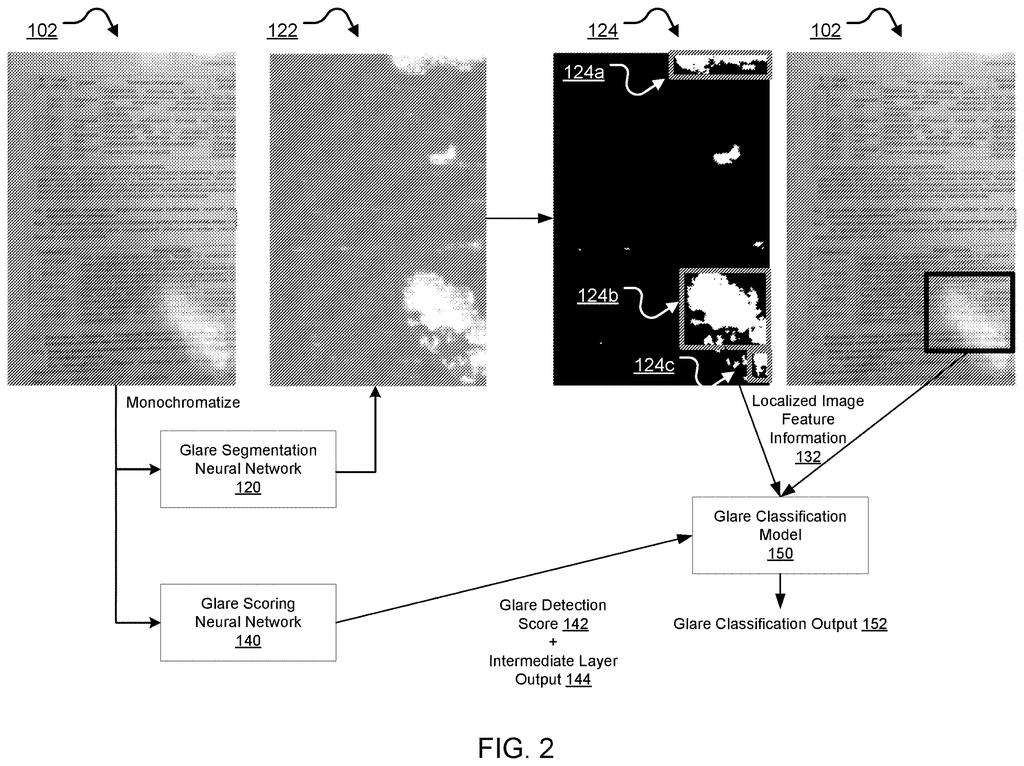
The system is a chain of four parts. First, a glare segmentation neural network (a program trained on many examples to label every part of a picture) builds a glare map. The map gives each pixel a score from 0 to 1 for how glare-like it looks. In the main example it works on a black-and-white copy of the image.
Next, the map is turned into a plain on/off mask. A pixel stays only if it is both very bright in its color channels and high on the glare score. The surviving pixels cluster into blobs, and a box is drawn around each one. One version measures only the box around the biggest blob.
A feature extraction model then measures the boxed area. Examples from the filing include:
- Saturation and intensity product: glare is bright and washed out, so this number runs close to 1 there.
- Dark channel gradient energy: how sharp the edges are in the darkest color layer of the patch.
- Bounding box fraction: how much of the whole image the box covers.
Separately, a glare scoring neural network reads the full image and outputs one score for how likely glare is anywhere in it. A glare classification model (a linear classifier in one version, meaning a simple weighted-sum decision) takes the close-up measurements, the global score and, optionally, a middle-layer output from the scoring network. It returns a yes/no answer or a probability.
… a glare classification model that uses at least the extracted localized image feature information and the glare score to generate a classification output that specifies whether the image has glare …
Translation: Another part of the software combines the details and scores to make a final decision on glare.
Why glare checks matter for scanned pages
The most direct use is in apps that scan documents. If the software can tell you a page has glare, the app could prompt you to retake it, or offer to reduce the glare, as the filing describes. The filing also points to text-reading software (OCR), which pulls words out of images and works better when a bright reflection isn't covering them.
There is no product named here, and the examiner's first review rejected the claims as filed, which is routine at this stage and often followed by amendments. Still, anyone who has re-scanned a glossy page three times can see the appeal of a phone that flags the problem right away.
Google's 79th filing we've tracked in AI photo editing since May builds on earlier applications like dropping products into lifestyle scenes and captioning a selected photo region.
Every extra check costs something. This design runs two analyses on each image, one of the whole picture and one of the brightest patch, and then a third step to combine them. That means more computing and more places for a mistake to creep in, and the filing gives no numbers on speed or accuracy.
The sharpest trade is the option to inspect only the largest glare patch. A page with several small reflections could slip past a check that fixates on one big blob.
For a phone app that has to answer in a moment, the extra steps are a fair price. A flagged retake beats a scan with a missing total, and the two-view setup is a sensible answer to white pages that confuse simpler checks. Routine engineering, aimed at a real annoyance.
Get our take in your Top Stories
Liked this breakdown? Add Patentlyze as a preferred source on Google, and our plain-English take shows up more often in your Top Stories the next time Google patent news breaks.
There are more where this came from
We read every patent application Big Tech publishes and send you the ones worth knowing. Plain English, free, every week.
The drawings
3 drawing sheets from US 2026/0350769 A1 · click any drawing to enlarge


Want this weekly breakdown for a company we don't cover? Patentlyze Pro →
Be the first to weigh in