
Samsung · Filed Jul 1, 2026 · Published Nov 12, 2026

A New Samsung Patent Turns Smart Rings Into a Stylus for Phone Drawing

Samsung describes a way to draw on a phone with a bare finger while two smart rings stand in for a stylus. One ring tracks how far you bend a finger, and the other tracks how you tilt the finger doing the drawing.
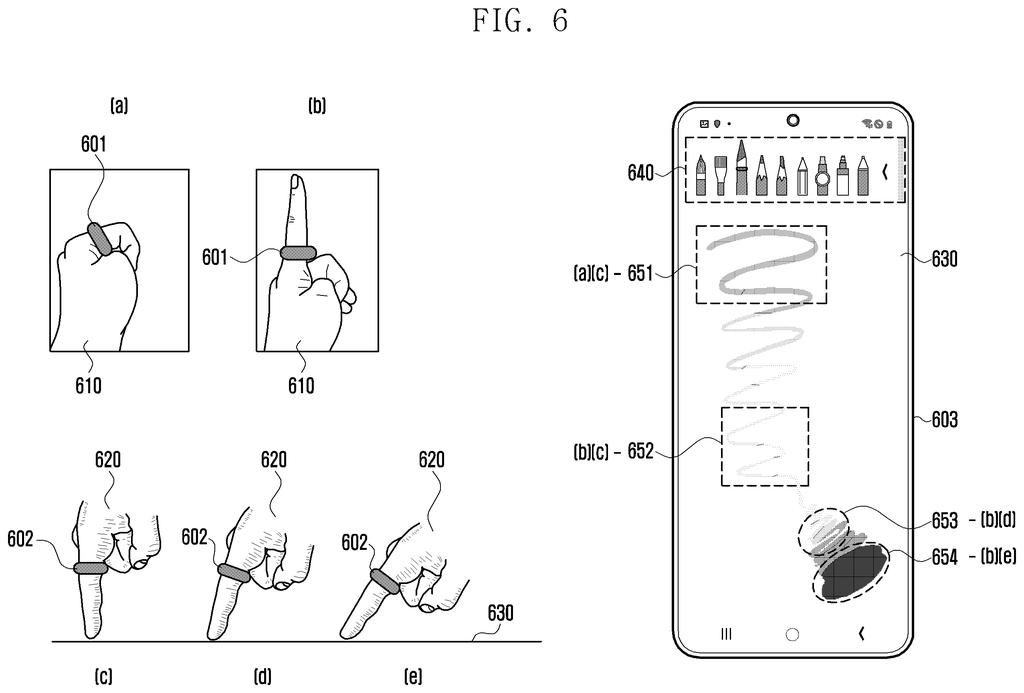
A phone drawing tool changes line styles on screen as the person tilts their finger and bends their other hand. Drawing from patent filing US 2026/0358914 A1.
A phone drawing tool changes line styles on screen as the person tilts their finger and bends their other hand.
See all 33 drawings from this filing ↓
Publication number US 2026/0358914 A1 US20260358914A1
Applicant Samsung Electronics Co., Ltd.
Filing date Jul 1, 2026
Publication date Nov 12, 2026
Inventors Jeonghyun LEE, Youngjae MEEN, Nina LEE
US classification 345/173
Status when we published Waiting for an examiner (Sep 9, 2026)
Parent application is a Continuation of PCTKR2024017304 (filed 2024-11-05)
Document 20 claims

What Samsung's smart-ring drawing patent does

A sketching app sits open on a phone, and the stylus is back at home. Draw with a bare finger and every line comes out the same: same width, same shade, no matter how hard you press or how you lean the finger.

Samsung's patent application tries to fix that with smart rings. In its examples, one ring sits on a finger of your free hand and senses how far you bend it, which the phone treats like pressing harder. A second ring sits on the finger you draw with and senses how that finger tilts.

The phone turns those two readings into line thickness, transparency and how smoothly one tone fades into another, then draws your touch with those settings. The screen doesn't need a special pen-sensing layer.

From the filing · CLAIM 1
receive data related to a pressure value from a first wearable device through the wireless communication circuit and receive and data related to a first inclination value from a second wearable device …

Translation: The phone gets data about how hard you press and how the wearable device is tilted.

How finger bend and finger tilt shape each stroke

The claimed setup has a phone with a touch screen plus two wearables, which the filing's examples show as smart rings. The first ring reports a pressure value, from a sensor that feels how hard the ring is squeezed as the finger bends. The second reports an inclination value (tilt), from motion sensors like the ones that tell a phone which way is up.

The phone then maps those readings onto the brush:

  • Pressure sets line thickness and/or transparency.
  • Tilt sets gradation, meaning how one tone, color or texture shifts into another.
  • Your touch on the screen decides where the stroke goes.

The filing gives a sample: at 0 degrees of tilt a stroke has one tone, and at 60 degrees it has four, with a thicker line. Extra claims let the phone subtract its own tilt to find the finger's angle against the screen, factor in the size of the touched patch, and show sliders to weight each setting (the example range is 0.5 to 2 times). A preview of the brush appears when a ring's Bluetooth signal is strong enough, meaning the ring is close.

The description also covers an eraser mode, where the same readings set the eraser's size and strength, and a bleed setting that spreads a stroke like wet ink.

From the filing · THE ABSTRACT
… determine, based on the pressure value, a first attribute value related to a thickness of a drawing and/or a transparency of the drawing, determine a second attribute value related to gradation of the drawing based on the first tilt value …

Translation: The system uses that physical pressure and tilt to control line thickness, transparency, and shading.

Why this matters for drawing without a stylus

If you have ever sketched on a phone with a fingertip, you know the lines come out flat and uniform. This approach would give you pressure and tilt control from gear you might already wear, with no stylus to buy or lose and no pen-sensing layer built into the screen. The sliders would also let you tune how strongly each ring affects the brush.

The catch is the setup. The full effect takes two rings, one on each hand, and many people own none. Pressure comes from bending a finger on your other hand, so it would take some practice. It is also a patent application, so there is no sign yet that a drawing app will ever work this way.

Samsung's 33rd filing we've tracked since June in our wearables reading your body watch, following one on separating heartbeat from arm motion and one on focusing light without lenses, adds to its body-sensing work.

Editorial take

The benefit lands on one person: someone who sketches on a phone and doesn't own a stylus. You would notice it the first time a line gets thicker as you curl a finger on your other hand. That feels quite different from pressing harder on glass, and plenty of people will find it odd at first.

The cost is steep for casual doodling. Two smart rings are a lot of gear, and an ordinary stylus already gives pressure and tilt with a single tool.

The idea earns its place for people who already wear a ring and want to catch a quick sketch on a phone without hunting for a pen. Verdict: a clever workaround with a narrow audience.

Get our take in your Top Stories

Liked this breakdown? Add Patentlyze as a preferred source on Google, and our plain-English take shows up more often in your Top Stories the next time Samsung patent news breaks.

There are more where this came from

We read every patent application Big Tech publishes and send you the ones worth knowing. Plain English, free, every week.

The drawings

33 drawing sheets from US 2026/0358914 A1 · click any drawing to enlarge

Internal parts that power the connected phone, drawing sheet 1 from US 2026/0358914 A1
Sheet 1 Internal parts that power the connected phone
A smart ring fitted with interior sensor bumps, drawing sheet 2 from US 2026/0358914 A1
Sheet 2 A smart ring fitted with interior sensor bumps
Raised sensors lining the inside edge of the ring, drawing sheet 3 from US 2026/0358914 A1
Sheet 3 Raised sensors lining the inside edge of the ring
Inside components that pack chips and sensors into the ring, drawing sheet 4 from US 2026/0358914 A1
Sheet 4 Inside components that pack chips and sensors into the ring
Wireless communication links between rings and a phone, drawing sheet 5 from US 2026/0358914 A1
Sheet 5 Wireless communication links between rings and a phone
Tilting your ringed finger widens the drawn stroke, drawing sheet 6 from US 2026/0358914 A1
Sheet 6 Tilting your ringed finger widens the drawn stroke
Bending one ringed finger changes line thickness on the phone, drawing sheet 7 from US 2026/0358914 A1
Sheet 7 Bending one ringed finger changes line thickness on the phone
Combining two smart rings to shade and sketch simultaneously, drawing sheet 8 from US 2026/0358914 A1
Sheet 8 Combining two smart rings to shade and sketch simultaneously
Show the other 25 sheets
Connecting a smart ring inside a drawing app, drawing sheet 9 from US 2026/0358914 A1
Sheet 9 Connecting a smart ring inside a drawing app
Choosing whether one ring controls stroke pressure or tilt, drawing sheet 10 from US 2026/0358914 A1
Sheet 10 Choosing whether one ring controls stroke pressure or tilt
Assigning separate brush controls across two paired rings, drawing sheet 11 from US 2026/0358914 A1
Sheet 11 Assigning separate brush controls across two paired rings
Sliders for tuning how ring sensors alter brush strokes, drawing sheet 12 from US 2026/0358914 A1
Sheet 12 Sliders for tuning how ring sensors alter brush strokes
Squeezing the ring lightly to make lines slightly thicker, drawing sheet 13 from US 2026/0358914 A1
Sheet 13 Squeezing the ring lightly to make lines slightly thicker
Maximum pressure sensitivity producing dramatic stroke widths, drawing sheet 14 from US 2026/0358914 A1
Sheet 14 Maximum pressure sensitivity producing dramatic stroke widths
Low opacity changes from gentle ring pressure, drawing sheet 15 from US 2026/0358914 A1
Sheet 15 Low opacity changes from gentle ring pressure
Higher sensitivity causing sharper shifts in stroke transparency, drawing sheet 16 from US 2026/0358914 A1
Sheet 16 Higher sensitivity causing sharper shifts in stroke transparency
Squeezing the ring adds minimal ink bleed to strokes, drawing sheet 17 from US 2026/0358914 A1
Sheet 17 Squeezing the ring adds minimal ink bleed to strokes
Cranking ring pressure settings widens ink bleed across the line, drawing sheet 18 from US 2026/0358914 A1
Sheet 18 Cranking ring pressure settings widens ink bleed across the line
Tilting the ringed finger slightly softens stroke edge shading, drawing sheet 19 from US 2026/0358914 A1
Sheet 19 Tilting the ringed finger slightly softens stroke edge shading
Maximum gradation spreads color gradients further across the line, drawing sheet 20 from US 2026/0358914 A1
Sheet 20 Maximum gradation spreads color gradients further across the line
Hovering near the screen lets you preview stroke effects, drawing sheet 21 from US 2026/0358914 A1
Sheet 21 Hovering near the screen lets you preview stroke effects
A pop up bubble previews brush textures before drawing, drawing sheet 22 from US 2026/0358914 A1
Sheet 22 A pop up bubble previews brush textures before drawing
Brush textures appear directly beneath your finger on touch, drawing sheet 23 from US 2026/0358914 A1
Sheet 23 Brush textures appear directly beneath your finger on touch
How the phone blends finger tilt and ring pressure, drawing sheet 24 from US 2026/0358914 A1
Sheet 24 How the phone blends finger tilt and ring pressure
Calculating finger tilt to set screen line style, drawing sheet 25 from US 2026/0358914 A1
Sheet 25 Calculating finger tilt to set screen line style
Shaping drawing strokes using ring tilt and touch size, drawing sheet 26 from US 2026/0358914 A1
Sheet 26 Shaping drawing strokes using ring tilt and touch size
Blending finger pressure and touch size to control stroke effects, drawing sheet 27 from US 2026/0358914 A1
Sheet 27 Blending finger pressure and touch size to control stroke effects
Applying user sensitivity weights to ring pressure measurements, drawing sheet 28 from US 2026/0358914 A1
Sheet 28 Applying user sensitivity weights to ring pressure measurements
Adjusting ring tilt sensitivity before rendering your strokes, drawing sheet 29 from US 2026/0358914 A1
Sheet 29 Adjusting ring tilt sensitivity before rendering your strokes
Scaling the calculated line thickness with custom weight values, drawing sheet 30 from US 2026/0358914 A1
Sheet 30 Scaling the calculated line thickness with custom weight values
Modifying stroke transparency or color using custom weights, drawing sheet 31 from US 2026/0358914 A1
Sheet 31 Modifying stroke transparency or color using custom weights
Showing a hover preview before your finger touches down, drawing sheet 32 from US 2026/0358914 A1
Sheet 32 Showing a hover preview before your finger touches down
Erasing your screen drawing using ring tilt and pressure, drawing sheet 33 from US 2026/0358914 A1
Sheet 33 Erasing your screen drawing using ring tilt and pressure
Browse all the drawings 33 drawing sheets
Patent filing page

Source. Full patent text and figures from the official USPTO publication PDF.
Reader comments

Be the first to weigh in

Start the discussion

Real name or a handle, either is fine. Comments are read by a person before they appear, so allow a little time. Keep it about the filing.