
Adobe Patents an AI That Suggests What to Add to Your Photo and Where
Adobe's filing describes an AI that looks at a photo of a tomato farm and suggests adding a woman in a plaid shirt picking tomatoes. Then it works out where she should stand and how far back.
What Adobe's photo-composition AI actually does
You're staring at a photo of an empty tomato farm, and you want it to feel alive. You just can't think of what belongs there, or where it should stand so it looks natural.
Adobe's patent application describes an AI helper for exactly that moment. You give it a background photo, or a cutout of an object, plus a short question in plain text. It answers with an idea, such as a woman in a plaid shirt picking tomatoes, or, going the other way, a fitting backdrop for your cutout, like a serene underwater scene. Then it generates the picture and blends it in.
It also decides where and how far back the new thing should sit, so a surfboard can be partly hidden behind a person instead of floating on top. You can keep going, adding a boat, then a surfboard, one request at a time.
receiving an image composition prompt comprising a background image or a foreground image and a text prompt; based on the image composition prompt, generating, utilizing a multi-modal large language model, a predicted image composition that describes a composite image …
Translation: The system takes a starting photo and a text description, then uses an AI model to plan out what to add to the picture.
How the AI picks a spot, size and depth
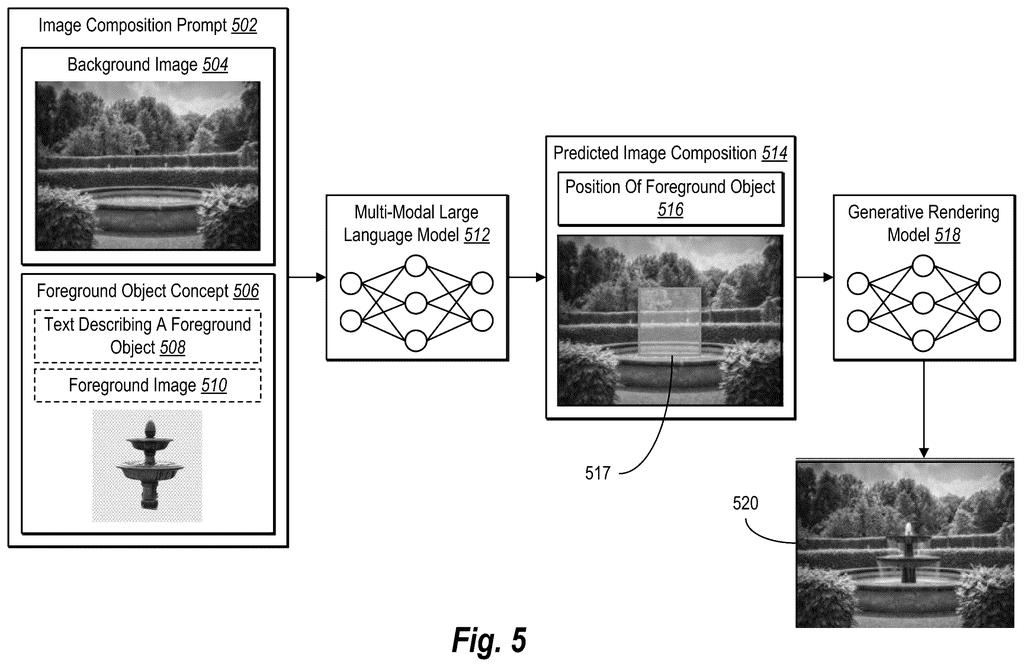
The core of the filing is a multi-modal large language model (a chatbot-style AI that reads images as well as words). You give it a background image or a foreground image, plus a text prompt. It does not draw anything itself. It writes a text description of the finished picture, and a separate image-generating model renders that plan.
Inside, the steps look like this:
- An image encoder (a component that turns a picture into numbers) processes each image.
- A separate projector (a translator layer) handles the background, the foreground and a depth map (an image showing how far away each pixel is). Each one converts its image into a form the language model can read alongside your words.
- The model outputs a suggested object, a suggested background, or a position: a rectangle plus a depth value. It can propose several rectangles with confidence scores and keep the highest.
To render the result, the filing describes a diffusion model (an image generator that refines noise into a picture) filling a masked area, or an object stitching model. A depth check removes the pixels of an inserted object that should sit behind something nearer.
For training, Adobe removes objects from real photos to get clean backgrounds, then captions each removed object with its location and depth. After filtering out 30% of the images, that leaves 709K backgrounds and over 1.3 million pairs. Random color, brightness and resolution changes keep the model from cheating on matching cues.
The present disclosure relates to systems, methods, and non-transitory computer-readable media that generates a predicted image composition that describes a composite image.
Translation: This patent covers computer software that figures out how to combine different visual elements into a single new photo.
Why this matters for Photoshop-style editing
If this ends up in an editor like Photoshop (the filing names Photoshop, Lightroom and Photoshop Express as possible homes), you could ask for help instead of guessing. Today, adding an object to a scene often means trying a prompt, seeing it look wrong, and trying again. A tool that already understands where things belong and how far back they sit could cut that loop.
Adobe's own tests are encouraging: the filing reports it beating GPT-4o and several research models at placing objects. Those are Adobe's own numbers. The examiner's first review rejected the claims as filed, which is routine and usually followed by amendments.
Adobe's 43rd filing we've tracked since May in our controllable AI image generation watch follows earlier applications like fur and hair without a background and lighting changes from one sentence.
Splitting the job in two is the central trade here. One AI writes a short text plan, and a second model draws it. That keeps each step simple, but a sentence can only carry so much, so fine details like the exact angle of light have to survive a trip through words.
Placement gives up some precision too. The filing describes a rectangle plus one average depth number per object, so a tall, slanted object gets treated as a single flat distance. The training photos come from images where things were already arranged naturally, which may push suggestions toward the expected, a plaid-shirted farmer among the tomatoes.
Those costs look acceptable. For everyday editing, a decent starting suggestion that lands in the right spot saves more time than perfect control would. The step that hides the part of an object that should sit behind something handles the most obvious giveaway of a fake.
Get our take in your Top Stories
Liked this breakdown? Add Patentlyze as a preferred source on Google, and our plain-English take shows up more often in your Top Stories the next time Adobe patent news breaks.
There are more where this came from
We read every patent application Big Tech publishes and send you the ones worth knowing. Plain English, free, every week.
The drawings
17 drawing sheets from US 2026/0350749 A1 · click any drawing to enlarge


Show the other 9 sheets


Want this weekly breakdown for a company we don't cover? Patentlyze Pro →
Be the first to weigh in