
Adobe Files Patent for Photo Editing That Changes Lighting and Backdrop From One Sentence
Type "snowy winter scene with morning lighting" and Adobe's patent application describes software that relights the object in your photo and paints a matching backdrop. The filing's big promise is that the logo on your coffee cup stays readable.
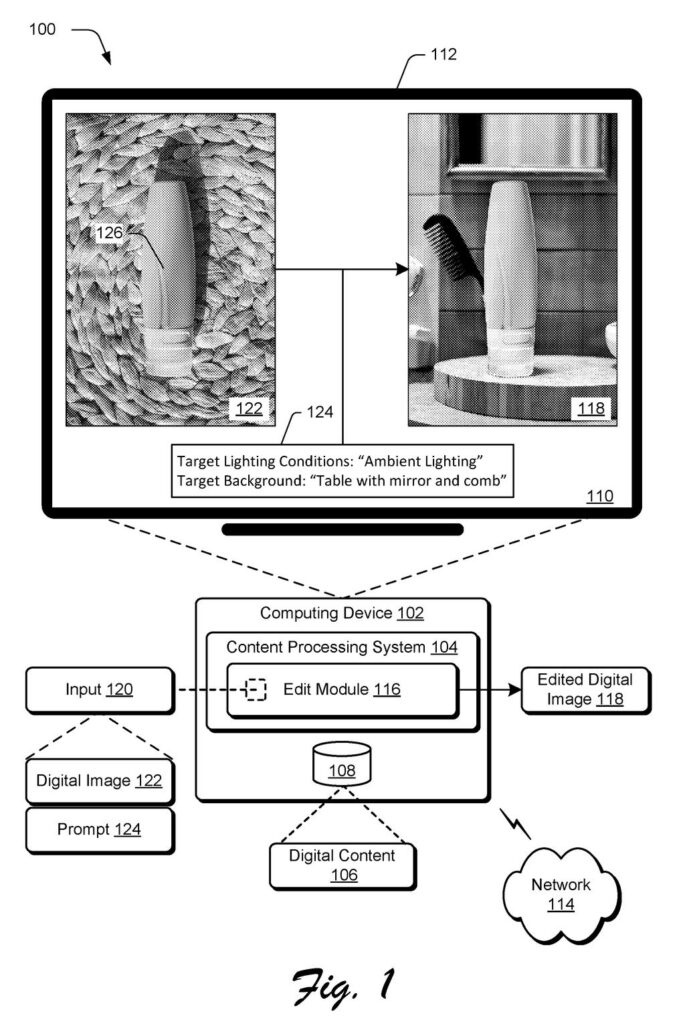
What Adobe's relight-and-swap patent does
Right now, dropping a product photo into a new scene usually goes one of two ways. Paste the object in untouched and the lighting clashes with the background, so it looks stuck on. Or let an AI redraw the whole picture and the text on your coffee cup comes out as gibberish.
Adobe's patent application describes a fix that starts with one sentence from you, such as "snowy winter scene with morning lighting." The system splits that into a lighting instruction and a background instruction, and reads each one in light of the other. "Morning lighting" means something different against snow than it does at a sunny beach.
It then relights the object, restores its sharp details, and paints a background that matches that light. The filing also describes adding a shadow that fits the scene.
… qualifying the lighting prompt based on the background condition and qualifying the background prompt based on the lighting condition …
Translation: The system adjusts the lighting and backdrop prompts so they fit well together.
How Adobe keeps the logo readable after relighting
The filing is a continuation of an earlier Adobe application. It starts with a photo and a text prompt. A text analysis model (software that works out how the words in a sentence relate to each other) splits the prompt into a lighting prompt and a background prompt. Each one is "qualified" by the other, meaning it is interpreted in the context of the other.
The description then walks through these steps:
- Cut the object out of its original background.
- Use a diffusion model (an AI that builds images by gradually refining noise) to relight a small, rough copy. The filing's example is 128x128 pixels. The light comes out right, but fine details like text get distorted.
- Use histogram matching (comparing how bright and colorful the pixels are in two images) to carry the rough copy's color profile onto the sharp original. The details survive. It can even work on the lightness channel alone.
- Use a generative fill model to paint a background that follows the object's new lighting.
Optionally, a shadow synthesis model adds, removes or adjusts shadows. In one example it puts a shadow in front of a coffee cup because it detects a light source behind it. The system can also show several lighting options to pick from, or write the prompt itself from a reference image.
Claim 1 covers the prompt split, the relit object and the matching background, all done with machine-learning models. Histogram matching and shadows come from the description.
… leverages a shadow synthesis model to edit shadows in the edited digital image. In this way, the techniques described herein preserve content details of the digital object when applying background and lighting effects.
Translation: An AI model fixes the shadows so the edited subject looks natural in its new scene.
What this means for product photos and ads
If you make product shots, ads or social posts, the fake-looking composite is a familiar headache. The filing's own example is a car ad: a car photographed in a parking lot, placed on a mountain road at sunset, with its logo text still intact.
The filing says it works from a single input image. Other approaches, it says, need several photos of the object from different angles or lots of computing power. It also names a Generative Fill model as one option for the background step. For a company that sells image-editing software, matching light between the object and the new scene is the difference between a fun demo and something a designer would actually ship.
Adobe's 41st patent application we've tracked since May on controllable AI images follows one on turning flat images into layers and one on moving objects in AI images.
Claim 1 is wider than the coffee cup example suggests. It asks for four things: a single prompt describing both lighting and background, a split into two instructions that each account for the other, a relit object, and a background built to match that lighting, all done with machine-learning models.
The logo-saving brightness-matching step, the shadow tool and the cutting-out step do not appear in claim 1. They live in the description. If granted, the claim would cover any tool that follows the four-step recipe, however it protects the fine details.
The most distinctive piece is the cross-reading of the two instructions. Claim 6 spells it out: the same lighting phrase gets treated differently against one backdrop than another. That idea is easy to explain and sensible. Whether it is new enough is a question for patent examiners, and this reads as a practical improvement to everyday photo editing.
Get our take in your Top Stories
Liked this breakdown? Add Patentlyze as a preferred source on Google, and our plain-English take shows up more often in your Top Stories the next time Adobe patent news breaks.
There are more where this came from
We read every patent application Big Tech publishes and send you the ones worth knowing. Plain English, free, every week.
The drawings
12 drawing sheets from US 2026/0350863 A1 · click any drawing to enlarge


Show the other 4 sheets


Want this weekly breakdown for a company we don't cover? Patentlyze Pro →
Be the first to weigh in