
Apple · Filed Jul 8, 2026 · Published Nov 5, 2026

Apple Files Patent for a Switchboard That Routes App Questions to the Right AI Model

Apple has filed a patent application for a go-between that lets apps hand questions to the AI model best suited to answer, then keep the conversation going. The model remembers the earlier exchange, so your device doesn't have to resend it.
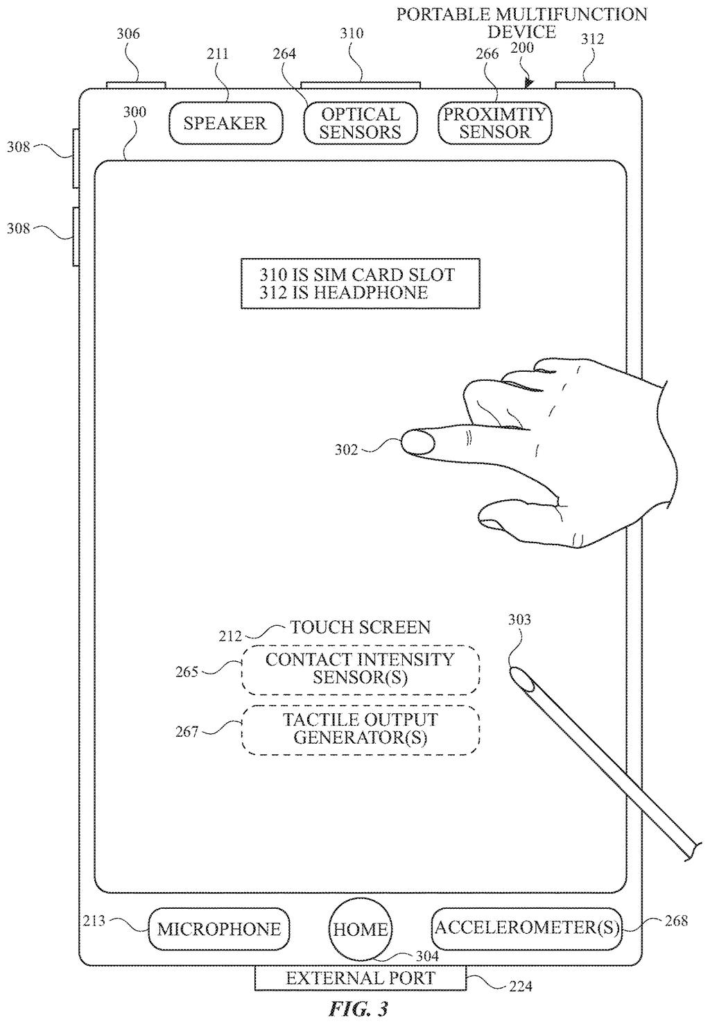
A smartphone touch screen accepting finger taps and stylus input from a user. Drawing from patent filing US 2026/0350061 A1.
A smartphone touch screen accepting finger taps and stylus input from a user.
See all 33 drawings from this filing ↓
Publication number US 2026/0350061 A1 US20260350061A1
Applicant Apple Inc.
Filing date Jul 8, 2026
Publication date Nov 5, 2026
Inventors Neal S. ELLIS
US classification 704/9
Status when we published Waiting for an examiner (Jul 29, 2026)
Parent application is a Continuation of 18959558 (filed 2024-11-25)
Document 22 claims

What Apple's AI request router actually does

When you ask an AI a follow-up question, somebody has to supply the earlier conversation, and resending all of it costs data, processing power and battery. Apple's filing describes a middleman built into the device that handles this for apps.

An app tells the middleman what it wants (its intent, such as answering a general knowledge question). The middleman picks a suitable AI model, opens a conversation with it and passes along the question. The model keeps a copy of the question and its own answer on its end. When the app follows up, the model already has the earlier exchange, so only the new question has to travel.

The filing says the chosen model can run on your device or on a different one. For general knowledge questions, the device can first check whether a model on the device can handle the job.

From the filing · CLAIM 1
identifying a model based on the intent; creating the session, using an API, with the identified model; receiving a second request with a second intent from the software application; transmitting the second request to the identified model via the session …

Translation: The system figures out the right AI for the job and opens a connection to it.

How the app, the router and the model talk

The filing describes a go-between layer on the device. An app sends it a request tagged with an intent (a label for what the person wants, such as a knowledge question). If no conversation is open yet, the layer picks an AI model based on that intent and opens a session (a standing connection to that model) using an API (the set of rules apps follow to ask the system for help).

Requests then flow through that session. The model writes a response and stores both the request and the response. When the app sends a follow-up, the model builds its next answer from what it saved.

Narrower claims add several options:

  • Choosing the model by intent type, a database of models, user preferences, or whether the size of the job passes a threshold.
  • For knowledge-seeking intents, checking first whether a local model can answer.
  • Running the model on the same device or on a second, different device.

Other claims cover images and documents: an app registers a file first, the model stores it and returns an identifier, and later requests point to that identifier, with progress updates during the transfer. Requests can also include tool functions (actions the model can ask the app to run), such as gathering user data or changing the state of the app or device. The app runs the action and returns the result to the model.

From the filing · THE ABSTRACT
… systems that route requests to a remote model or to a local model based on an intent type. This application also includes disclosure related to routing of knowledge-based requests to remote model or to a local model.

Translation: Requests go to either an on device AI or a cloud based AI depending on what you need.

Why follow-up AI questions could cost less

The practical payoff is lighter, quicker follow-up answers. The filing says that because the model already holds earlier requests and responses, the device sends less data and uses less processing power and battery. For you, that could mean AI features inside apps that respond faster to a second or third question without draining your phone.

It also points to a privacy angle. The description says checking whether a local model can handle a knowledge question first reduces how much information leaves your device. Apps get one consistent way to ask for AI help, and the system decides where the work happens, which matters as more apps want AI features.

Apple's fifth patent we've tracked since October in our AI models working together watchlist builds on earlier applications, including one swapping a failing model and one routing to AI or rules.

Editorial take

The central trade here is memory for bandwidth. Letting the model store each request and answer saves your device from resending the conversation, but it means the history lives with the model, which may be on another device. That is a real cost for anyone who cares where their questions end up, and the filing's local-first check for knowledge questions is the main thing offsetting it.

The second cost is the guessing. The system must choose a model from a label like an intent type, a user preference or a size threshold. A wrong guess sends a question to a model that is too weak or too heavy, and the person only sees a slow or poor answer.

The trade reads as worth it. Follow-up questions are the most common thing people do with AI, and shipping the whole backstory every time is wasteful. The design asks for trust in the router, which is a fair price for the savings.

Get our take in your Top Stories

Liked this breakdown? Add Patentlyze as a preferred source on Google, and our plain-English take shows up more often in your Top Stories the next time Apple patent news breaks.

There are more where this came from

We read every patent application Big Tech publishes and send you the ones worth knowing. Plain English, free, every week.

The drawings

33 drawing sheets from US 2026/0350061 A1 · click any drawing to enlarge

Connecting phones to cloud servers and everyday services, drawing sheet 1 from US 2026/0350061 A1
Sheet 1 Connecting phones to cloud servers and everyday services
Internal parts and memory that run a smartphone, drawing sheet 2 from US 2026/0350061 A1
Sheet 2 Internal parts and memory that run a smartphone
Software parts that detect and sort touchscreen taps, drawing sheet 3 from US 2026/0350061 A1
Sheet 3 Software parts that detect and sort touchscreen taps
Sensors, buttons, and speakers on a touchscreen phone, drawing sheet 4 from US 2026/0350061 A1
Sheet 4 Sensors, buttons, and speakers on a touchscreen phone
Computer hardware and apps running on a desktop system, drawing sheet 5 from US 2026/0350061 A1
Sheet 5 Computer hardware and apps running on a desktop system
Steps apps follow to share data with other software, drawing sheet 6 from US 2026/0350061 A1
Sheet 6 Steps apps follow to share data with other software
Programs built to request help from outside services, drawing sheet 7 from US 2026/0350061 A1
Sheet 7 Programs built to request help from outside services
Messages sent between apps to request and receive tasks, drawing sheet 8 from US 2026/0350061 A1
Sheet 8 Messages sent between apps to request and receive tasks
Show the other 25 sheets
A smartphone home screen showing preinstalled apps, drawing sheet 9 from US 2026/0350061 A1
Sheet 9 A smartphone home screen showing preinstalled apps
Touchpad gestures that can trigger actions on a device, drawing sheet 10 from US 2026/0350061 A1
Sheet 10 Touchpad gestures that can trigger actions on a device
Smartwatch hardware showing a display and physical controls, drawing sheet 11 from US 2026/0350061 A1
Sheet 11 Smartwatch hardware showing a display and physical controls
Internal parts and motion sensors powering a smartwatch, drawing sheet 12 from US 2026/0350061 A1
Sheet 12 Internal parts and motion sensors powering a smartwatch
Computer memory and processors running a voice assistant, drawing sheet 13 from US 2026/0350061 A1
Sheet 13 Computer memory and processors running a voice assistant
How the digital assistant turns voice input into answers, drawing sheet 14 from US 2026/0350061 A1
Sheet 14 How the digital assistant turns voice input into answers
Organizing concepts like reservations and reminders, drawing sheet 15 from US 2026/0350061 A1
Sheet 15 Organizing concepts like reservations and reminders
The AI model that turns your question into a reply, drawing sheet 16 from US 2026/0350061 A1
Sheet 16 The AI model that turns your question into a reply
Connecting a phone assistant to a cloud AI model, drawing sheet 17 from US 2026/0350061 A1
Sheet 17 Connecting a phone assistant to a cloud AI model
Asking permission before sending your photo to the cloud, drawing sheet 18 from US 2026/0350061 A1
Sheet 18 Asking permission before sending your photo to the cloud
Offering suggested follow-up questions for a cloud AI reply, drawing sheet 19 from US 2026/0350061 A1
Sheet 19 Offering suggested follow-up questions for a cloud AI reply
Presenting recipes and quick action buttons from cloud AI, drawing sheet 20 from US 2026/0350061 A1
Sheet 20 Presenting recipes and quick action buttons from cloud AI
Turning an AI answer into a ready-to-send text message, drawing sheet 21 from US 2026/0350061 A1
Sheet 21 Turning an AI answer into a ready-to-send text message
Dragging desktop files straight into the AI assistant, drawing sheet 22 from US 2026/0350061 A1
Sheet 22 Dragging desktop files straight into the AI assistant
Querying an attached document using the AI assistant prompt, drawing sheet 23 from US 2026/0350061 A1
Sheet 23 Querying an attached document using the AI assistant prompt
Returning document summaries and drafting messages with attachments, drawing sheet 24 from US 2026/0350061 A1
Sheet 24 Returning document summaries and drafting messages with attachments
Asking for confirmation before sending selected files to a friend, drawing sheet 25 from US 2026/0350061 A1
Sheet 25 Asking for confirmation before sending selected files to a friend
Getting travel packing tips from a remote AI model, drawing sheet 26 from US 2026/0350061 A1
Sheet 26 Getting travel packing tips from a remote AI model
Deciding whether the local assistant or an online model acts, drawing sheet 27 from US 2026/0350061 A1
Sheet 27 Deciding whether the local assistant or an online model acts
Sending hard questions to a remote AI helper, drawing sheet 28 from US 2026/0350061 A1
Sheet 28 Sending hard questions to a remote AI helper
How an app routes follow-up questions to the cloud, drawing sheet 29 from US 2026/0350061 A1
Sheet 29 How an app routes follow-up questions to the cloud
Uploading photos and documents alongside questions for an AI model, drawing sheet 30 from US 2026/0350061 A1
Sheet 30 Uploading photos and documents alongside questions for an AI model
Letting an AI ask the app for extra details, drawing sheet 31 from US 2026/0350061 A1
Sheet 31 Letting an AI ask the app for extra details
Starting a live chat session with the chosen AI, drawing sheet 32 from US 2026/0350061 A1
Sheet 32 Starting a live chat session with the chosen AI
Returning AI answers and handling follow-up questions for apps, drawing sheet 33 from US 2026/0350061 A1
Sheet 33 Returning AI answers and handling follow-up questions for apps
Browse all the drawings 33 drawing sheets
Patent filing page

Source. Full patent text and figures from the official USPTO publication PDF.
Reader comments

Be the first to weigh in

Start the discussion

Real name or a handle, either is fine. Comments are read by a person before they appear, so allow a little time. Keep it about the filing.