
IBM Files Patent for a Meeting Tool That Tells Others When You're on Speakerphone
Your laptop would listen to its own speaker, then tell everyone else in the meeting when your call is leaking out loud.
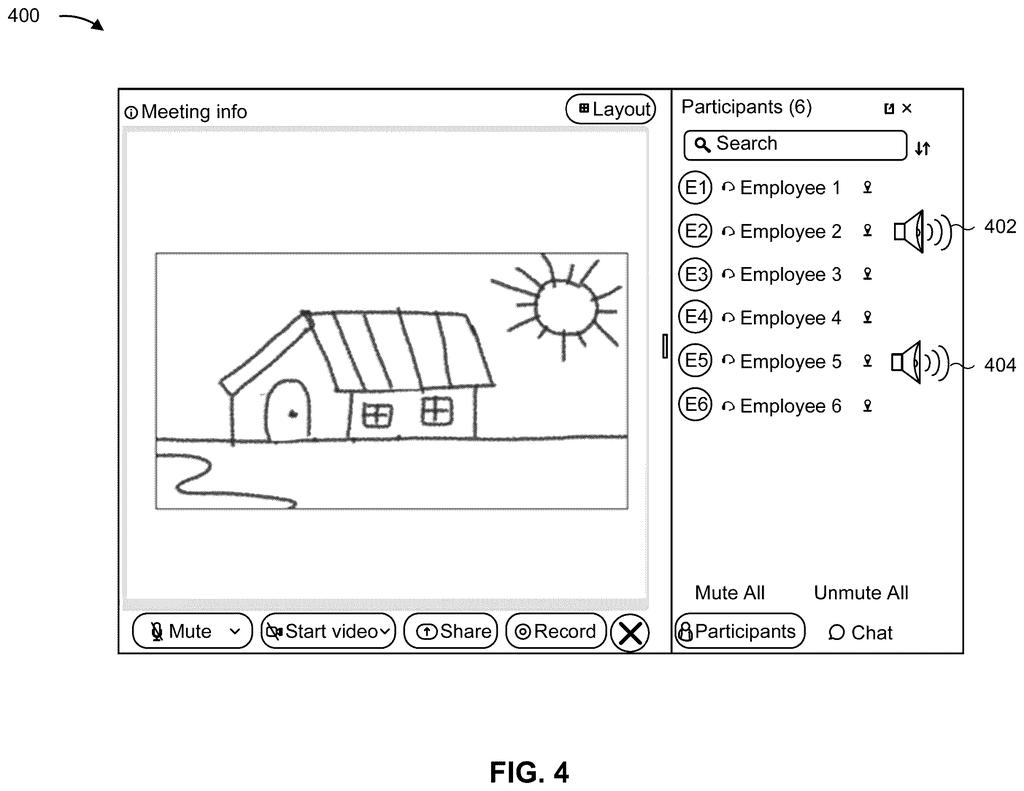
What IBM's speakerphone detector actually does
Right now, keeping a work call private is up to you. Nothing checks whether you remembered your headphones, whether your phone is on speaker, or whether a loose headset plug is also playing the call out loud. Everyone else on the call has no idea.
IBM's filing describes a fix. While you're in a meeting, your device listens through its own microphone for sound coming out of its own speaker. It turns that sound into text, then checks how closely the text matches what the meeting is actually saying.
If the match is close, the device flags that you're broadcasting the call. Other attendees see a small speaker icon next to your name, so the host can remind you to switch to headphones or move somewhere private.
… determining, by the device, whether the device is broadcasting the meeting audio output based on a result of a comparison of the first representation and the second representation; …
Translation: The tool compares what the meeting software is playing against what the microphone hears to see if it is on speakerphone.
How the laptop compares two transcripts
The meeting software already produces one stream of audio that goes to every attendee. The device turns that stream into a transcript (a text version of what was said). Either the meeting server or the device itself can do this step.
At the same time, the device's microphone records whatever is coming out of its own speaker. One claim says this recording is taken straight from the microphone, without software muting or noise cancellation, so the leaked sound is still there to hear. That recording becomes a second transcript.
Then the device compares the two:
- A similarity algorithm (a formula that scores how alike two pieces of text are) produces a number, such as the share of words that match over a short window.
- If the score passes a threshold (a cutoff), the device decides it is broadcasting.
- The cutoff can be tuned. Attendees can declare they're using a loudspeaker, which helps train it, and a higher cutoff can be used in noisy rooms.
The device then sends an indication to the meeting server, and other attendees see an alert icon that can name the device. The check can repeat at set intervals through the meeting. The filing says comparing text instead of raw sound keeps the computing work light.
The device may output an indication that the device is broadcasting the meeting audio output.
Translation: It then sends a warning to others letting them know they are on speakerphone.
Why a loose headset jack makes this useful
If you take calls on speaker in a coffee shop, an open office, or on a train, anyone nearby can hear what's said. The filing lists health, financial, and business details as the kinds of information at risk. The loose headset jack is the sneakiest case: you think the call is private, but the speaker is still playing it.
A feature like this would turn a private habit into something the whole meeting can see. That could nudge people toward headphones, and it gives hosts a way to ask about it. It would also mean your device is listening through its microphone during calls, which some people will want explained before they switch it on.
IBM's 439th filing in our IBM coverage since May joins earlier applications like pain care tied to sleep data and faster encrypted chip math.
The real problem here is accidental broadcasting: a speaker left on during a sensitive call, a headset with a loose plug silently failing, a moment where everyone in earshot hears something they were never meant to hear. Most meetings carry nothing that sensitive, but the ones that do, covering layoffs, medical records, or a pending deal, can cause serious damage from a single overheard sentence.
The approach matches that size of problem well. A quiet comparison of what the meeting software is playing against what the microphone is picking up, followed by a small warning icon, is a proportionate response to an occasional but costly failure.
The remaining question is human: someone has to see the icon and act on it fast enough to matter.
Get our take in your Top Stories
Liked this breakdown? Add Patentlyze as a preferred source on Google, and our plain-English take shows up more often in your Top Stories the next time IBM patent news breaks.
There are more where this came from
We read every patent application Big Tech publishes and send you the ones worth knowing. Plain English, free, every week.
The drawings
8 drawing sheets from US 2026/0351277 A1 · click any drawing to enlarge


Want this weekly breakdown for a company we don't cover? Patentlyze Pro →
Be the first to weigh in