
Microsoft Files Patent for an AI Assistant That Investigates Why an App Broke
When an app breaks, the error message often points at the wrong place. Microsoft's patent filing hands an AI a described toolbox so it can go find the real culprit while the app is still running.
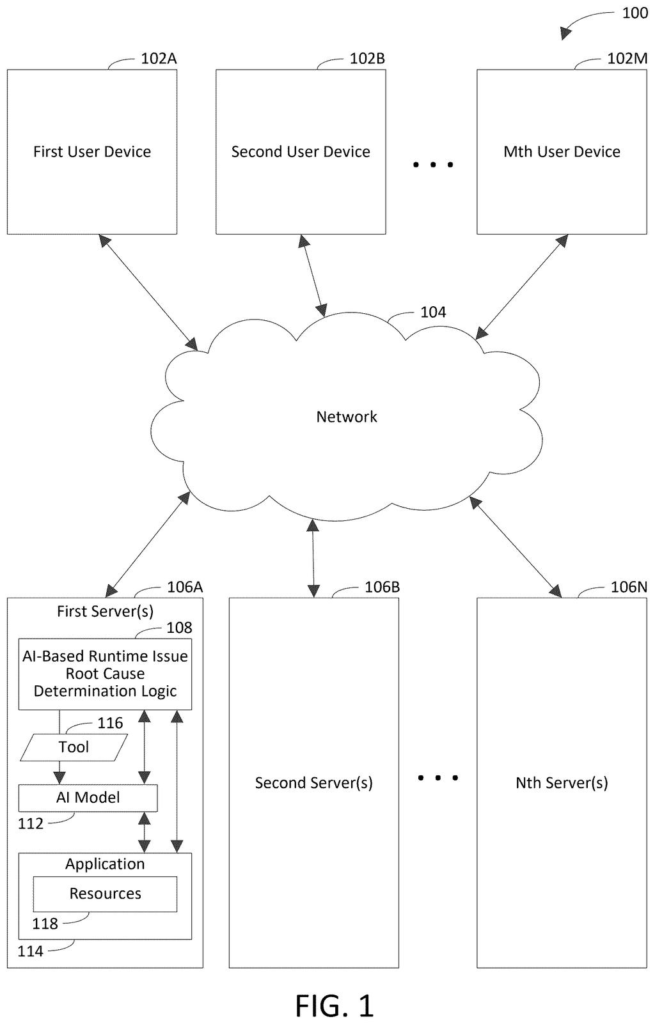
What Microsoft's AI bug-hunting helper actually does
Imagine your company's online store stops letting customers check out at 2 a.m. The error on screen blames the website, but the real fault sits in a database two services away that the website never even called. Today a developer has to dig through piles of cryptic records and connect the dots by hand.
Microsoft's patent filing describes an AI helper built into the coding workspace. The developer asks, why is my app broken?, and the system picks out the most relevant records: a map of the app's parts, error logs, and performance numbers. It then gives the AI a short description of a few tools it can use to fetch fresh information from the live app.
The AI chooses a tool, asks the developer for permission, and reports the likely culprit. It can also suggest a fix, such as restarting a database.
receive a user input via a user interface in an application development environment, the user input inquiring about a root cause of a runtime issue encountered by an application that is under development …
Translation: A developer asks the system to figure out why a running app crashed or failed.
How the AI gets a toolbox and asks permission
A developer types a question into their coding workspace, such as what caused this error? The system picks data that looks relevant. The claims name three kinds: an application model (a map of the app's parts and their live status), logs (records of events and errors), and telemetry (numbers on speed and usage).
The AI model then gets a description of a tool: its name, what data it can collect, and when to use it. With that, the AI can request the tool itself. The filing's example has the AI asking for the console logs of the app's website, and the system matching that request to a real tool.
Dependent claims add more steps:
- The tool asks the developer for authorization before it collects anything.
- The AI reports the root cause (the fundamental reason the problem happened), with links back to the evidence.
- It can recommend a fix, such as restarting a database, run it after a second approval, and confirm the problem is gone.
The filing also describes a hands-off version. A logged error, a failed health check, or a timer (every 5 to 30 minutes, in its examples) can set the AI investigating without a question.
An AI model is caused to determine whether the application has the runtime issue and/or a root cause of the runtime issue by providing a description of a tool that is configured to dynamically gather identified data items in the subset of the data items from at least a subset of resources that define the application while the application is executing.
Translation: The artificial intelligence uses a special diagnostic tool to collect live data while the app runs to pinpoint the bug.
What this means for developers hunting live bugs
If this reaches developer tools, the biggest change is time. The filing's own example is a shopping site that cannot take orders and loses $1 million an hour, so finding the true cause fast matters. The AI can also decode an obscure error code, which helps when a developer is working with technology they barely know.
The filing names Microsoft's Visual Studio and Azure as examples of where this kind of tool could live, though it covers any development environment. The examiner's first review rejected the claims as filed, which is routine at this stage and usually followed by amendments. Nothing in the document says a feature like this is shipping.
Microsoft's 29th filing we've tracked since July in our AI agents that act for you watchlist follows earlier applications like finding its own helper apps and digital ID badges for agents.
The cost of this design is trust. To find the real cause, the AI needs a way into a live app, with its logs and performance numbers, and the permission prompts that guard that access also slow the developer down. Approve enough prompts in a day and people stop reading them.
The hands-off version raises the stakes. An AI that restarts a database after a failed health check saves someone's night when it is right, and makes an outage worse when it is wrong. The filing relies on a confirmation step to catch mistakes, but the AI is also the one grading its own fix.
Giving a chatbot a menu of tools is how many AI assistants already work, so the claims cover a broad idea more than a new trick. The trade still looks worth making for the version where a human approves each step, since a developer who sees the evidence links can check the AI's answer in seconds.
Get our take in your Top Stories
Liked this breakdown? Add Patentlyze as a preferred source on Google, and our plain-English take shows up more often in your Top Stories the next time Microsoft patent news breaks.
There are more where this came from
We read every patent application Big Tech publishes and send you the ones worth knowing. Plain English, free, every week.
The drawings
12 drawing sheets from US 2026/0349867 A1 · click any drawing to enlarge


Show the other 4 sheets


Want this weekly breakdown for a company we don't cover? Patentlyze Pro →
Be the first to weigh in