
Samsung Files Patent to Stop Your Phone Waking Up in Your Pocket
Your phone's touch sensor keeps listening while the screen is off, and Samsung's new filing teaches it to judge whether two taps came from a fingertip or from the inside of your pocket.
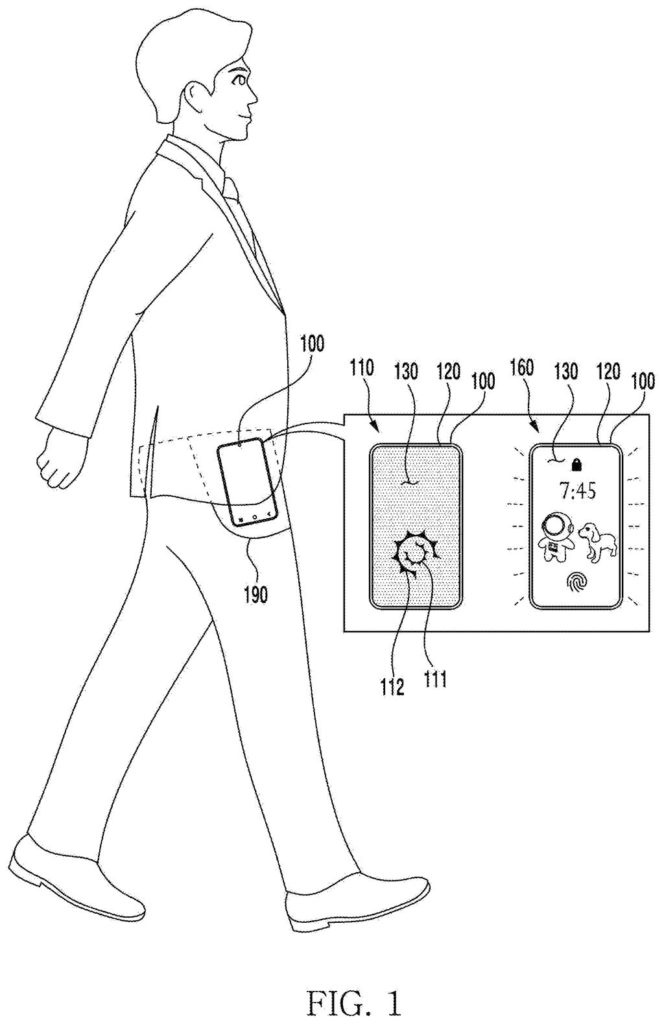
What Samsung's pocket-proof double tap does
A phone rides in a jeans pocket all afternoon, pressed by fabric, keys and your leg. Its screen is off, but the touch sensor is still listening, because that is how a double tap can wake it up.
That listening is the problem. Two stray bumps can look a lot like a double tap, and suddenly your lock screen lights up for no reason and drains a little battery. Samsung's patent application has the phone check the size of each touch. A deliberate double tap tends to leave two similar fingertip-sized patches, while pocket contact can look very different from one bump to the next.
If the two touches don't match well enough, the phone treats them as separate bumps instead of one double tap. It can also check how close together the touches landed, and how quickly.
… while the display panel is in a low power state or a power-off state: generate first information on a first touch contact based on signals from the touch sensor, after the first touch contact is released, generate second information on a second touch contact based on signals from the touch sensor …
Translation: The phone tracks two consecutive taps while the screen is off to decide if you meant to wake it up.
How the phone compares the size of two taps
While the screen is off or dimmed, a small chip next to the display (the touch processing circuitry) keeps reading the touch sensor, which spots fingers through tiny changes in electrical charge. It records a first touch, waits for it to lift, then records a second one.
Then it runs a series of checks:
- Size band: each touch must be roughly fingertip-sized, between a circle about 4 mm across and one about 25 mm across. Anything outside that band is ignored.
- Size match: the second touch must land in a range that depends on the first. In one example, a 4 mm first touch allows a second touch of 4 to 20 mm.
- Time and place: the filing also describes checking that the taps came close together in time and in position.
Near the screen's edge, a big touch may mean part of your hand hangs off the glass, so the allowed range can shrink. The filing applies similar logic to foldable and rollable phones, where a bent section of the screen stays exposed.
A pass wakes the lock screen. Touches that fit the size band but fail the match count as single taps, which show a dim always-on screen instead. The phone waits a short threshold time before showing that single-tap response, so you don't see one screen flash and then another.
Why your phone may stop lighting up in pockets
If it works as described, your phone should light up less often against your leg or inside a bag. That saves a little battery and spares you the odd feeling that your phone is acting up on its own. Double-tap-to-wake only helps if it fires when you mean it to and stays quiet when you don't.
The filing also covers details that matter in daily life: edge touches, foldable screens and the always-on display. Because the check runs on the touch chip, the filing describes the main processor being able to stay asleep until a real double tap shows up, which fits the battery-saving goal. The idea targets a problem most phone owners will recognize.
This is the 286th Samsung filing we've tracked in our cell phone coverage since May, adding to work like one cutting AI chip data delays and one matching sounds to vibrations.
Claim 1 is wide in one way and tight in another. It names any electronic device with a touch screen, and it applies only while the screen is dimmed or fully off. The required step is the size check: both touches must fall in an allowed size band, and the second must land in a band set by the first.
Distance between the taps and the time between them appear only in later claims, so claim 1 does not need them. That makes the size comparison the center of what Samsung is asking to cover. A double-tap wake feature that never compares the two touch sizes would sit outside the wording of this claim as filed.
In practice, this is a modest fix for a familiar annoyance: a phone lighting up against your leg. The rule is clear and easy to check, which also shows how narrow the core idea is.
Get our take in your Top Stories
Liked this breakdown? Add Patentlyze as a preferred source on Google, and our plain-English take shows up more often in your Top Stories the next time Samsung patent news breaks.
There are more where this came from
We read every patent application Big Tech publishes and send you the ones worth knowing. Plain English, free, every week.
The drawings
17 drawing sheets from US 2026/0339467 A1 · click any drawing to enlarge


Show the other 9 sheets


Want this weekly breakdown for a company we don't cover? Patentlyze Pro →
Be the first to weigh in