
Samsung · Filed Jun 9, 2026 · Published Oct 29, 2026

Samsung Files Patent to Slow Any Video Moment While You Press and Hold

Press and hold on a video and your phone slows that moment down, even if the footage was never shot in slow motion. Samsung's filing says the phone makes the missing frames on the spot.
A phone screen lets a viewer press and hold during playback to slow down a video. Drawing from patent filing US 2026/0341307 A1.
A phone screen lets a viewer press and hold during playback to slow down a video.
See all 27 drawings from this filing ↓
Publication number US 2026/0341307 A1 US20260341307A1
Applicant Samsung Electronics Co., Ltd.
Filing date Jun 9, 2026
Publication date Oct 29, 2026
Inventors Ara GO, Sujung BAE, Yanggeun OH
US classification 386/343
Status when we published Waiting for an examiner (Aug 20, 2026)
Parent application is a Continuation of PCTKR2024019165 (filed 2024-11-28)
Document 20 claims

What Samsung's hold-to-slow-motion gesture does

You're watching a clip of your kid blowing out birthday candles, and the best second flies by in a blink. You press and hold a finger on the screen, and the video drops into slow motion right there. Lift your finger and it picks up at normal speed.

Samsung's patent application describes this press-and-hold gesture for a phone's video player. The clip doesn't need to be shot in a special slow-motion mode. While you hold, the phone makes up extra in-between pictures, so the slowed-down part looks smooth instead of choppy.

The filing also covers pressing harder for slower motion, choosing whether the slowed part plays forward or backward, and saving just the slowed section as its own clip.

From the filing · CLAIM 1
… while the second user input is maintained on the touch display, generate interpolation frames by performing a frame rate conversion (FRC) operation for corresponding frames included in the video …

Translation: Holding your finger down creates extra frames so the video slows down smoothly.

How the phone invents frames while you hold

The claims cover a simple loop. While a video plays normally, a touch on the screen switches it into slow-motion mode. As long as the finger stays down, the device runs a frame rate conversion (FRC, a way of creating new in-between frames by working out how things moved from one frame to the next) and plays the original frames and the new ones together. When you let go, normal playback resumes at the frame right after the last one shown.

Samsung calls this a "temporal zoom." The description says the in-between frames can come from an AI model that estimates motion vectors (the direction and distance objects moved between two frames). A neural chip can do that estimate and the graphics chip can draw the new frames. The extra frames sit in a temporary buffer and are deleted after they play. The phone only remembers the start and end times.

The filing also describes optional variations:

  • Pressure: a harder press means more extra frames, so slower motion.
  • Position and drag: touching one half of the screen, or dragging one way, plays forward, while the other half or direction plays in reverse. A longer drag adds more frames.
  • Saving and sharing: the phone rebuilds the slowed clip from the stored times when you save or share it.
  • Zoom: a pinch can enlarge part of the picture while it plays slowly.

Presets of 1, 3 or 7 extra frames are shown, and 7 gives roughly one eighth speed. The filing also mentions PCs, VR headsets and turning burst photos into a GIF.

From the filing · THE ABSTRACT
… based on the second user input being released from the touch display, resume playing back the video in the normal mode through the touch display …

Translation: Lifting your finger makes the video immediately return to its normal speed.

What this means for ordinary phone videos

Most of us shoot ordinary video and wish we'd caught the moment in slow motion. Under this filing, you could press on the screen during playback, slow just the part you care about, and save or share only that clip. You wouldn't plan ahead or switch camera modes.

For Samsung, the appeal is that it adds a trick to footage people already have. The filing's own background says recording super slow motion needs a high-spec camera, extra storage and more processing time, and it limits how long you can record. Here, the extra frames get made only for the seconds you ask for.

That makes this Samsung's 1554th filing in our Samsung coverage since May, adding to work like the charging ring and the twice-folding phone.

Editorial take

The shortest road to a product here is a short one. It needs a touchscreen and a chip that can estimate motion, and the filing says that can be the phone's AI processor or its graphics chip. No new sensor, no special camera.

The building blocks are already in a phone: a gallery app, a video player, and a way to fill in extra frames, which the filing's own background says phones use for super slow motion shot at 240 frames per second. What remains is software work, mainly making the new frames fast enough to appear the moment your finger lands. The document does not say how fast that must be.

If the speed works out, the whole feature fits inside a gallery app update. That makes it a believable idea for a phone you may already own.

Get our take in your Top Stories

Liked this breakdown? Add Patentlyze as a preferred source on Google, and our plain-English take shows up more often in your Top Stories the next time Samsung patent news breaks.

There are more where this came from

We read every patent application Big Tech publishes and send you the ones worth knowing. Plain English, free, every week.

The drawings

27 drawing sheets from US 2026/0341307 A1 · click any drawing to enlarge

Internal parts of a networked phone, drawing sheet 1 from US 2026/0341307 A1
Sheet 1 Internal parts of a networked phone
Hardware chips that handle touchscreen video playback, drawing sheet 2 from US 2026/0341307 A1
Sheet 2 Hardware chips that handle touchscreen video playback
Switching into slow motion while touching the screen, drawing sheet 3 from US 2026/0341307 A1
Sheet 3 Switching into slow motion while touching the screen
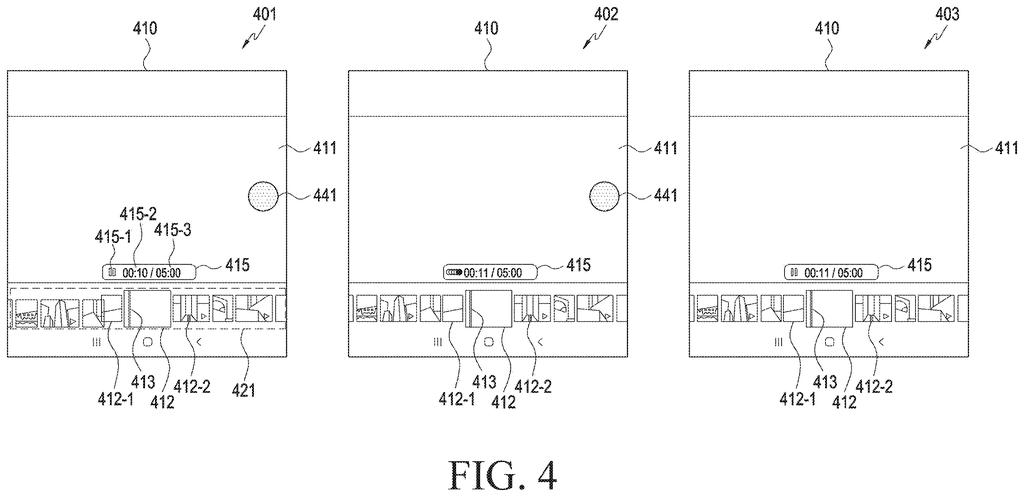
Holding your finger on a video to slow it down, drawing sheet 4 from US 2026/0341307 A1
Sheet 4 Holding your finger on a video to slow it down
Creating extra frames to produce smooth slow motion, drawing sheet 5 from US 2026/0341307 A1
Sheet 5 Creating extra frames to produce smooth slow motion
Choosing forward or backward slow motion by touch location, drawing sheet 6 from US 2026/0341307 A1
Sheet 6 Choosing forward or backward slow motion by touch location
Tapping the left or right side to control playback direction, drawing sheet 7 from US 2026/0341307 A1
Sheet 7 Tapping the left or right side to control playback direction
Adjusting video speed based on touch pressure, drawing sheet 8 from US 2026/0341307 A1
Sheet 8 Adjusting video speed based on touch pressure
Show the other 19 sheets
Pressing harder on the screen slows the video further, drawing sheet 9 from US 2026/0341307 A1
Sheet 9 Pressing harder on the screen slows the video further
How dragging your finger controls slow-motion playback speed, drawing sheet 10 from US 2026/0341307 A1
Sheet 10 How dragging your finger controls slow-motion playback speed
Sliding your finger up or down adjusts the playback speed, drawing sheet 11 from US 2026/0341307 A1
Sheet 11 Sliding your finger up or down adjusts the playback speed
Steps for creating and saving a slow-motion video clip, drawing sheet 12 from US 2026/0341307 A1
Sheet 12 Steps for creating and saving a slow-motion video clip
Saving a slowed section into your phone photo gallery, drawing sheet 13 from US 2026/0341307 A1
Sheet 13 Saving a slowed section into your phone photo gallery
A prompt asking whether to save the slow-motion clip, drawing sheet 14 from US 2026/0341307 A1
Sheet 14 A prompt asking whether to save the slow-motion clip
Sharing a slowed clip directly to other apps, drawing sheet 15 from US 2026/0341307 A1
Sheet 15 Sharing a slowed clip directly to other apps
Converting and sending a slow-motion video directly to friends, drawing sheet 16 from US 2026/0341307 A1
Sheet 16 Converting and sending a slow-motion video directly to friends
Steps for saving newly generated slow-motion frames into a video, drawing sheet 17 from US 2026/0341307 A1
Sheet 17 Steps for saving newly generated slow-motion frames into a video
Adjusting playback speed controls inside a mobile video editor, drawing sheet 18 from US 2026/0341307 A1
Sheet 18 Adjusting playback speed controls inside a mobile video editor
Video editor timeline displaying slowed sections alongside effects, drawing sheet 19 from US 2026/0341307 A1
Sheet 19 Video editor timeline displaying slowed sections alongside effects
Expanding a thumbnail strip to inspect individual slow-motion frames, drawing sheet 20 from US 2026/0341307 A1
Sheet 20 Expanding a thumbnail strip to inspect individual slow-motion frames
Erasing unwanted objects from footage while playing in slow motion, drawing sheet 21 from US 2026/0341307 A1
Sheet 21 Erasing unwanted objects from footage while playing in slow motion
Cropping and zooming into a selected area during slow playback, drawing sheet 22 from US 2026/0341307 A1
Sheet 22 Cropping and zooming into a selected area during slow playback
Selecting different slow-motion playback speeds in a gallery app, drawing sheet 23 from US 2026/0341307 A1
Sheet 23 Selecting different slow-motion playback speeds in a gallery app
Desktop video player interface with speed options for any moment, drawing sheet 24 from US 2026/0341307 A1
Sheet 24 Desktop video player interface with speed options for any moment
Selecting slow motion speeds on a virtual headset display, drawing sheet 25 from US 2026/0341307 A1
Sheet 25 Selecting slow motion speeds on a virtual headset display
How the phone creates extra frames to smooth out playback, drawing sheet 26 from US 2026/0341307 A1
Sheet 26 How the phone creates extra frames to smooth out playback
Turning a burst of photos into a fluid video clip, drawing sheet 27 from US 2026/0341307 A1
Sheet 27 Turning a burst of photos into a fluid video clip
Browse all the drawings 27 drawing sheets
Patent filing page

Source. Full patent text and figures from the official USPTO publication PDF.
Reader comments

Be the first to weigh in

Start the discussion

Real name or a handle, either is fine. Comments are read by a person before they appear, so allow a little time. Keep it about the filing.