
Samsung Files Patent for One AI Model That Handles Many Editing Jobs
Asking an AI to delete a stranger from a photo and asking it to turn that photo into a cartoon are different jobs. Samsung's patent application tries to let one model do both by labeling each request before the model sees it.
What Samsung's task-label AI patent actually does
Ever asked an AI to erase a stranger from your vacation photo, then asked it to turn the same photo into a cartoon? Those sound like similar requests, but to the software they are very different jobs, and companies often build a separate AI model for each one.
Samsung's patent application describes a way to let one model handle all of it. Before your request reaches the model, a helper reads it and works out what kind of job it is. Then it attaches a label to your words and adjusts how your uploaded photo is read, so the model knows which job to do.
The payoff, according to the filing, is fewer models stored on a device and less waiting while models swap in and out of memory. The filing also shows a chatbot version, where you upload an error code or a photo of a damaged gadget and get a diagnosis back.
… adding a token to the input prompt, the token indicating the at least one task type; embedding, based on the at least one task type, position information in the reference data; …
Translation: The system tags the prompt and data to tell the AI model which specific editing job needs to be done.
How the request gets labeled and position-shifted
Samsung's filing starts with two inputs: your prompt (the text instruction, like "change the background to a beach") and reference data (the thing you want worked on, such as an uploaded photo, a document or an audio clip). A task type classifier (a sorting step) decides what kind of job the prompt describes. It can be a language model trained to sort requests, a task the user picks from a menu, or an object detector that spots what is in the upload.
Then two things happen:
- A token (a short label such as "[task type 1]") is added to the prompt, usually at the front.
- The reference data is encoded (turned into numbers), and a position embedding (numbers that record where each piece of the upload sits) is shifted by a position offset tied to the task type.
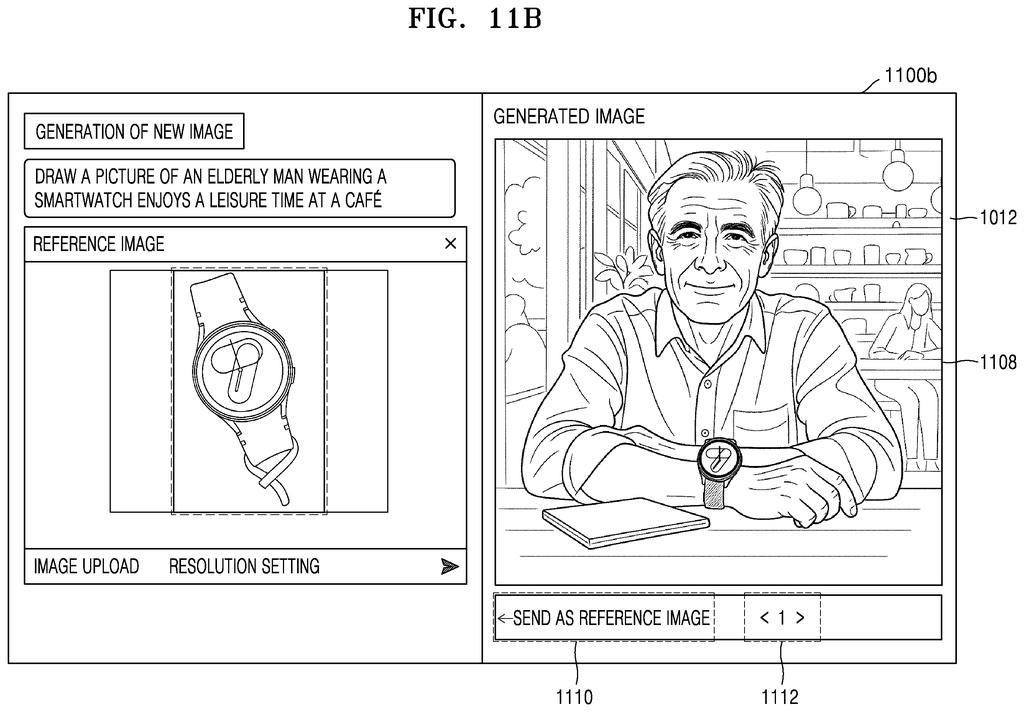
In the image examples, one type covers jobs where an object must stay in place, like removing an object or changing style. Another covers jobs where it need not, like swapping the background. A third covers jobs where the object itself must change, like putting a smartwatch on an elderly man sitting in a café.
If a request mixes two types, it gets two tokens and two offsets, one for each axis of the image. The filing also describes choosing the position method by data type (such as RoPE, a rotary position method, for images) and training the model on examples labeled with their task.
… inputting, to an artificial intelligence (AI) model, the input prompt including the token and the reference data including the position information, and providing an output corresponding to the input prompt, …
Translation: Everything is fed into a single AI model to produce the final edited result.
Why one model for many jobs matters on a device
If this works as described, one model on your phone or in the cloud could take on photo edits, restyling and chat help without swapping between separate models. The filing says that cuts loading time and storage, which would mean quicker replies and less space eaten by AI files on your device.
The examples show where Samsung is looking. One is an image app that reuses its own output as the next reference, so you can lift a smartwatch from one picture into a new scene. The other is a support chatbot where you upload an error code, a photo of a damaged product or a debug log, with product choices like mobile, TV and home appliance. The filing even lets the label step run on your device while the model runs on a server.
Samsung's 15th filing we've tracked since July in our AI models that work in teams watchlist builds on earlier applications like picking the right-sized AI and blending AI skills together.
Claim 1 is short and wide. It asks for four things together: work out what kind of job a request is, stick a label for that job onto the request, shift the position markers on the uploaded material according to the job, and feed both to an AI model.
Nothing in claim 1 mentions photos, phones or a particular way of sorting requests. Those details show up only in later claims, like the one that uses a language model to sort requests, or the one that picks a position method by data type such as text, audio or image. As written, the claim reaches any AI system that does both steps, whether it edits pictures or answers questions about a washing machine.
The pairing is what holds the claim together. A system that only labels requests, or only shifts position markers, would fall outside claim 1 as worded. Whether a claim this broad survives review is unknown, but it stakes out a lot of ground for a plain-sounding idea.
Get our take in your Top Stories
Liked this breakdown? Add Patentlyze as a preferred source on Google, and our plain-English take shows up more often in your Top Stories the next time Samsung patent news breaks.
There are more where this came from
We read every patent application Big Tech publishes and send you the ones worth knowing. Plain English, free, every week.
The drawings
24 drawing sheets from US 2026/0350471 A1 · click any drawing to enlarge


Show the other 16 sheets


Want this weekly breakdown for a company we don't cover? Patentlyze Pro →
Be the first to weigh in