
Sony Files Patent to Keep Controller Buttons Usable While You Rearrange Them
Sony Interactive Entertainment has filed a patent for a simple safety net: when you reprogram an adaptive controller, a couple of buttons stay locked to "confirm" and "cancel" so you can never trap yourself in the menu.
What Sony's controller edit mode actually does
Ever reassigned a button and then realized the one you needed to press next no longer does what you thought? On a normal controller that's a minor annoyance. On a controller built for people with disabilities, where every button might be set up in an unusual way, it could leave you stuck.
Sony's patent describes an edit mode that fixes this. The moment you enter it, the controller temporarily switches to a standard layout where one button at a set position means "confirm" and another means "cancel." That's true even if your everyday setup has those jobs on completely different buttons.
You then reassign buttons however you like. When you finish, your own layout takes over, and the controller flashes a light so you know which one you're editing.
apply, in an edit mode for assigning a function desired by a user to any button, setting information in which an edit-related function enabled in the edit mode is assigned to a particular button (i) that is included in the plurality of buttons, and (ii) that is located at a predetermined position …
Translation: Special setup instructions are loaded into a specific button when you enter editing mode.
How Sony pins confirm and cancel buttons in place
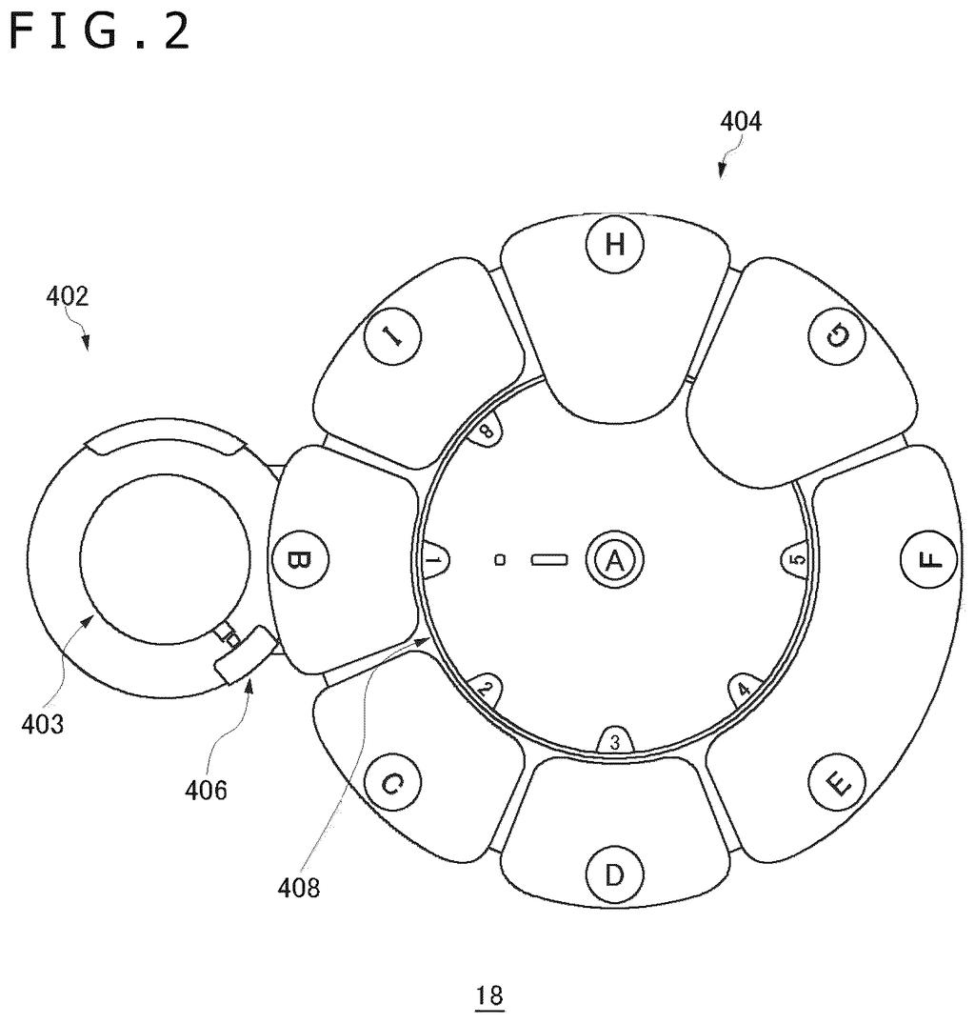
The patent covers a controller with several buttons and a component the filing calls an applying section. When the controller enters an edit mode, that section loads a temporary set of settings in which edit-related functions, such as a decision function (move to the next step) and a cancel function (go back a step), are assigned to buttons at predetermined positions.
The description gives a concrete example from Sony's adaptive controller, which has a round pad of nine buttons: a center button and eight around it. In edit mode, the center button acts as confirm and one outer button acts as cancel. The filing says these come from the controller's default profile (a stored set of settings).
Those fixed buttons are not off limits. On the editing screen, you can still give them other jobs for use after you leave edit mode. The edit screen shows both your assignments and the temporary edit-mode ones, so you can see the difference.
The filing also describes some related details:
- A light ring on the controller glows (yellow in the example) so you can tell which of several connected controllers is being edited.
- The controller keeps the position of its analog stick (the thumb joystick) from before you entered edit mode, so steering does not suddenly flip.
Why this matters for adaptive controller users
For someone using an adaptive controller, the benefit is confidence. You can experiment with a very unusual layout, or even leave confirm and cancel unassigned, without worrying that you've broken your way back into the settings menu. The edit mode works the same way every time, regardless of what you set up before.
The filing also mentions related ideas. These include an alert if you forget to assign an essential function, a one-press toggle that acts like holding a button down, and sound cues for stick sensitivity. These are described as part of the same system, though the claims here focus on the edit mode with fixed buttons. Sony's tooling around the adaptive controller looks like a practical effort to make setup less frustrating.
This is the 25th Sony filing we've tracked in input & haptics since May, a topic that already includes applications for swappable sliding joysticks and a motorized button-pressing clip.
Getting locked out of your own settings is a quiet but real frustration. Someone who has rearranged every button to suit their hands suddenly can't find the control that lets them undo the change, because they moved that one too.
The fix is small and specific: one button, always in the same place, always ready to help you edit or escape. You would notice it the moment an experiment goes wrong and you need a way back.
For people who rely on custom layouts because of physical differences, that guaranteed exit matters more than it might sound. It makes the whole system feel safe to explore, which is the point of having customization in the first place.
Get our take in your Top Stories
Liked this breakdown? Add Patentlyze as a preferred source on Google, and our plain-English take shows up more often in your Top Stories the next time Sony patent news breaks.
There are more where this came from
We read every patent application Big Tech publishes and send you the ones worth knowing. Plain English, free, every week.
The drawings
18 drawing sheets from US 2026/0335760 A1 · click any drawing to enlarge


Show the other 10 sheets


Want this weekly breakdown for a company we don't cover? Patentlyze Pro →
Be the first to weigh in