
Microsoft Patents a Way to Give Text-Typing Meeting Participants the Same On-Screen Spotlight as Speakers
When you type instead of speak in a video call, most platforms treat you like you're silent. A new Microsoft patent wants to change that by giving real-time text users the same visual attention that voice speakers already get.
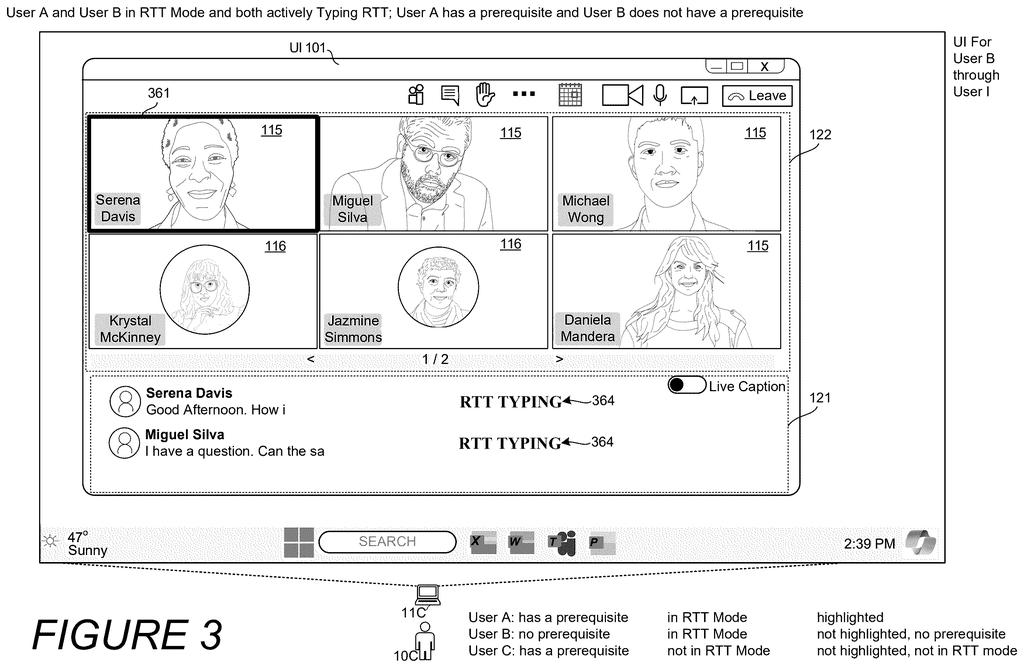
How Microsoft's typing-highlight system works in video calls
A person types their way through a video meeting instead of speaking out loud. Most platforms ignore that entirely, showing no visual cue that they're actively contributing. The other participants have no easy way to know someone is "talking" via text.
Microsoft's patent describes a system that fixes this by flagging certain participants with a visual highlight whenever they're actively typing in a call. Think of it like the green border or spotlight effect that appears around someone's video tile when they speak, but triggered by typing instead of audio. The highlight appears only while the person is actively composing text, and disappears when they stop.
Critically, the system also tells the meeting's recording and AI tools to treat that person as an "active speaker." That means their text contributions get included in transcripts, summaries, and any AI-generated action items, on the same footing as spoken words.
while the first participant is in a real-time text mode actively communicating real-time text or actively typing a text message in a message mode, displaying a visual element in association with an image or an identifier of the first participant, the visual element indicating an active text input status of the first participant …
Translation: Typing participants get a special visual badge on screen when they meet certain conditions.
How the system flags RTT users as active speakers in real time
The patent centers on two related problems: visibility and record-keeping for participants who communicate via real-time text (RTT) during online meetings.
Real-time text is different from ordinary chat. Instead of sending a complete message when you press Enter, RTT transmits each character as you type it, letter by letter, so other participants can read your words as they form. This is already an established accessibility tool, but most meeting platforms don't visually signal when someone is using it.
The system works like this:
- When a participant joins, the platform checks their settings for a stored prerequisite (the patent's term for a flag that marks this person as needing RTT accommodations).
- While that person is actively typing in RTT mode or composing a text message, a visual element (a highlight, icon, or border) appears next to their name or profile photo.
- When they stop typing, the visual element disappears.
- Participants without a prerequisite flag get no such indicator, even if they also type messages.
The same flag also routes the participant's text into the meeting's active speaker detection logic. That means AI tools generating transcripts, summaries, or task lists treat typed contributions the same way they treat spoken audio, so nothing gets left out of the official record.
The system also acknowledges such users as an “active speaker” so the content shared in RTT is also recorded equitably in meeting records and used in AI models for generating transcripts, summaries, tasks, etc.
Translation: Typing participants are treated like speakers so meeting transcripts and AI summaries include them fairly.
What this means for accessibility in Teams and meeting records
For people who are deaf, hard of hearing, or who have speech disabilities, this kind of parity matters in a practical, immediate way. Right now, a person typing their contribution can be visually invisible to colleagues and invisible to the meeting's AI summary tools, even while actively communicating. This patent directly addresses both gaps in one system, rather than treating visual presence and record-keeping as separate problems.
The design fits squarely into Microsoft's Teams platform and its ongoing investment in accessibility features. The meeting-AI angle is particularly telling: as AI-generated meeting summaries become standard, whose words get captured shapes whose work gets credited. Accessibility in the new Big Tech patents space is increasingly showing up not just in the UI layer but inside the AI pipelines that decide what counts as participation.
This is the 351st Microsoft filing in our Microsoft coverage since May, adding to work like auto-organizing folders and AI-hardened chat rules.
The visual highlight only activates if a participant has already flagged a prerequisite in their account settings, which means someone joining from a borrowed device or a guest account gets no indicator at all, even if they rely on typed communication in every meeting they attend. That silent failure is a real cost for a system whose entire purpose is accommodation.
The infrastructure fix buried inside the patent is more durable: making sure typed contributions count as "active speech" for transcripts and AI summaries doesn't depend on any pre-configured flag and helps people regardless of how they joined. That piece carries its weight.
The two ideas are bundled together, but they don't share the same fragility. If the implementation leans on the AI-and-transcript side, this matters. If it leans on the settings-flag side, it will help the people who need it least and miss the rest.
There are more where this came from
We read every patent application Big Tech publishes and send you the ones worth knowing. Plain English, free, every week.
The drawings
24 drawing sheets from US 2026/0254782 A1 · click any drawing to enlarge


Want this weekly breakdown for a company we don't cover? Patentlyze Pro →