
Adobe Patents Technology to Automatically Spot Overlapping Layered Artwork Elements
Designing artwork where shapes weave over and under each other is one of the more finicky tasks in vector graphics software. Adobe has filed a patent for a system that spots those interlocked arrangements automatically, so you don't have to trace every layer yourself.
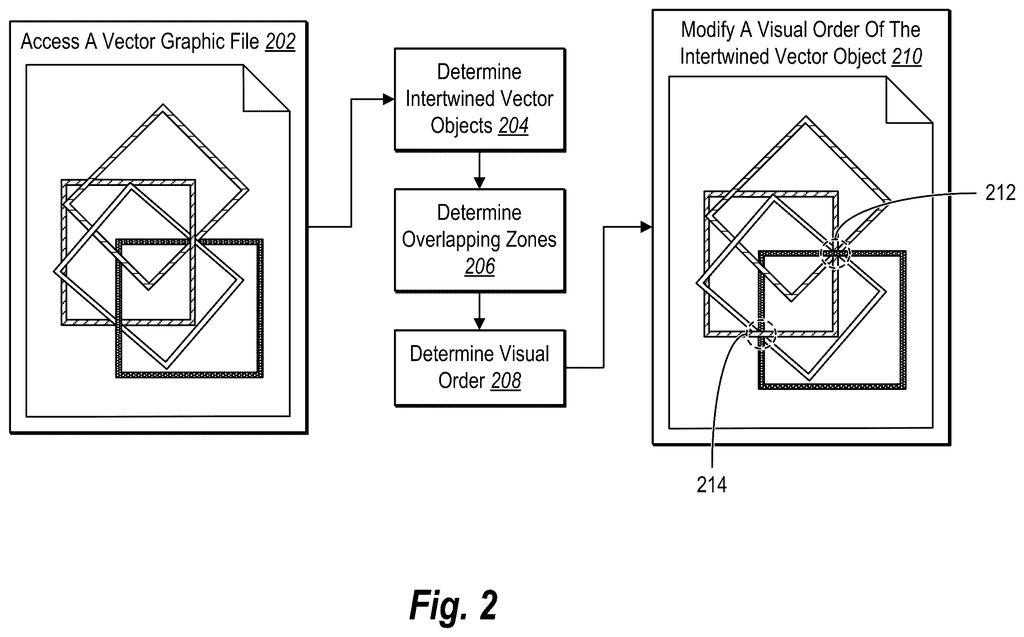
What Adobe's interlocking vector detection actually does
A graphic designer opens a complex logo in Adobe Illustrator: rings, ribbons, or letters that cross over and under each other in a carefully arranged pattern. Getting that effect right requires managing a tangle of hidden clipping layers, and figuring out which objects belong to the same interlocking group is painstaking work.
Adobe's patent describes software that reads a vector file and automatically works out which shapes are part of an interlocked arrangement. The key insight is that certain invisible "clipping" regions either don't touch each other at all or else a free-floating shape crosses exactly where those regions meet, and that combination is the tell-tale sign of an intertwining effect.
Once the system flags those groups, it can treat them as a single organized unit. That means you could select, move, or re-create the whole interlocking arrangement in one step rather than hunting through dozens of individual layers.
determining that the plurality of vector objects comprise one or more clipping groups; and determining that the one or more clipping groups are spatially mutually exclusive or a non-clipping path object intersects with a union of clipping path boundaries of the one or more clipping groups.
Translation: The software checks if specific design elements overlap or fit together in precise ways.
How Adobe's system finds overlapping clipping boundaries
Vector graphics programs like Illustrator represent artwork as mathematical shapes rather than pixels. One common technique is clipping: a shape is used as a "cookie cutter" that reveals only part of whatever sits beneath it. Designers use stacked clipping groups to fake the look of shapes passing over and under each other.
Adobe's system works in two steps. First, it scans the file and looks for clipping groups (sets of shapes where one outline controls what's visible). Then it applies a geometric test:
- Are the clipping boundaries spatially mutually exclusive (non-overlapping)? That is, do they carve up space without sharing any area?
- Or does a non-clipping path (a regular visible shape) cross the combined outline formed by joining all the clipping regions together?
Either condition is enough to classify the collection as an intertwined group. The system then packages that group so the design application can treat it as a single editable object.
The claim covers both detection (reading an existing file and labeling groups) and creation (building new interlocking arrangements from scratch with the same structural rules).
What this means for designers working with layered artwork
For everyday designers, the payoff is time. Interlocking graphics are common in logos, Celtic-style patterns, infographics, and motion graphics, and today rebuilding or editing one usually means unraveling its layer structure manually. A tool that recognizes the structure automatically could make those edits as simple as moving any other grouped object.
The broader implication is that Adobe is investing in making vector files machine-readable at a semantic level, not just a geometric one. the pattern in Adobe's vector-intelligence filings points toward tools that understand what a design is trying to do, which is the foundation you'd need for AI-assisted editing to work reliably on complex artwork.
Adobe's 169th filing in our Adobe coverage since May adds to a pattern that includes shadow removal and repair and auto-spacing along curves.
The problem here is real but fairly narrow. Designers who regularly produce interlocking or woven graphics do face genuine friction, and the manual clipping-group archaeology required to edit someone else's intertwined artwork is genuinely annoying. That said, it's a specialist pain point, not a crisis that haunts most users most days.
The approach is sensible rather than ambitious. Checking whether clipping regions are non-overlapping or whether a stray path crosses their combined boundary is a tidy geometric rule, and it's the kind of check a human expert would run mentally. Whether it covers the full variety of intertwining tricks designers actually use in the wild is the real question the patent leaves open.
As a standalone filing, this reads like infrastructure: a detection primitive that has to exist before higher-level features (auto-repair, AI-assisted re-styling) become possible. Useful, but its value depends entirely on what Adobe builds on top of it.
Get our take in your Top Stories
Liked this breakdown? Add Patentlyze as a preferred source on Google, and our plain-English take shows up more often in your Top Stories the next time Adobe patent news breaks.
There are more where this came from
We read every patent application Big Tech publishes and send you the ones worth knowing. Plain English, free, every week.
The drawings
11 drawing sheets from US 2026/0278864 A1 · click any drawing to enlarge


Show the other 3 sheets


Want this weekly breakdown for a company we don't cover? Patentlyze Pro →
Be the first to weigh in