
Apple Patents an Eye-Tracking System That Holds Your Selection Until You Confirm It
Eye-tracking interfaces have a classic problem: your eyes wander constantly, and the device can't always tell the difference between "I'm looking at this button" and "I want to press it." Apple's new patent describes a guided path system that holds your button selection in place while your eyes travel to a separate confirmation target, canceling only if you drift off course.
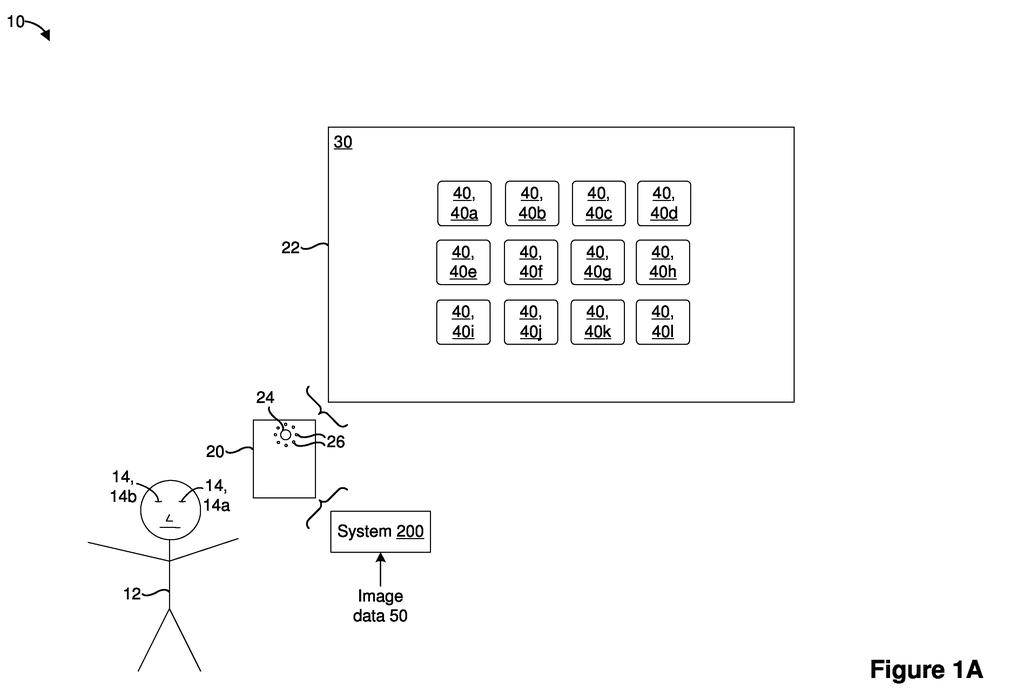
How Apple's gaze-path system stops accidental eye taps
On most screens you tap with a finger, so accidental presses are rare. But when your eyes are the pointer, almost every glance becomes a potential input, and that makes it very easy to trigger things you didn't mean to.
Apple's patent tackles this with a two-step gaze system. When you look at a button or UI element, instead of activating it immediately, the device displays a separate confirmation dot at a fixed spot nearby. The device then traces an expected travel path between the button and the dot. As long as your eyes move along that corridor, the button stays selected. If your gaze wanders outside the corridor, the selection drops and the confirmation dot disappears.
Only when your eyes actually land on the confirmation dot does the action fire. It's a deliberate two-beat gesture: look at the thing, then look at the confirm target. That gives the device a much cleaner signal that you meant to do something, rather than just glanced past it.
displaying, on the display, a user interface (UI) including a first UI element that is associated with a first UI operation; in response to detecting, via the eye tracker, a first gaze input directed to the first UI element, displaying a visual indicator at a fixed location that is separate from the first UI element …
Translation: Looking at a button makes a separate confirmation target appear on the screen.
How the eye tracker guards the path from button to confirm target
The system works in three stages, all driven by an onboard eye tracker (a sensor that follows where on the screen your eyes are pointing).
- Stage 1 - Detection: The eye tracker notices your gaze has landed on a UI element, such as a button, icon, or link. This triggers the display of a separate visual indicator (a small confirmation target) at a fixed location away from the element itself.
- Stage 2 - Path enforcement: The device computes an expected gaze travel path, essentially a corridor between the original element and the confirmation target. While your eyes stay inside that corridor boundary, the original element remains selected and the indicator stays visible.
- Stage 3 - Confirm or cancel: If your gaze reaches the visual indicator before leaving the corridor, the associated action fires. If your eyes drift outside the corridor boundary at any point, the selection is dropped and the indicator vanishes, requiring you to start over.
The claim language is precise about what triggers cancellation: deviation outside the boundary is what kills the selection, not simply slowing down or pausing. This means the system tolerates normal, slightly imprecise eye movement as long as the general direction stays correct.
The confirmation target appears at a fixed location, not somewhere relative to where your eyes happen to be. That consistency lets users learn where to look, which is important for building reliable muscle memory in an eyes-only interface.
… maintaining selection of the first UI element while a gaze travels within a boundary defining the expected gaze travel path. The method further includes, in accordance with a determination that the gaze deviates outside the boundary, deselecting the first UI element and ceasing to display the visual indicator …
Translation: Your selection stays active as long as your eyes move inside an allowed path toward the confirmation target.
What this means for Vision Pro and hands-free control
For anyone using a device controlled entirely by eye movement, such as Apple Vision Pro or an accessibility tool for people who can't use their hands, accidental activations are a constant frustration. This patent addresses that at the interaction-design level rather than just asking the software to be more forgiving.
Apple's interest in hands-free and gaze-based input shows up across multiple hardware lines, and a reliable confirmation mechanism is table-stakes for making those products feel polished. If this system ships, you'd notice it as fewer accidental button presses and a clearer sense of intentionality when navigating with your eyes, the kind of fix that makes a whole interface feel more trustworthy.
Apple's 26th filing we've tracked in our eye and hand controls watchlist since May builds on earlier applications like filtering accidental pinches in AR and gaze-based Mac unlocking.
Claim 1 is written broadly enough to cover any electronic device with a display and an eye tracker, not a specific headset, not a specific OS. That scope matters because it could apply to Vision Pro, future iPhone eye-tracking features, or accessibility hardware, and it sets up a potential licensing position across a wide class of products.
The core of the claim is a simple sequence: gaze on element, show a fixed indicator, define a path corridor, maintain selection inside it, cancel outside it, confirm on the indicator. That sequence is genuinely specific as interaction patents go. Many eye-tracking UI patents describe vague dwell-time systems (look at something long enough and it activates). This one defines an explicit spatial corridor with a deliberate second target, which is a more precise and arguably more defensible design.
The practical question is whether the path-enforcement approach will feel natural to users or just add a step. The patent doesn't resolve that, and real-world usability testing would. But as a piece of mechanism design, the logic is sound: you need confirmation, and spatial movement is a much richer signal than dwell time alone.
Get our take in your Top Stories
Liked this breakdown? Add Patentlyze as a preferred source on Google, and our plain-English take shows up more often in your Top Stories the next time Apple patent news breaks.
There are more where this came from
We read every patent application Big Tech publishes and send you the ones worth knowing. Plain English, free, every week.
The drawings
14 drawing sheets from US 2026/0277410 A1 · click any drawing to enlarge


Show the other 6 sheets


Want this weekly breakdown for a company we don't cover? Patentlyze Pro →
Be the first to weigh in