
Apple · Filed Jun 25, 2026 · Published Oct 22, 2026

Apple Files Patent for Camera Effects That Jump From One Person to Another

Apple describes a camera effect that follows your hands and body, then leaps to another person when you point, throw, or pull. It treats a visual effect like a ball you can toss to a friend, even if that friend is in another room.
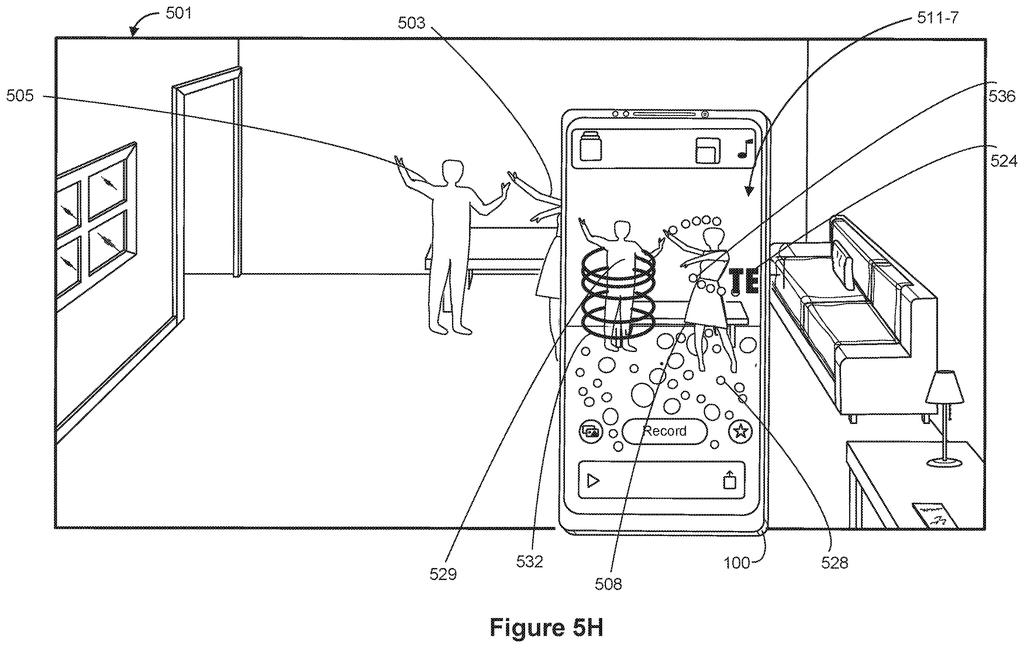
A smartphone camera tracks two dancers in a living room, shifting animated visual effects from one person over to the next. Drawing from patent filing US 2026/0330782 A1.
A smartphone camera tracks two dancers in a living room, shifting animated visual effects from one person over to the next.
See all 30 drawings from this filing ↓
Publication number US 2026/0330782 A1 US20260330782A1
Applicant Apple Inc.
Filing date Jun 25, 2026
Publication date Oct 22, 2026
Inventors Joanna M. Newman, Daniel Escudero, Corbin F. Peters, Joseph-Alexander P. Weil, Juan Gril, Jose Moises Tafolla Carmona
US classification 345/633
Status when we published Waiting for an examiner (Jul 14, 2026)
Parent application is a Continuation of 18437634 (filed 2024-02-09)
Document 13 claims

What Apple's pass-along camera effects do

Imagine you and a friend are dancing in front of your phone's camera. Glowing rings circle around you, and bubbles trail from your hands as you wave. Then you point at your friend, and the rings slide off you and start circling them instead.

That is the scene Apple describes in this patent application. The device watches the camera view, spots a person, and tracks how their hands, arms or whole body move. An effect appears near that person and is shaped by their movement. When a certain moment happens, like a pointing or throwing gesture, the effect jumps to a second person and starts following their motion.

The second person can be standing next to you, or on the other end of a live call.

From the filing · THE ABSTRACT
… applies a first virtual effect to a first portion of a view of a three-dimensional environment with a first set of values for a first set of characteristics of the first virtual effect selected in accordance with tracking of movement of one or more portions of the first physical object …

Translation: The system adds a digital effect to a specific area and tracks how a person moves.

How the effect follows hands, then switches

The filing covers a method (a repeatable series of steps) for a device with a display and one or more cameras. It shows a live view of a three-dimensional environment that includes a moving person or object.

When a first event happens, the device places a virtual effect near that person. The effect's look is controlled by a set of characteristics (things like position, size or motion), and the values come from motion tracking. That means the camera follows individual body parts such as hands, arms or feet. The description contrasts this with segmentation (cutting a person's outline out of the background), which cannot tell how a hand moves inside that outline.

When a second event meets certain criteria, the effect moves:

  • It appears near a second person or object, with new values based on that person's tracked movement.
  • The description lists pointing, a throwing gesture, holding a pose, leaving the camera view, or the other person pulling toward themselves as example triggers.
  • After the handoff, the first person's movements stop changing the effect, and it can later be passed back.

The two people can share a room or be in different places. The claims also cover showing this in a real-time communication session and visually highlighting whoever currently holds the effect.

What this means for Apple's Clips-style videos

If this became a feature, you would notice it most in video calls and short clips. Effects would stop being a fixed layer on top of your face and start acting like something you can throw, share or take turns with. Because the filing covers people in different places, a group call could pass one effect around the way you would pass a ball.

The description uses an app labeled Clips for its examples, with music playing, lyrics appearing near the dancers, and a record button. It also lists head-mounted displays among possible screens, so the same idea could reach headsets. It is a patent application, so none of this promises a product.

Apple's 573rd filing we've tracked since May adds to a run of headset comfort work that includes a motion sickness resize patent and one on skipping eye scans.

Editorial take

If you have ever filmed a dance clip or a silly video call with a friend, you know effects usually stick to one face or float over everyone the same way. A filter that hands itself to whoever you point at turns the effect into a prop in the game you are playing. You would notice it right away, because the effect reacts to the moment as it happens.

This filing continues an earlier application, and its claims are broad and focus on the order of steps. The text says nothing about how fast it would run or how many people it could follow at once.

Still, as a camera feature for parties and calls, the pass-along idea is easy to picture and fun to use. Few people would need a manual to figure it out.

Get our take in your Top Stories

Liked this breakdown? Add Patentlyze as a preferred source on Google, and our plain-English take shows up more often in your Top Stories the next time Apple patent news breaks.

There are more where this came from

We read every patent application Big Tech publishes and send you the ones worth knowing. Plain English, free, every week.

The drawings

30 drawing sheets from US 2026/0330782 A1 · click any drawing to enlarge

Hardware parts that run the phone and its camera apps, drawing sheet 1 from US 2026/0330782 A1
Sheet 1 Hardware parts that run the phone and its camera apps
Software that organizes screen taps and user gestures, drawing sheet 2 from US 2026/0330782 A1
Sheet 2 Software that organizes screen taps and user gestures
A touchscreen phone accepting finger and stylus inputs, drawing sheet 3 from US 2026/0330782 A1
Sheet 3 A touchscreen phone accepting finger and stylus inputs
Memory and display parts for a desktop computer, drawing sheet 4 from US 2026/0330782 A1
Sheet 4 Memory and display parts for a desktop computer
Two setups linking cameras and sensors for virtual reality, drawing sheet 5 from US 2026/0330782 A1
Sheet 5 Two setups linking cameras and sensors for virtual reality
Connecting external cameras and sensors to a central computer, drawing sheet 6 from US 2026/0330782 A1
Sheet 6 Connecting external cameras and sensors to a central computer
The home screen showing installed apps on a phone, drawing sheet 7 from US 2026/0330782 A1
Sheet 7 The home screen showing installed apps on a phone
Controlling an external screen using an angled touch pad, drawing sheet 8 from US 2026/0330782 A1
Sheet 8 Controlling an external screen using an angled touch pad
Show the other 22 sheets
Tapping the video clips app to start recording, drawing sheet 9 from US 2026/0330782 A1
Sheet 9 Tapping the video clips app to start recording
Pointing the phone camera at an empty table, drawing sheet 10 from US 2026/0330782 A1
Sheet 10 Pointing the phone camera at an empty table
Dancing in front of the camera triggers sparkles, drawing sheet 11 from US 2026/0330782 A1
Sheet 11 Dancing in front of the camera triggers sparkles
Changing poses makes the sparkles react differently, drawing sheet 12 from US 2026/0330782 A1
Sheet 12 Changing poses makes the sparkles react differently
Adding animated 3D text into the camera view, drawing sheet 13 from US 2026/0330782 A1
Sheet 13 Adding animated 3D text into the camera view
Wrapping glowing virtual rings around a dancing person, drawing sheet 14 from US 2026/0330782 A1
Sheet 14 Wrapping glowing virtual rings around a dancing person
Expanding the glowing rings as a second person joins, drawing sheet 15 from US 2026/0330782 A1
Sheet 15 Expanding the glowing rings as a second person joins
Moving the rings over to follow the second person, drawing sheet 16 from US 2026/0330782 A1
Sheet 16 Moving the rings over to follow the second person
Bubbles floating around two people during a video recording, drawing sheet 17 from US 2026/0330782 A1
Sheet 17 Bubbles floating around two people during a video recording
Passing a virtual ball during a video call, drawing sheet 18 from US 2026/0330782 A1
Sheet 18 Passing a virtual ball during a video call
Catching the virtual ball sent through a video call, drawing sheet 19 from US 2026/0330782 A1
Sheet 19 Catching the virtual ball sent through a video call
How the phone tracks movement to trigger visual effects, drawing sheet 20 from US 2026/0330782 A1
Sheet 20 How the phone tracks movement to trigger visual effects
Placing graphics behind a person so they look natural, drawing sheet 21 from US 2026/0330782 A1
Sheet 21 Placing graphics behind a person so they look natural
Animating shapes that flow from a moving body, drawing sheet 22 from US 2026/0330782 A1
Sheet 22 Animating shapes that flow from a moving body
Adjusting camera effects when someone touches real objects, drawing sheet 23 from US 2026/0330782 A1
Sheet 23 Adjusting camera effects when someone touches real objects
Positioning on-screen text so it avoids covering people, drawing sheet 24 from US 2026/0330782 A1
Sheet 24 Positioning on-screen text so it avoids covering people
Switching visual effects based on tracked movements, drawing sheet 25 from US 2026/0330782 A1
Sheet 25 Switching visual effects based on tracked movements
Jumping a virtual effect from one person to another, drawing sheet 26 from US 2026/0330782 A1
Sheet 26 Jumping a virtual effect from one person to another
Updating effects only for the active person, drawing sheet 27 from US 2026/0330782 A1
Sheet 27 Updating effects only for the active person
Returning a visual effect back to the first person, drawing sheet 28 from US 2026/0330782 A1
Sheet 28 Returning a visual effect back to the first person
Sharing dynamic effects during real-time video calls, drawing sheet 29 from US 2026/0330782 A1
Sheet 29 Sharing dynamic effects during real-time video calls
Highlighting each speaker's tile during a group call, drawing sheet 30 from US 2026/0330782 A1
Sheet 30 Highlighting each speaker's tile during a group call
Browse all the drawings 30 drawing sheets
Patent filing page

Source. Full patent text and figures from the official USPTO publication PDF.
Reader comments

Be the first to weigh in

Start the discussion

Real name or a handle, either is fine. Comments are read by a person before they appear, so allow a little time. Keep it about the filing.