
Samsung Files Patent for Photo Editing That Finishes Cut-Off People You Drag Around
Drag a person who is half cut off by the edge of a photo toward the middle, and most editors leave you with a torso floating in space. Samsung's filing has an AI draw the rest of them.
What Samsung's drag-and-fix photo editing does
You're scrolling through a vacation photo and want to nudge your friend toward the middle of the frame. The problem: she's standing at the edge, and her arm is cut off. Drag her over and you get a person with half a body, now sitting in front of a background that doesn't match.
Samsung's patent application describes a photo editor that handles this for you. When you pick up an object and move it, the phone works out which parts of the picture now look wrong: the hole you left behind, and the missing piece of the thing you moved.
Then it hands those spots to an AI image generator to redraw. The result is a new picture where the moved object looks whole and the empty space looks like it was never there.
… obtain a second image by cropping a portion of the first image corresponding to an object and moving the cropped portion from a first position to a second position with respect to the first image through the user interface …
Translation: The software lets you cut out a person or object and drag them to a new spot.
How the mask tells the AI what to redraw
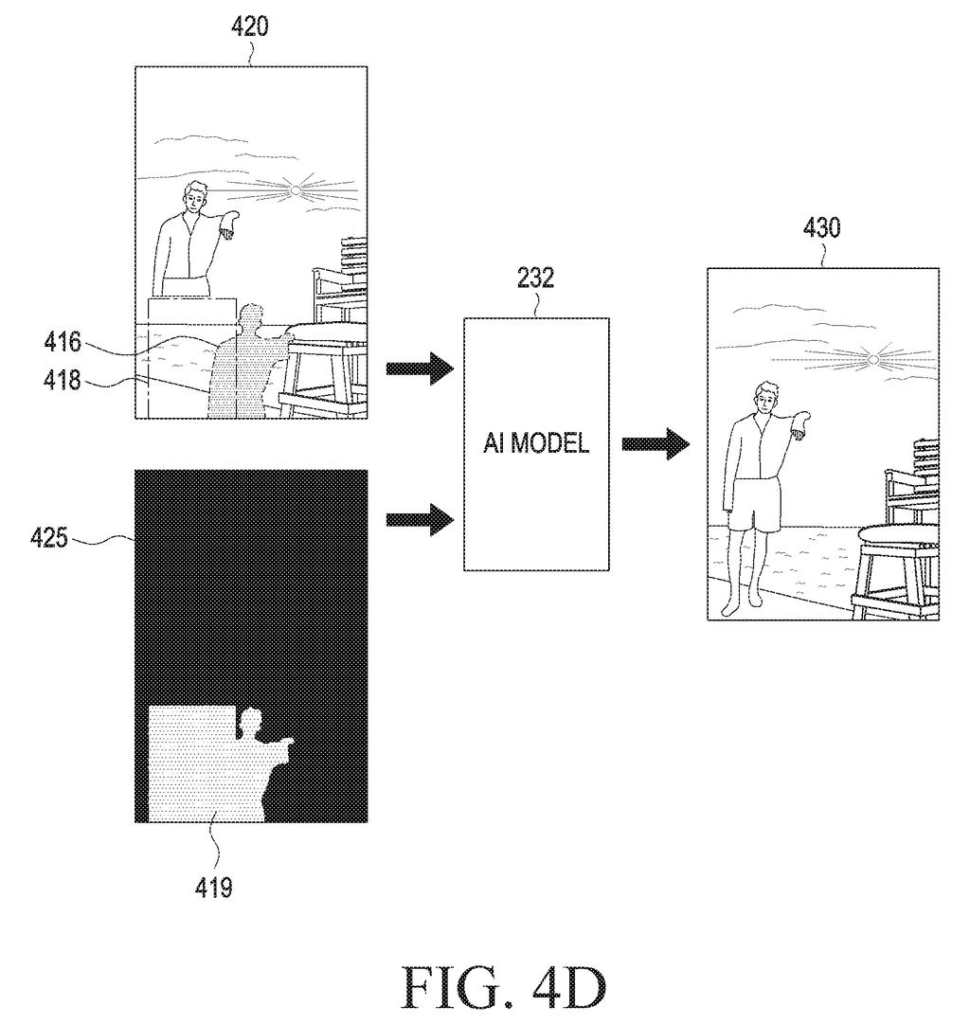
The claims cover a three-image process. The first image is the original photo. The second image is what you get after you cut out an object (by touching and dragging it) and place it somewhere else. The third image is the final, AI-repaired result.
The key step is the mask: a black-and-white map that marks which pixels the AI should redraw (white) and which it should leave alone (black). The claims say the mask is built from where the object started and where it ended up. One marked area is the empty hole left behind. The other is a strip between the starting position and the new one, used to fill in the part of the object that was cut off.
The filing describes several ways to find that missing part:
- If the object touched the photo's edge, the strip between that edge and the new position is marked for redrawing.
- An object detection engine (software that recognizes things like a person or a cup) estimates what the complete shape should look like.
- A depth estimation step checks whether something in front was blocking the object.
- You can also stretch an on-screen box to mark the missing area yourself.
The AI can run on the device or on an outside server. The claims name GAN-based or stable-diffusion-based image generators. The description also mentions adding a shadow that matches the light direction.
… obtain mask information indicating at least one area in the second image to be modified by inpainting based on the first position of the cropped portion and the second position of the cropped portion …
Translation: The device figures out what empty background needs to be filled in behind the moved object.
Why this fits Samsung's phone photo editor
If you edit photos on your phone, this targets a very common annoyance: moving something around only to find it looks pasted on. Samsung's phones already let you cut out and move objects, and this filing covers the cleanup that makes the moved piece look real.
The description also lists extras: fixing shadows, correcting the brightness of a moved object that was lit differently before, and even using a language model to finish partly hidden text on a sign. These are described as variations, not the core claim. Together they point to an editor where dragging an object feels like moving a real thing in a real scene.
Samsung's 31st filing we've tracked since July in the AI photo editing race builds on a doodle-to-object tool and a before-and-after slider.
Getting this feature to users needs no new hardware at all. It's a software upgrade: a phone with a screen, a chip, and an AI model that could run on the device or through the internet.
The one thing that has to work well first is the AI's ability to redraw missing pieces of a photo convincingly, like filling in a wall behind a person you just moved across the frame. The document shows no evidence of how well that works yet.
The simplest and smartest path to a real product is the detail about using drag distance to decide how much of the photo needs fixing. That's easy to build, easy to understand, and easy to ship as a button in a photo editing app.
Get our take in your Top Stories
Liked this breakdown? Add Patentlyze as a preferred source on Google, and our plain-English take shows up more often in your Top Stories the next time Samsung patent news breaks.
There are more where this came from
We read every patent application Big Tech publishes and send you the ones worth knowing. Plain English, free, every week.
The drawings
17 drawing sheets from US 2026/0330726 A1 · click any drawing to enlarge


Show the other 9 sheets


Want this weekly breakdown for a company we don't cover? Patentlyze Pro →
Be the first to weigh in