
Google Files Patent to Let You Fine-Tune Photo Colors Before You Shoot
Google's patent application puts a color slider on your camera preview that starts from the phone's own automatic guess. Fixing a too-yellow or too-blue shot would take one drag.
What Google's camera color slider actually does
Your phone camera tries to make white things look white, but odd lighting can fool it. When you step in to fix it by hand, the controls usually offer a short list of fixed choices like shade, cloudy or incandescent, and a real room rarely matches any of them.
Google's patent application describes a different control: a slider right on the live camera preview. Before you touch anything, the phone makes its own automatic guess about the color of the light, and that guess becomes the middle of the slider. Drag toward warm orange and the scene gets cozier. Drag toward cool blue and it gets cooler. Slide back to the center and you are back where the phone started.
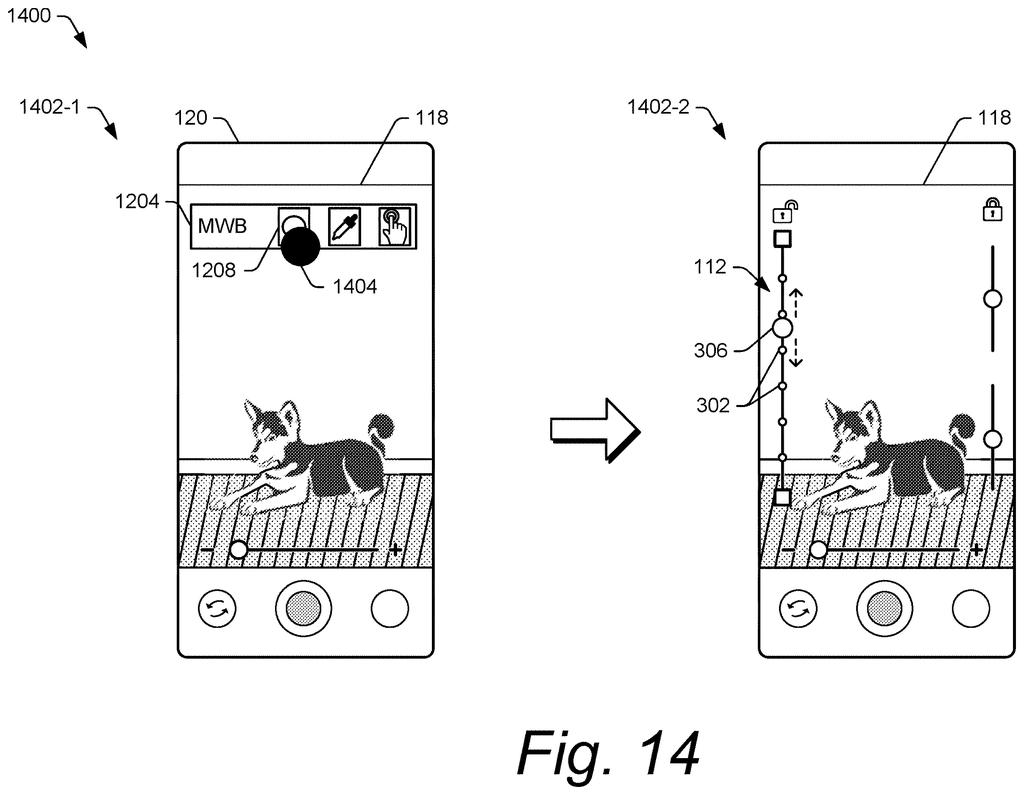
The filing also describes a second slider for purple and green tints, a lock that freezes the colors while you move around, and a way to tap something neutral, like a wall, to tell the phone what white should look like.
presenting, during a live-preview mode of a camera application of the camera system, at least one manual control via a camera user interface, the at least one manual control configured to enable user adjustment of a white balance with respect to a current frame presented in the live-preview mode of the camera application …
Translation: The camera shows manual color controls on screen while you look at the live preview.
How the slider builds on the auto color guess
White balance is the camera setting that corrects for the color of the light, so a white wall looks white under yellow bulbs or in blue shade. The claims cover a method that shows a manual control during the live preview, works out an automatic white-balance decision for the current frame, and then applies your adjustment relative to that decision.
Under the hood, the adjustment is stored as gains (how much the red and blue parts of the image get boosted or dimmed). A look-up table (a stored list of values) defines the center, upper and lower ends of the slider, and those limits can be tuned to the camera. One claimed detail: your tweak is kept as the light changes, so later frames are adjusted relative to each new automatic decision.
The description adds several options:
- Two sliders: one between red and blue tones, one between purple and green.
- White-balance lock: freezes the colors so a colorful object in view cannot mislead the phone. The example locks onto a neutral bicycle, then films a chair.
- Touch white balance: you tap a neutral spot, like the wall behind a dog, to set the colors. This is kept separate from tap-to-focus.
A variant also blends smoothly between seven preset lighting types, and the claims mention controls for exposure, brightness, saturation, hue and contrast.
The HWB mode may provide options for a user to select a WB setting, via a camera user interface in a live-preview mode, along a continuous WB-adjustment range.
Translation: A hybrid mode lets you slide color settings smoothly up and down while previewing shots.
Why your phone's auto color fix may get a dial
The practical payoff is for photos taken under tricky light: a dinner under warm bulbs, an office with mixed lamps and windows, a shady park. Instead of picking the closest preset and living with a slight tint, you would nudge the color until it looks right, and watch the preview change as you drag.
The filing also says the slider can be colored from warm to cool, so you do not need to know anything about color temperature to use it. Because the lock and tap-to-set options sit alongside it, the same camera screen could serve casual shooters and people who want tighter control. It is a small change to an everyday screen, but it is one you would notice every time you shoot.
That makes this Google's 73rd filing we've tracked since May in the AI photo editing race, joining one on avoiding fake details and one on far-away coworkers.
Color casts are a daily annoyance: a dinner photo that comes out orange, a snowy hike that looks blue. Automatic white balance handles most scenes, but it is still a guess, and a guess can miss when the light is mixed or the frame is full of one color.
A single slider that starts at the phone's own guess fits the size of that problem well. It asks very little of you, and it skips the fixed presets that rarely match a real room. The filing covers a modest interface and some math, so expect polish on an existing feature.
The lock and tap-to-set options help people who want more control over the same annoyance. Overall, it is a sensible, small fix for a frustration most phone owners have met.
Get our take in your Top Stories
Liked this breakdown? Add Patentlyze as a preferred source on Google, and our plain-English take shows up more often in your Top Stories the next time Google patent news breaks.
There are more where this came from
We read every patent application Big Tech publishes and send you the ones worth knowing. Plain English, free, every week.
The drawings
18 drawing sheets from US 2026/0343106 A1 · click any drawing to enlarge


Show the other 10 sheets


Want this weekly breakdown for a company we don't cover? Patentlyze Pro →
Be the first to weigh in