
Meta Files Patent to Have Smart Glasses Build a Custom Control Panel on the Spot
Ask your glasses for something they have no screen for, and this Meta patent application has an AI draw one on the spot. If you like it, you can save it for next time.
What Meta's glasses do when no control fits
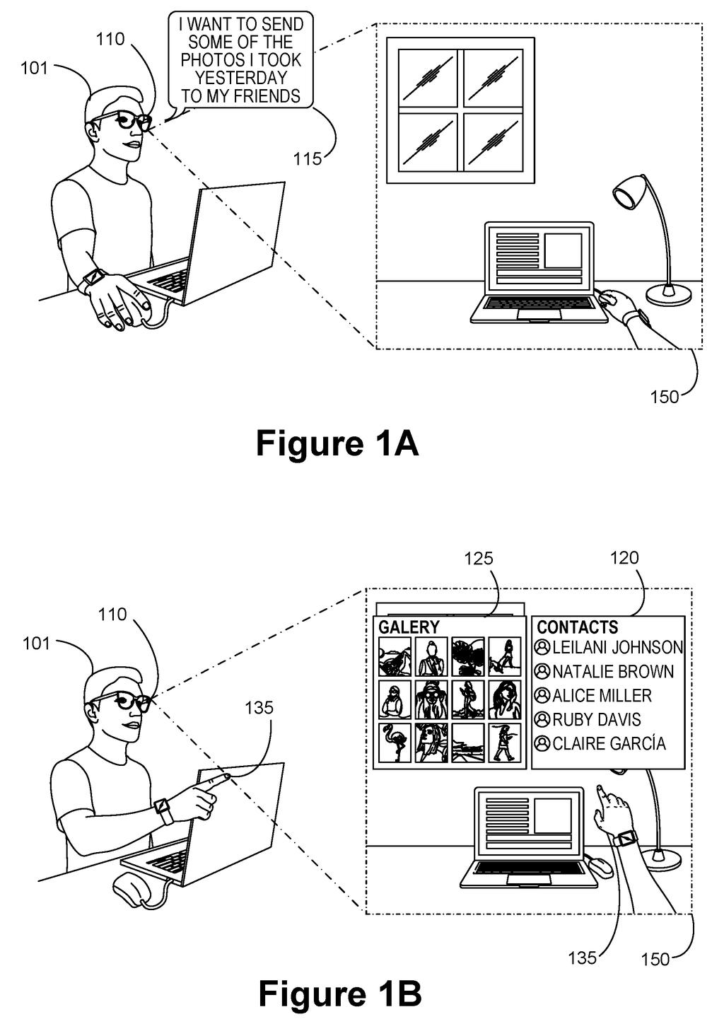
Imagine you're wearing smart glasses and you say, "I want to send some of yesterday's photos to my friends." There's no ready-made screen for that exact job, so a typical assistant would fire questions at you out loud: which photos? Which friends? Good luck keeping track of the answers.
Meta's patent application has the glasses build the screen for you. They first check whether any built-in control can handle your request. If none can, an AI model generates a fresh set on the spot, like a list of your contacts next to a grid of recent photos. You point, pinch or speak to pick, and the glasses send the photos.
If you like what the AI built, you can tell the glasses to save it, and it joins the built-in set for next time.
… in accordance with a determination that the one or more tasks cannot be performed using the predefined set of UI elements, cause a machine-learning algorithm to generate one or more generated UI elements based on the request; …
Translation: If standard buttons cannot handle your request, artificial intelligence instantly creates brand new controls.
How the glasses decide to build a new control
The claims cover a loop that runs while someone is wearing a head-worn device, such as AR glasses or an XR headset (a headset that blends digital content with the real world). The device starts with a predefined set of interface pieces, like menus and buttons. When you make a request, a check decides whether those pieces can do the job.
If they can't, a machine-learning algorithm (software trained on large numbers of examples) generates new interface pieces based on your request and shows them on the glasses' displays. Your inputs on those pieces, whether a hand gesture, a gaze or a voice command, trigger the task. The filing lists a slider, knob, scrollable list, switch, 3D rotator, media player and app status panel as possible pieces.
Other claims add extras:
- The AI can draw on your past use of generated screens and on a guess at what you intend.
- One piece can lead to the next, such as a playlist builder that later adds an audio player and a list of recommended songs.
- A save command adds a generated piece to the permanent set.
The abstract and description also cover a second idea: when your hand is in view, the controls appear at your hand instead of a default spot like the bottom of your view. Say "increase volume," and a slider shows up by your hand, you pinch and slide it, and it disappears when you let go.
… determining a hand location of the hand of the user, wherein the hand location is distinct from the default display position. The method further includes causing displays of the head-wearable device to present the UI elements at the hand location.
Translation: The glasses figure out where your hand is and float the custom menu right above it.
Why this matters for Meta's AI glasses and voice
Talking to an assistant is easy but blunt. "Turn it up" gives you no say over how much, and "scale the window" can leave the assistant guessing which window you mean. The patent's answer is to let your voice start the job and a quick, purpose-built control finish it, which could save you from repeating yourself to your glasses.
It also points to a different way of building software for glasses. Instead of designers drawing every screen ahead of time, the AI would draw some of them live and let you keep the useful ones. That depends on how well the AI picks controls, and the filing describes checking whether people actually finish what they set out to do.
That makes this Meta's 84th filing we've tracked in our smart glasses watchlist since May, adding to work like slimmer battery frames and 3D walk recordings.
Claim 1 is short and broad. It needs a head-worn device with a built-in set of controls, a check on whether those controls can handle your request, and an AI model that makes new controls when they can't. After that, you act on the new controls and the task happens.
Look at what it leaves open. It names no particular task, no particular kind of AI, and no particular way of giving input, so a voice command, a gesture or a glance would all fit. If granted, it would reach any head-worn assistant that builds its own screens on demand after finding the stock ones lacking.
The limits are the fallback check and the head-worn device itself. The hand-placement idea from the abstract appears nowhere in the claims, and the save-to-library feature shows up only in dependent claim 3. Whether a claim this general survives review is unknown.
Get our take in your Top Stories
Liked this breakdown? Add Patentlyze as a preferred source on Google, and our plain-English take shows up more often in your Top Stories the next time Meta patent news breaks.
There are more where this came from
We read every patent application Big Tech publishes and send you the ones worth knowing. Plain English, free, every week.
The drawings
12 drawing sheets from US 2026/0339498 A1 · click any drawing to enlarge


Show the other 4 sheets


Want this weekly breakdown for a company we don't cover? Patentlyze Pro →
Be the first to weigh in