
Samsung Files Patent for a Watch That Spreads Out Notifications When You Twist Your Wrist
Your smartwatch buries missed alerts in pages you have to swipe through one at a time. Samsung's filing turns them into a ranked stack of cards that spreads open when you turn your wrist.
What Samsung's wrist-twist notification stack does
You're rushing to a meeting and your watch has buzzed three times. To see what you missed, you swipe left, swipe right, swipe again, hunting for the one message that actually matters.
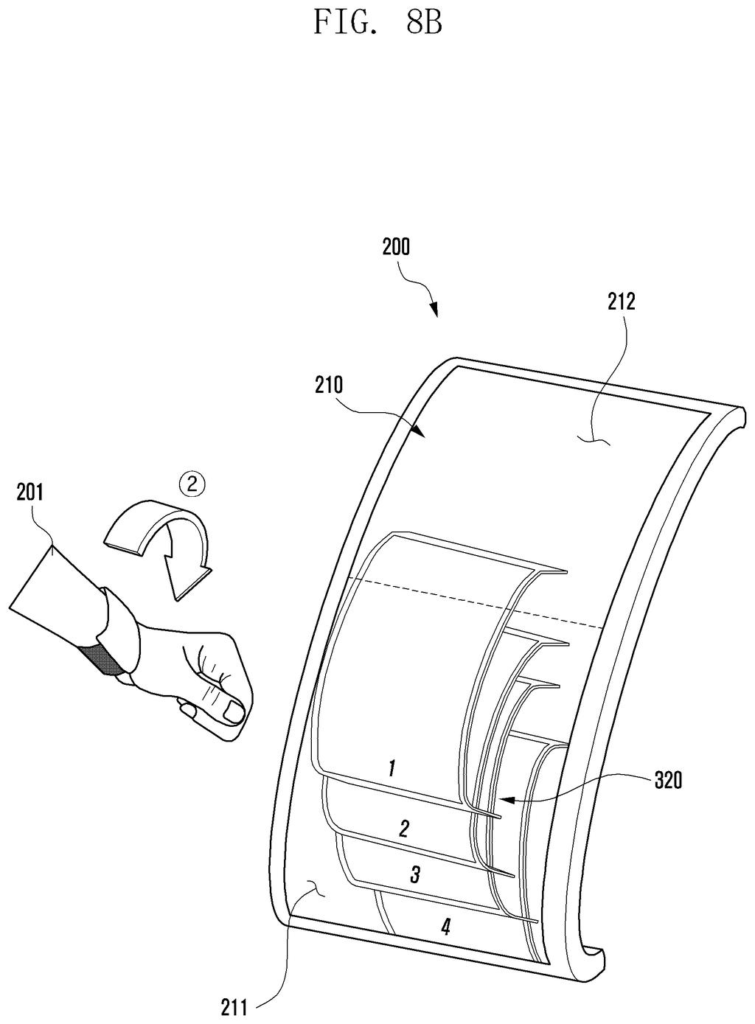
Samsung's patent application replaces that hunt with a stack of cards, one for each missed alert, piled on top of each other on the watch face. Twist your wrist the way you do to check the time, and the stack spreads open and the top cards stretch across more of the screen.
You set the ranking. Emergency warnings, such as typhoon or earthquake alerts, can sit on top, followed by your main contacts and favorite apps. Twist back and forth and the top card drops to the bottom, so you can flip through the pile without touching the screen.
display a first multilayer having a first size in which a first layer corresponding to a first unidentified notification and a second layer corresponding to a second unidentified notification at least partially overlap …
Translation: Stack stacked notification cards on top of each other when they arrive.
How the watch sorts, fans out and reshuffles alerts
On paper, the watch screen is split into a first display area and a second display area, though the filing says they can really be one continuous screen. Which part is easier to see depends on how your wrist is turned: rotating it toward your body brings the second area into view, and rotating it away brings the first.
Unread alerts show up as a multilayer: overlapping pages, one per notification, stacked like a hand of cards. A motion sensor (the description mentions a 6-axis sensor, meaning an accelerometer for tilt plus a gyroscope for spin speed) detects the twist. The stack then grows, the gaps between cards widen, and at least one card, such as the top one, slides into the other screen area as a glance view.
- Ranking: you set the order. Emergency messages sit on top, then chosen apps or main contacts, then frequently used apps, then scheduled events.
- Grouping: several alerts from one app share a single card, shown as a collage, overlapping, or a count.
- Reshuffle: twist out and quickly back in, and the top card drops to the bottom.
- Exit: rotate far enough and the stack gives way to your clock face.
A status icon, such as the phone connection or a workout app, is also copied to the other screen area when you rotate.
… transform the first multilayer into a second multilayer having a second size based on detecting the wearable electronic device rotating in a first direction, by using the sensor …
Translation: Spread out the stacked notifications when you twist your wrist.
Why a wrist twist could cut down watch swiping
If you wear a smartwatch, you know the drill: alerts pile up, and finding the one you care about means swiping through pages. This design uses a motion you already make, turning your wrist to look at the screen, to open a ranked stack of what you missed. A storm warning or a message from a main contact would surface before a routine app ping.
For Samsung, which makes the Galaxy Watch line, this is a software-side change that could show up as a setting on watches it already sells, since the motion sensors it describes (an accelerometer and a gyroscope) are standard watch parts. Anyone with a watch full of unread pings would notice the difference, though the filing says nothing about whether it will become a product.
This is the 1574th Samsung filing in our Samsung coverage since May, joining work like self-balancing robots and folding smart glasses.
The price of a wrist gesture is accidents. A watch that reacts to twists will sometimes open its stack while you reach for a coffee mug, and a clumsy flick back could shuffle the order of cards you set.
Ranking costs something too, because someone has to decide what counts as important. The filing leaves that mostly to you, with emergency messages, chosen contacts, frequently used apps and calendar events as example tiers, so anyone who never opens settings gets whatever default Samsung picks.
Overlapping cards also hide things, since a low-ranked message can sit buried under the pile. Even so, the trade is worth it on a screen this small: a ranked stack you open with one turn of the wrist beats swiping through pages one by one.
Get our take in your Top Stories
Liked this breakdown? Add Patentlyze as a preferred source on Google, and our plain-English take shows up more often in your Top Stories the next time Samsung patent news breaks.
There are more where this came from
We read every patent application Big Tech publishes and send you the ones worth knowing. Plain English, free, every week.
The drawings
29 drawing sheets from US 2026/0339393 A1 · click any drawing to enlarge


Show the other 21 sheets


Want this weekly breakdown for a company we don't cover? Patentlyze Pro →
Be the first to weigh in