
Samsung · Filed Jun 11, 2026 · Published Oct 29, 2026

Samsung Files Patent for a Watch That Spreads Out Notifications When You Twist Your Wrist

Your smartwatch buries missed alerts in pages you have to swipe through one at a time. Samsung's filing turns them into a ranked stack of cards that spreads open when you turn your wrist.
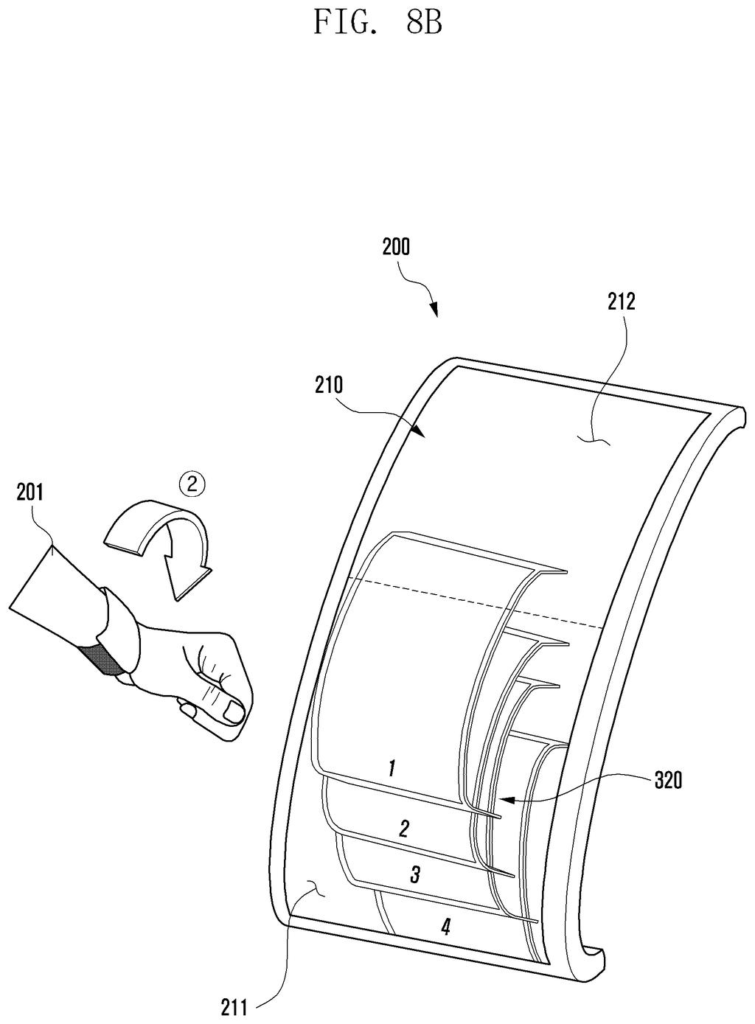
A curved smartwatch display fans out stacked notifications when the wearer tilts their wrist. Drawing from patent filing US 2026/0339393 A1.
A curved smartwatch display fans out stacked notifications when the wearer tilts their wrist.
See all 29 drawings from this filing ↓
Publication number US 2026/0339393 A1 US20260339393A1
Applicant Samsung Electronics Co., Ltd.
Filing date Jun 11, 2026
Publication date Oct 29, 2026
Inventors Nina LEE, Dongil SON
US classification 361/679.26
Status when we published Waiting for an examiner (Aug 25, 2026)
Parent application is a Continuation of PCTKR2025099034 (filed 2025-01-16)
Document 20 claims

What Samsung's wrist-twist notification stack does

You're rushing to a meeting and your watch has buzzed three times. To see what you missed, you swipe left, swipe right, swipe again, hunting for the one message that actually matters.

Samsung's patent application replaces that hunt with a stack of cards, one for each missed alert, piled on top of each other on the watch face. Twist your wrist the way you do to check the time, and the stack spreads open and the top cards stretch across more of the screen.

You set the ranking. Emergency warnings, such as typhoon or earthquake alerts, can sit on top, followed by your main contacts and favorite apps. Twist back and forth and the top card drops to the bottom, so you can flip through the pile without touching the screen.

From the filing · CLAIM 1
display a first multilayer having a first size in which a first layer corresponding to a first unidentified notification and a second layer corresponding to a second unidentified notification at least partially overlap …

Translation: Stack stacked notification cards on top of each other when they arrive.

How the watch sorts, fans out and reshuffles alerts

On paper, the watch screen is split into a first display area and a second display area, though the filing says they can really be one continuous screen. Which part is easier to see depends on how your wrist is turned: rotating it toward your body brings the second area into view, and rotating it away brings the first.

Unread alerts show up as a multilayer: overlapping pages, one per notification, stacked like a hand of cards. A motion sensor (the description mentions a 6-axis sensor, meaning an accelerometer for tilt plus a gyroscope for spin speed) detects the twist. The stack then grows, the gaps between cards widen, and at least one card, such as the top one, slides into the other screen area as a glance view.

  • Ranking: you set the order. Emergency messages sit on top, then chosen apps or main contacts, then frequently used apps, then scheduled events.
  • Grouping: several alerts from one app share a single card, shown as a collage, overlapping, or a count.
  • Reshuffle: twist out and quickly back in, and the top card drops to the bottom.
  • Exit: rotate far enough and the stack gives way to your clock face.

A status icon, such as the phone connection or a workout app, is also copied to the other screen area when you rotate.

From the filing · THE ABSTRACT
… transform the first multilayer into a second multilayer having a second size based on detecting the wearable electronic device rotating in a first direction, by using the sensor …

Translation: Spread out the stacked notifications when you twist your wrist.

Why a wrist twist could cut down watch swiping

If you wear a smartwatch, you know the drill: alerts pile up, and finding the one you care about means swiping through pages. This design uses a motion you already make, turning your wrist to look at the screen, to open a ranked stack of what you missed. A storm warning or a message from a main contact would surface before a routine app ping.

For Samsung, which makes the Galaxy Watch line, this is a software-side change that could show up as a setting on watches it already sells, since the motion sensors it describes (an accelerometer and a gyroscope) are standard watch parts. Anyone with a watch full of unread pings would notice the difference, though the filing says nothing about whether it will become a product.

This is the 1574th Samsung filing in our Samsung coverage since May, joining work like self-balancing robots and folding smart glasses.

Editorial take

The price of a wrist gesture is accidents. A watch that reacts to twists will sometimes open its stack while you reach for a coffee mug, and a clumsy flick back could shuffle the order of cards you set.

Ranking costs something too, because someone has to decide what counts as important. The filing leaves that mostly to you, with emergency messages, chosen contacts, frequently used apps and calendar events as example tiers, so anyone who never opens settings gets whatever default Samsung picks.

Overlapping cards also hide things, since a low-ranked message can sit buried under the pile. Even so, the trade is worth it on a screen this small: a ranked stack you open with one turn of the wrist beats swiping through pages one by one.

Get our take in your Top Stories

Liked this breakdown? Add Patentlyze as a preferred source on Google, and our plain-English take shows up more often in your Top Stories the next time Samsung patent news breaks.

There are more where this came from

We read every patent application Big Tech publishes and send you the ones worth knowing. Plain English, free, every week.

The drawings

29 drawing sheets from US 2026/0339393 A1 · click any drawing to enlarge

Wearable parts that connect to networks and run apps, drawing sheet 1 from US 2026/0339393 A1
Sheet 1 Wearable parts that connect to networks and run apps
Screen and touch sensor parts that control the display, drawing sheet 2 from US 2026/0339393 A1
Sheet 2 Screen and touch sensor parts that control the display
Twisting your left wrist inward toward your eyes, drawing sheet 3 from US 2026/0339393 A1
Sheet 3 Twisting your left wrist inward toward your eyes
Rotating your right wrist inward to view the screen, drawing sheet 4 from US 2026/0339393 A1
Sheet 4 Rotating your right wrist inward to view the screen
Stacked notification cards shown close together along the curved screen, drawing sheet 5 from US 2026/0339393 A1
Sheet 5 Stacked notification cards shown close together along the curved screen
Spreading stacked notification cards so you can read them, drawing sheet 6 from US 2026/0339393 A1
Sheet 6 Spreading stacked notification cards so you can read them
Rolling your wrist outward away from your sightline, drawing sheet 7 from US 2026/0339393 A1
Sheet 7 Rolling your wrist outward away from your sightline
Turning your right wrist outward to angle the screen downward, drawing sheet 8 from US 2026/0339393 A1
Sheet 8 Turning your right wrist outward to angle the screen downward
Show the other 21 sheets
Stacked notification cards line the bottom curved screen, drawing sheet 9 from US 2026/0339393 A1
Sheet 9 Stacked notification cards line the bottom curved screen
Notifications spread out toward the user's line of sight, drawing sheet 10 from US 2026/0339393 A1
Sheet 10 Notifications spread out toward the user's line of sight
Core hardware parts that run the wristband and detect twists, drawing sheet 11 from US 2026/0339393 A1
Sheet 11 Core hardware parts that run the wristband and detect twists
Indicator dots appear as notifications unfold across the top section, drawing sheet 12 from US 2026/0339393 A1
Sheet 12 Indicator dots appear as notifications unfold across the top section
Visual dots mark active cards spread across the lower screen, drawing sheet 13 from US 2026/0339393 A1
Sheet 13 Visual dots mark active cards spread across the lower screen
Initial collapsed stack of alert cards before any wrist motion, drawing sheet 14 from US 2026/0339393 A1
Sheet 14 Initial collapsed stack of alert cards before any wrist motion
Twisting the wrist outward fans out the notification stack, drawing sheet 15 from US 2026/0339393 A1
Sheet 15 Twisting the wrist outward fans out the notification stack
Rotating the wrist back collapses the expanded cards again, drawing sheet 16 from US 2026/0339393 A1
Sheet 16 Rotating the wrist back collapses the expanded cards again
Rotating your arm further collapses cards into a tighter stack, drawing sheet 17 from US 2026/0339393 A1
Sheet 17 Rotating your arm further collapses cards into a tighter stack
A full wrist turn returns to the clock face, drawing sheet 18 from US 2026/0339393 A1
Sheet 18 A full wrist turn returns to the clock face
Twisting your wrist outward fans out your notifications, drawing sheet 19 from US 2026/0339393 A1
Sheet 19 Twisting your wrist outward fans out your notifications
Flicking back quickly cycles to the next notification card, drawing sheet 20 from US 2026/0339393 A1
Sheet 20 Flicking back quickly cycles to the next notification card
Swiping up on the curved screen flips through cards manually, drawing sheet 21 from US 2026/0339393 A1
Sheet 21 Swiping up on the curved screen flips through cards manually
Tapping the front card opens up the selected notification, drawing sheet 22 from US 2026/0339393 A1
Sheet 22 Tapping the front card opens up the selected notification
Choosing which favorite apps and widgets appear in the stack, drawing sheet 23 from US 2026/0339393 A1
Sheet 23 Choosing which favorite apps and widgets appear in the stack
Organizing the stack so high priority alerts sit on top, drawing sheet 24 from US 2026/0339393 A1
Sheet 24 Organizing the stack so high priority alerts sit on top
Unread alerts from one app grouped into a single card, drawing sheet 25 from US 2026/0339393 A1
Sheet 25 Unread alerts from one app grouped into a single card
Notifications from a second app gathered into another card, drawing sheet 26 from US 2026/0339393 A1
Sheet 26 Notifications from a second app gathered into another card
Stacking notifications from different apps on the curved screen, drawing sheet 27 from US 2026/0339393 A1
Sheet 27 Stacking notifications from different apps on the curved screen
How turning your wrist spreads stacked alerts across the watch, drawing sheet 28 from US 2026/0339393 A1
Sheet 28 How turning your wrist spreads stacked alerts across the watch
Steps for shifting notifications when rotated the opposite way, drawing sheet 29 from US 2026/0339393 A1
Sheet 29 Steps for shifting notifications when rotated the opposite way
Browse all the drawings 29 drawing sheets
Patent filing page

Source. Full patent text and figures from the official USPTO publication PDF.
Reader comments

Be the first to weigh in

Start the discussion

Real name or a handle, either is fine. Comments are read by a person before they appear, so allow a little time. Keep it about the filing.