
Apple · Filed Jul 13, 2026 · Published Nov 5, 2026

Apple Files Patent for Floating Controls That Stay Anchored to Your Torso

Apple describes a dashboard that floats about two feet in front of your torso. Look down and it appears, look up and it disappears, and it is waiting in the same spot when you look back.
A phone locks floating workout dials in place in front of a user once they hold the device at the desired spot and click a button. Drawing from patent filing US 2026/0350926 A1.
A phone locks floating workout dials in place in front of a user once they hold the device at the desired spot and click a button.
See all 23 drawings from this filing ↓
Publication number US 2026/0350926 A1 US20260350926A1
Applicant Apple Inc.
Filing date Jul 13, 2026
Publication date Nov 5, 2026
Inventors Yiqiang NIE, Giovanni M. AGNOLI, Allison W. DRYER, Giancarlo YERKES
US classification 345/156
Status when we published Waiting for an examiner (Jul 30, 2026)
Parent application is a Continuation of 19054411 (filed 2025-02-14)
Document 19 claims

What Apple's body-anchored headset controls do

A walker heads out for a workout wearing an augmented reality headset. Her calorie count, her pace and a camera feed all need somewhere to appear, and if they hang in the middle of her view, they block the street ahead.

Apple's patent application describes parking those panels around your body instead. They sit about two feet in front of your torso, roughly at sternum or belly-button height, arranged in a gentle curve. Look down and they appear. Look up and they vanish. Walk somewhere new, look down again, and they are back in the same spot relative to you.

You could set the height with a button press, and extra panels can wait off to your side, such as a second camera feed that shows up when you turn your head to the right. The filing says the same idea can work on a phone, too.

From the filing · CLAIM 1
… displaying, via the display generation component, a set of one or more virtual objects with a respective spatial orientation relative to at least a first portion of a body of the user; …

Translation: The system anchors digital controls to your body so they stay with you as you move.

How the controls hide, return and stay in place

The claims cover one core behavior: showing a set of floating controls at a position defined by a part of your body, such as your torso. This is called body-locked display (the panels are placed relative to you instead of a wall or a fixed spot in your vision).

The main claim runs through a loop:

  • Your view turns, and the controls appear in a set arrangement around your body.
  • The controls stop being displayed.
  • You move around the physical space.
  • Your view turns again, and the controls reappear in the same arrangement relative to your body.

The description adds that the panels are only conditionally body-locked. They are placed using your torso when they first appear, then hold still until they leave your view, so turning your whole body gives the same result as turning only the device. In the example, a dashboard sits two feet in front of your navel, with side panels at 30 and 60 degrees.

Dependent claims add options: choosing which controls appear (their layout relative to each other stays fixed), setting the height, shrinking a panel that would slide partly out of view, and changing the content depending on what activity you are doing.

What this means for headsets and phone-based AR

On a headset, physical buttons are hard to see and reach. The filing says controlling things through head movement helps for that reason. A dashboard that returns whenever you look down gives you a predictable place to check your pace, your calories or a camera feed, without hunting through menus.

The description covers head-mounted devices and also phones, with examples like walking or riding a bike with a rear-view camera feed. For you, the payoff would be a headset that keeps its interface out of the way of the real world while leaving the important things one glance down.

Apple's 120th filing we've tracked in our AR glasses watchlist since May adds to a picture that includes one on 3D rising maps and one warning bystanders about the camera.

Editorial take

Wearing a screen on your face creates a plain problem: anything the device draws competes with the real world you are trying to see. A menu parked in the middle of your view blocks the sidewalk. A menu pinned to the room gets left behind the moment you walk away from it.

Anchoring controls to your torso answers both complaints with one idea, and the idea fits the size of the problem. Nobody has to learn a new gesture or find a button, because looking down is something people already do.

The filing is a layout rule, and a layout rule only matters if the panels show the right things. Whether a belly-height dashboard feels natural or gets annoying over a long walk will come down to testing that nobody can do from a document.

Get our take in your Top Stories

Liked this breakdown? Add Patentlyze as a preferred source on Google, and our plain-English take shows up more often in your Top Stories the next time Apple patent news breaks.

There are more where this came from

We read every patent application Big Tech publishes and send you the ones worth knowing. Plain English, free, every week.

The drawings

23 drawing sheets from US 2026/0350926 A1 · click any drawing to enlarge

How a person uses mixed reality hardware in a room, drawing sheet 1 from US 2026/0350926 A1
Sheet 1 How a person uses mixed reality hardware in a room
Main computer components that manage the virtual experience, drawing sheet 2 from US 2026/0350926 A1
Sheet 2 Main computer components that manage the virtual experience
Display parts that project virtual images for the viewer, drawing sheet 3 from US 2026/0350926 A1
Sheet 3 Display parts that project virtual images for the viewer
Cameras tracking finger poses to recognize hand gestures, drawing sheet 4 from US 2026/0350926 A1
Sheet 4 Cameras tracking finger poses to recognize hand gestures
Infrared lights and sensors following where your eyes look, drawing sheet 5 from US 2026/0350926 A1
Sheet 5 Infrared lights and sensors following where your eyes look
How the system checks reflections to pinpoint your gaze, drawing sheet 6 from US 2026/0350926 A1
Sheet 6 How the system checks reflections to pinpoint your gaze
Holding a phone outdoors to view digital objects, drawing sheet 7 from US 2026/0350926 A1
Sheet 7 Holding a phone outdoors to view digital objects
Virtual windows staying in place as the phone moves, drawing sheet 8 from US 2026/0350926 A1
Sheet 8 Virtual windows staying in place as the phone moves
Show the other 15 sheets
Moving the phone shifts your view across anchored virtual screens, drawing sheet 9 from US 2026/0350926 A1
Sheet 9 Moving the phone shifts your view across anchored virtual screens
How floating panels become solid once the phone stops moving, drawing sheet 10 from US 2026/0350926 A1
Sheet 10 How floating panels become solid once the phone stops moving
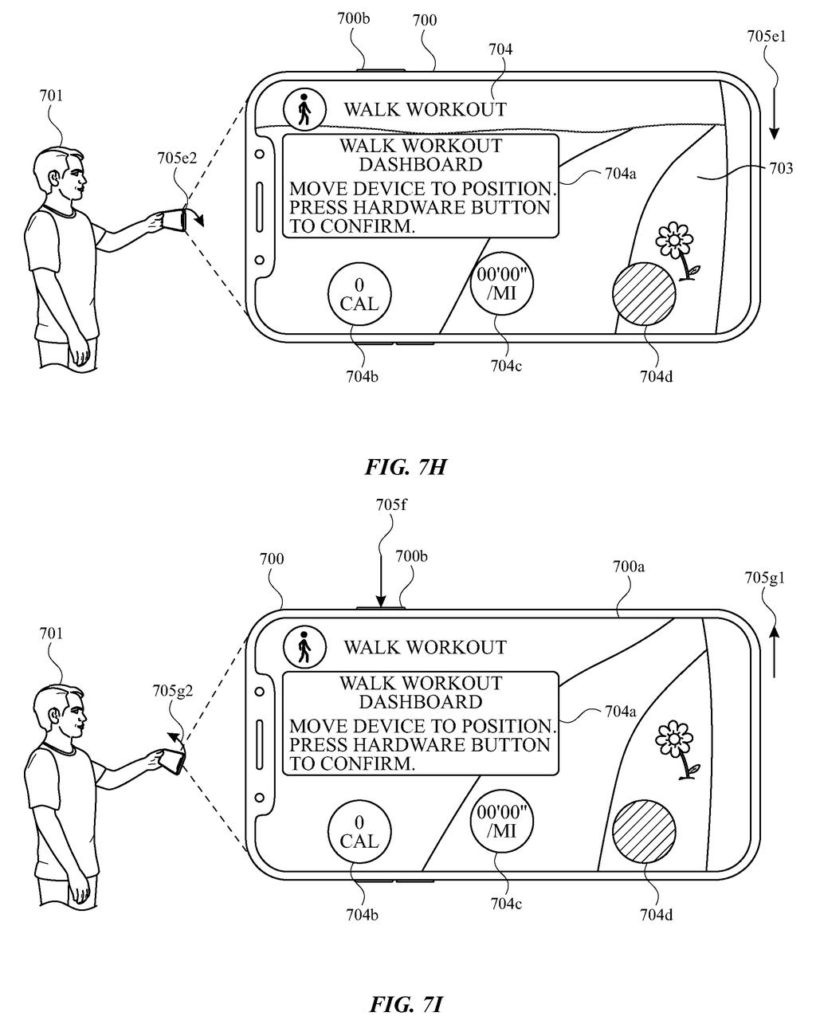
Anchoring a workout panel with a button press, drawing sheet 11 from US 2026/0350926 A1
Sheet 11 Anchoring a workout panel with a button press
Tilting your phone brings floating workout stats back into view, drawing sheet 12 from US 2026/0350926 A1
Sheet 12 Tilting your phone brings floating workout stats back into view
Walking forward keeps the floating controls anchored near your body, drawing sheet 13 from US 2026/0350926 A1
Sheet 13 Walking forward keeps the floating controls anchored near your body
Tilting the phone reveals or hides anchored icons, drawing sheet 14 from US 2026/0350926 A1
Sheet 14 Tilting the phone reveals or hides anchored icons
Selecting an anchored metric opens a detailed chart in midair, drawing sheet 15 from US 2026/0350926 A1
Sheet 15 Selecting an anchored metric opens a detailed chart in midair
Switching workout types loads custom controls and route maps, drawing sheet 16 from US 2026/0350926 A1
Sheet 16 Switching workout types loads custom controls and route maps
Moving the phone shifts virtual navigation banners across the screen, drawing sheet 17 from US 2026/0350926 A1
Sheet 17 Moving the phone shifts virtual navigation banners across the screen
Tilting the device reveals pinned landmarks and turn directions, drawing sheet 18 from US 2026/0350926 A1
Sheet 18 Tilting the device reveals pinned landmarks and turn directions
Keeping floating labels pinned to objects as you turn, drawing sheet 19 from US 2026/0350926 A1
Sheet 19 Keeping floating labels pinned to objects as you turn
Deciding whether to lock items to your view, drawing sheet 20 from US 2026/0350926 A1
Sheet 20 Deciding whether to lock items to your view
Anchoring route markers to the world when in view, drawing sheet 21 from US 2026/0350926 A1
Sheet 21 Anchoring route markers to the world when in view
Showing floating controls that follow your body movement, drawing sheet 22 from US 2026/0350926 A1
Sheet 22 Showing floating controls that follow your body movement
Showing camera views of your surroundings from different angles, drawing sheet 23 from US 2026/0350926 A1
Sheet 23 Showing camera views of your surroundings from different angles
Browse all the drawings 23 drawing sheets
Patent filing page

Source. Full patent text and figures from the official USPTO publication PDF.
Reader comments

Be the first to weigh in

Start the discussion

Real name or a handle, either is fine. Comments are read by a person before they appear, so allow a little time. Keep it about the filing.