
Apple Patents a Virtual Page Where Flat Maps Rise Into 3D
Apple's patent imagines a floating sheet in your headset where a marked patch of a flat map turns into 3D buildings, then flattens again as you drag it away.
What Apple's virtual paper actually does
Every time you scroll a web page, the words slide up and get chopped off at the edge of the window. That works fine for flat text. It gets awkward when the page also holds a 3D object, because a 3D object wants to stick out toward you instead of getting sliced like a sheet of paper.
Apple's filing describes a floating virtual paper for a headset: a flat sheet with edges, hovering in front of you like a page. Mark off a patch of it, and whatever flat content sits there, such as a street map, gets rebuilt as 3D buildings that rise out of the sheet toward you. The rest of the map stays flat.
Drag the map and the patch stays put like a little window. Streets sliding in turn 3D, and streets sliding out flatten again. The filing also mentions live traffic, shown as moving cars and buses.
… converting the one or more conforming virtual objects to one or more corresponding stereoscopic virtual objects; and displaying the one or more corresponding stereoscopic virtual objects within the subregion protruding from the bounded surface into the CGR environment.
Translation: Turning flat map features into 3D objects that pop out of the page.
How a marked patch turns flat streets into 3D
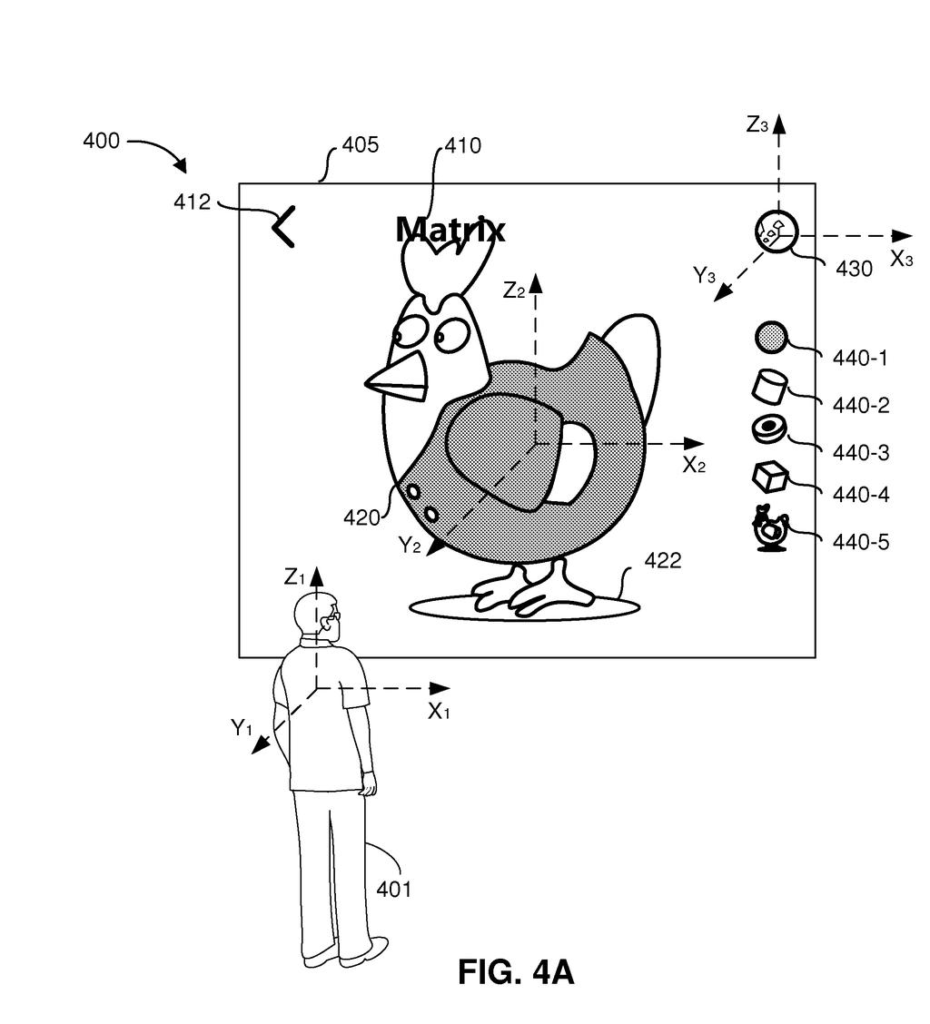
The filing centers on a bounded surface, which Apple calls a virtual paper: a flat sheet with edges that floats in a headset's view of a room or a virtual space. Flat content, which the patent calls conforming content, hugs the sheet like ink on a page and bends with it if the sheet is turned or twisted.
The claims cover what happens next. A user designates a subregion, a marked patch of the sheet. Flat objects inside it are converted into stereoscopic objects (3D shapes with real depth) that protrude from the sheet toward the viewer. Content outside the patch stays flat. One claimed example is a 2D map whose marked patch shows live traffic as 3D objects.
The filing describes two ways the patch can behave while you scroll:
- It can stay at a fixed spot relative to the sheet's edges, like a window. Content sliding in becomes 3D, and content sliding out flattens.
- It can move along with the content, so the 3D patch travels with the map.
Underneath, the 3D objects run on their own world coordinates (their own set of space and direction rules), separate from the rules that govern the sheet. That lets a 3D object rotate or animate by itself while the page scrolls. The description adds a blurred backside for the sheet and objects that fold back into the surface near its edges.
… displaying a first stereoscopic virtual object within a perimeter of a first side of the bounded surface, wherein the first stereoscopic virtual object is displayed in accordance with a second set of world coordinates that is different from the first set of world coordinates characterizing the native user CGR environment.
Translation: Placing 3D elements on the flat surface by using a different coordinate system than the surrounding room.
Why Apple's page idea matters for headsets
Headset screens are meant for reading, shopping and navigating, and all of those mix text with objects. Flat text clips cleanly at a window edge, but a 3D object has no obvious way to get cut. This design gives the headset one rule: depth lives inside a marked window, and everything else stays flat and readable. That could suit maps, product pages or a 3D model sitting beside its description.
The filing lists head-mounted devices, phones and tablets as possible hardware, and this application continues a chain that traces back to a March 2019 provisional filing. Nothing here says a product is coming. It does show Apple thinking about page layouts for 3D screens, and about how your hands and eyes would move through them.
Apple's 119th filing we've tracked since May joins earlier applications like one warning bystanders about the camera and one zooming where you look in our Apple AR glasses.
Locking 3D depth inside a bordered window means everything outside that window stays flat, and anything you scroll toward the edge gets squashed back into the page. That is a real cost: a building or diagram you were studying shrinks the moment it drifts too close to the boundary.
The trade still reads as sensible. A page that clips cleanly and stays readable is more useful than a 3D object floating over the text you actually came to read.
The whole thing depends on the headset redrawing fast enough that content does not visibly snap between flat and deep as it crosses the border. If the hardware lags, the seam becomes the most noticeable thing on screen, and the design falls apart at precisely the moment it should feel seamless.
Get our take in your Top Stories
Liked this breakdown? Add Patentlyze as a preferred source on Google, and our plain-English take shows up more often in your Top Stories the next time Apple patent news breaks.
There are more where this came from
We read every patent application Big Tech publishes and send you the ones worth knowing. Plain English, free, every week.
The drawings
26 drawing sheets from US 2026/0350953 A1 · click any drawing to enlarge


Show the other 18 sheets


Want this weekly breakdown for a company we don't cover? Patentlyze Pro →
Be the first to weigh in