
Apple Patents a Dial That Buzzes Harder as You Near a Setting's Limit
Apple has filed for a physical control that tells your fingertips when you're running out of room. The closer you get to the end of a setting, the harder it buzzes.
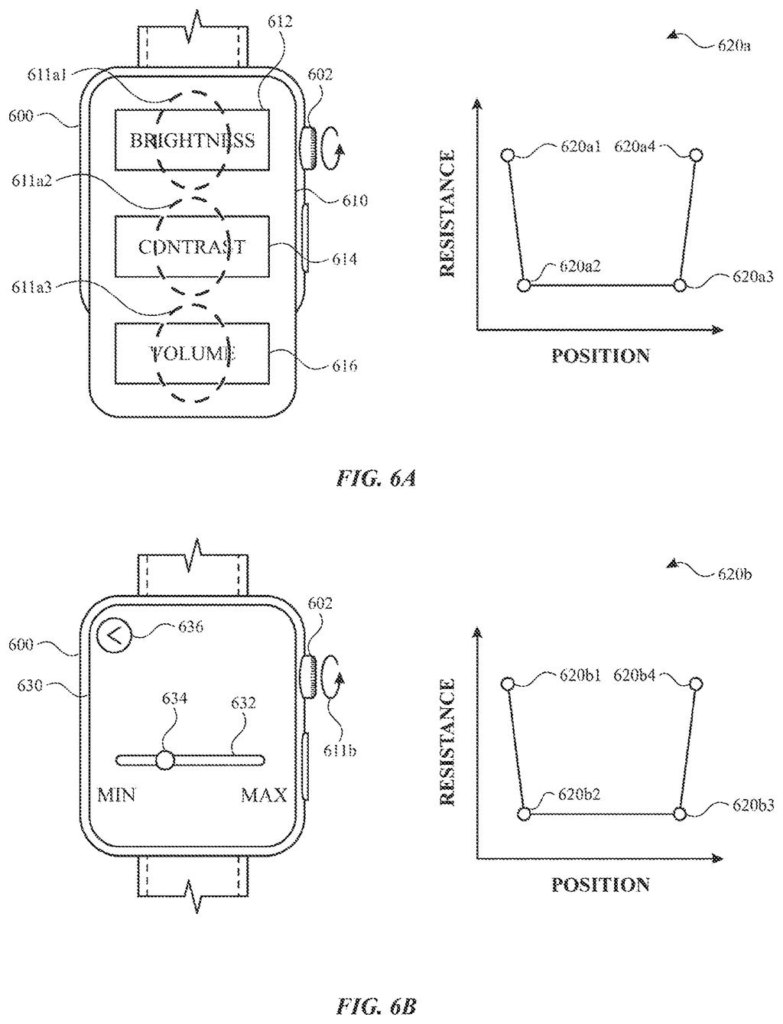
What Apple's buzzing dial actually does
You're turning a dial to raise the volume, and you can't tell how close you are to the top without staring at the screen. Apple has a patent application for a physical control that answers this by touch.
When the dial gets within a set distance of a limit, it starts to buzz, and the buzz gets stronger the closer you get. Away from the limit it stays quiet, so the buzz only shows up when it has something to tell you. Your fingertip learns the end of the range before your eyes do.
The filing also covers what happens at the limit. If you reach the end and let go, the control itself can move back the other way, sometimes with its own fading buzz or none at all. A speaker can add a sound as you turn.
… causing the physical input mechanism to provide a set of haptics with intensity levels that change in a first manner as the physical mechanism is moved in the first direction.
Translation: Making the dial vibrate differently as you keep turning it near the edge.
How the buzz grows as the dial nears its end
The claims cover a method for a computer system connected to a physical input mechanism, meaning a control you move with your hand, such as a rotating dial. The system tracks where the mechanism is as you move it in one direction. Once it is within a threshold distance of a target position (for example, the end of a range of values), it plays a set of haptics (small, precise vibrations you feel through your fingers) whose strength changes in a set pattern.
The patterns the claims describe:
- A series of haptics, each stronger than the last, as the mechanism moves farther toward the target.
- Or a single haptic that grows stronger over time as you keep moving.
- No haptics at all while the mechanism is outside the threshold distance.
Then comes the return move. When the mechanism reaches the target position and certain criteria are met, such as your finger no longer touching it, the system makes the mechanism move itself in the opposite direction. That return can have its own haptics that change in a different way, for instance starting strong and getting weaker. It can also move back with no haptics.
The filing also describes an on-screen bar showing the range of a setting and a marker for the current value, which moves as you move the control. A speaker can play a sound alongside the buzz. The longer description covers related versions too, where different settings get different resistance, stopping distances or resting positions.
Why Apple cares about the feel of a dial
The practical payoff is feeling where a setting ends without looking. For things like volume or brightness, a growing buzz warns you before you hit the limit, so you overshoot less and glance at the screen less. That helps most when your eyes are busy with something else.
The filing says its goal is fewer wasted inputs, less cognitive burden and better battery life, which is typical language for interface work. Because the feedback changes with the type of setting, one physical control could feel different depending on what it is adjusting. That points to Apple treating the feel of a hardware control as something software can design.
Apple's 11th filing in input and haptics we've tracked since May adds to a run that includes a touch-sensing MacBook case and hand-wave Siri controls.
Anyone who has spun a volume control past the level they wanted knows the problem. A plain dial gives no hint of where its range ends. It costs a second or two each time and pulls your eyes to a screen, so the pain is small but constant.
The fix here fits that size. A stronger buzz as you approach the limit uses your sense of touch, and the self-return move gives a clear finish when you let go. Nothing in it asks you to learn a new habit.
The claims are narrow: a buzz pattern near a position, plus a return move. That makes it a careful refinement for a modest annoyance, and the best result would be one you stop noticing because it just feels right.
Get our take in your Top Stories
Liked this breakdown? Add Patentlyze as a preferred source on Google, and our plain-English take shows up more often in your Top Stories the next time Apple patent news breaks.
There are more where this came from
We read every patent application Big Tech publishes and send you the ones worth knowing. Plain English, free, every week.
The drawings
27 drawing sheets from US 2026/0349540 A1 · click any drawing to enlarge


Show the other 19 sheets


Want this weekly breakdown for a company we don't cover? Patentlyze Pro →
Be the first to weigh in