
Samsung · Filed Jun 23, 2026 · Published Nov 5, 2026

Samsung Files Patent for a Floating Screen That Watches Your Hand Through the Glass

Samsung's filing describes an image that hangs in the air in front of a screen, with a hidden sensor that can see your hand exactly where the image floats. The odd starting move is that the device flips the picture upside down on purpose.
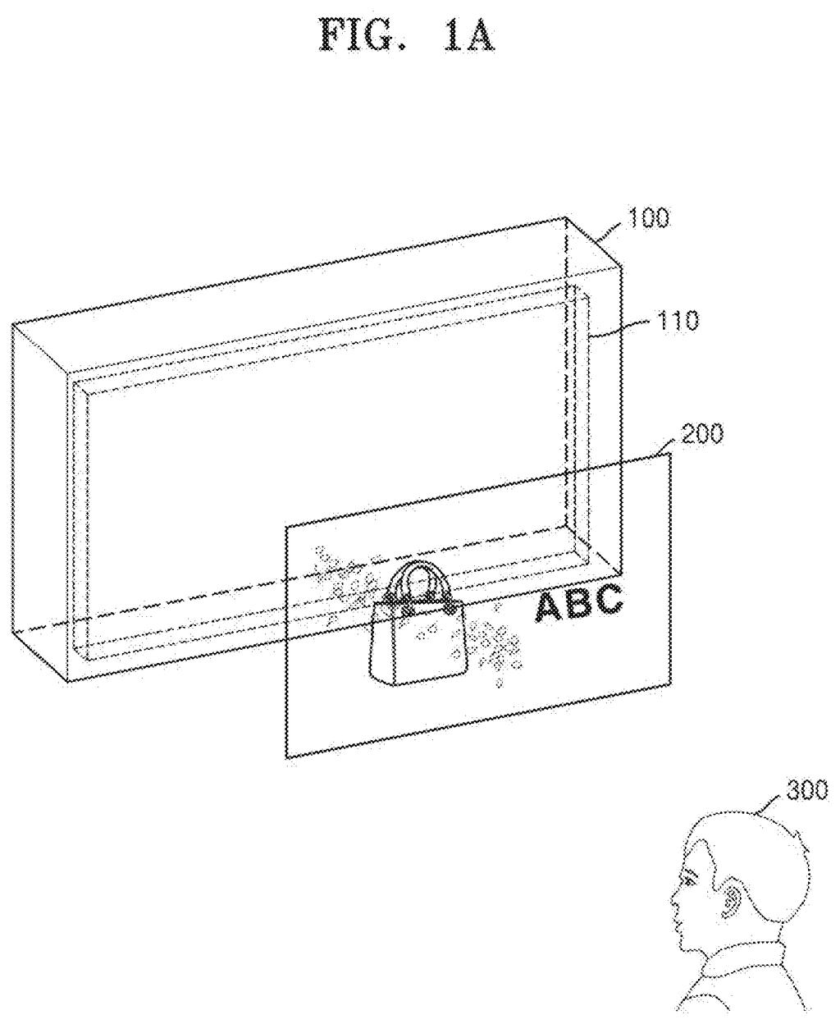
A transparent display enclosure projects a floating virtual image in midair directly in front of a viewer. Drawing from patent filing US 2026/0349527 A1.
A transparent display enclosure projects a floating virtual image in midair directly in front of a viewer.
See all 43 drawings from this filing ↓
Publication number US 2026/0349527 A1 US20260349527A1
Applicant SAMSUNG ELECTRONICS CO., LTD.
Filing date Jun 23, 2026
Publication date Nov 5, 2026
Inventors Jaeseung CHUNG, Changkun LEE, Narae CHOI, Jungkwuen AN, Bongsu SHIN
US classification 345/156
Status when we published Waiting for an examiner (Aug 25, 2026)
Parent application is a Continuation of PCTKR2026005675 (filed 2026-04-28)
Document 15 claims

What Samsung's floating-screen patent does

You're at a self-service kiosk and a menu button seems to hang in the air about a foot in front of the glass. You reach out to tap it, but your finger meets nothing, so you can't tell whether the machine noticed. That's the basic puzzle with floating screens, and this Samsung patent application goes after it.

The filing describes a display that uses a clear plate and a lens to make an image look like it's hovering in front of the device. Because the optics turn the picture upside down, the device flips it both ways first, so it ends up looking normal to you.

The same plate also carries light back to a small hidden sensor, so the device can see your hand right where the image floats. It can then show a cursor that sharpens as your finger gets closer.

From the filing · CLAIM 1
… a waveguide comprising a first optical coupling area configured to direct the light of the flipped image provided from the optical engine to be incident into the waveguide and a second optical coupling area configured to emit the light of the flipped image incident through the first optical coupling area to outside …

Translation: A special piece of glass channels the projected light through internal paths before sending it out to your eyes.

How the flipped image lands right-side up

The core claim covers a processor that takes an image and flips it horizontally and vertically before anything is shown. An optical engine (a tiny projector) sends the light of that flipped picture into a waveguide, a thin clear plate that carries light along inside it by bouncing it off its surfaces.

Light enters through a first optical coupling area (a patterned spot that steers light into the plate) and leaves through a second one on the front. A lens in front of the plate then focuses the light onto a virtual projection plane, the spot in midair where the picture appears to float. The lens inverts the image, which cancels out the earlier flip, so you see the original picture the right way up.

Other claims add the hand tracking. A third coupling area sends outside light back through the plate to an image sensor, retracing the path the picture took. That means the camera focuses sharply on the floating plane, right where your hand will be. The device can then:

  • Recognize gestures, such as a swipe, made on the floating image.
  • Judge how far your hand is from the plane by how blurry it looks, and show an indicator that reflects that distance.
  • Run a calibration with several target points to build a transform matrix (a set of numbers that converts your hand position into positions on the floating image), and redo it when it detects drift or repeated missed taps.
From the filing · THE ABSTRACT
… a lens configured to provide the virtual image in which the input image is floating on a virtual projection plane by focusing the light of the flipped image emitted through the second optical coupling area into an inverted image on the virtual projection plane …

Translation: A front lens focuses the light so the picture appears to hang suspended in the open air.

Why floating buttons need a hand-tracking trick

The practical payoff would be a floating button that reacts when you reach for it. The filing lists many possible devices, from smartphones and monitors to head-up displays and digital signage, so the idea isn't tied to one product. Hiding the sensor behind the plate also means no visible camera opening, which the filing says helps keep the device thinner and lighter.

The description also admits that a floating image looks a little different to each person, depending on eye spacing and head position. That is why the patent builds in a calibration step for every user, and a way to correct it while you use the device. Without that, a tap you aim at one spot could land somewhere else.

Samsung's 132nd filing we've tracked since May in our display technology watchlist follows earlier applications like one on moisture-sealing holes and one distinguishing hover from touch.

Editorial take

Pressing a button you cannot feel is more frustrating than it sounds. Miss a tap on a touchscreen and you get a click or a vibration to tell you something went wrong. Miss a tap on a floating light image and you get nothing, so you keep poking at air while the device silently ignores you.

The filing attacks that specific cost directly. The camera shares the same plate as the image projector, so it already knows where your hand should be. A cursor grows sharper as your finger moves closer, giving you the feedback a physical button would have provided by feel.

The document stays quiet on bright sunlight and crowded spaces, so those remain open questions. Within the problem it sets out to solve, though, the approach matches the frustration it targets.

Get our take in your Top Stories

Liked this breakdown? Add Patentlyze as a preferred source on Google, and our plain-English take shows up more often in your Top Stories the next time Samsung patent news breaks.

There are more where this came from

We read every patent application Big Tech publishes and send you the ones worth knowing. Plain English, free, every week.

The drawings

43 drawing sheets from US 2026/0349527 A1 · click any drawing to enlarge

A display device projects a 3D hologram in midair, drawing sheet 1 from US 2026/0349527 A1
Sheet 1 A display device projects a 3D hologram in midair
Light bounces through glass into a focusing lens, drawing sheet 2 from US 2026/0349527 A1
Sheet 2 Light bounces through glass into a focusing lens
Flipping the source image before projecting it right side up, drawing sheet 3 from US 2026/0349527 A1
Sheet 3 Flipping the source image before projecting it right side up
Why the projector flips the image so it appears correctly, drawing sheet 4 from US 2026/0349527 A1
Sheet 4 Why the projector flips the image so it appears correctly
The main hardware parts that control the projected hologram, drawing sheet 5 from US 2026/0349527 A1
Sheet 5 The main hardware parts that control the projected hologram
Tiny surface grooves spread projector light across the panel, drawing sheet 6 from US 2026/0349527 A1
Sheet 6 Tiny surface grooves spread projector light across the panel
Straightening light beams and bending them onto a floating plane, drawing sheet 7 from US 2026/0349527 A1
Sheet 7 Straightening light beams and bending them onto a floating plane
An air gap separates the glass plate and lens, drawing sheet 8 from US 2026/0349527 A1
Sheet 8 An air gap separates the glass plate and lens
Show the other 35 sheets
Adding a lens brings the floating screen in front, drawing sheet 9 from US 2026/0349527 A1
Sheet 9 Adding a lens brings the floating screen in front
Adjusting lens focus changes how far away images appear, drawing sheet 10 from US 2026/0349527 A1
Sheet 10 Adjusting lens focus changes how far away images appear
Focusing light directly inside the glass removes the separate lens, drawing sheet 11 from US 2026/0349527 A1
Sheet 11 Focusing light directly inside the glass removes the separate lens
Internal parts including the image sensor that watches incoming light, drawing sheet 12 from US 2026/0349527 A1
Sheet 12 Internal parts including the image sensor that watches incoming light
Screen lets light reach a sensor that tracks hands, drawing sheet 13 from US 2026/0349527 A1
Sheet 13 Screen lets light reach a sensor that tracks hands
Leaving out a lens keeps background objects in focus, drawing sheet 14 from US 2026/0349527 A1
Sheet 14 Leaving out a lens keeps background objects in focus
Turning trapped light into an image of your hands, drawing sheet 15 from US 2026/0349527 A1
Sheet 15 Turning trapped light into an image of your hands
Tiny ridges guide light through glass to a camera, drawing sheet 16 from US 2026/0349527 A1
Sheet 16 Tiny ridges guide light through glass to a camera
Steps for capturing real scenes through an extra side strip, drawing sheet 17 from US 2026/0349527 A1
Sheet 17 Steps for capturing real scenes through an extra side strip
Routing room light up a side strip into the camera, drawing sheet 18 from US 2026/0349527 A1
Sheet 18 Routing room light up a side strip into the camera
Sending incoming light down to a bottom camera sensor, drawing sheet 19 from US 2026/0349527 A1
Sheet 19 Sending incoming light down to a bottom camera sensor
Multiple cameras catching scene views at four different depths, drawing sheet 20 from US 2026/0349527 A1
Sheet 20 Multiple cameras catching scene views at four different depths
Two side tracks focus cameras at different depths, drawing sheet 21 from US 2026/0349527 A1
Sheet 21 Two side tracks focus cameras at different depths
Sliding one camera across multiple lenses to scan depths, drawing sheet 22 from US 2026/0349527 A1
Sheet 22 Sliding one camera across multiple lenses to scan depths
How the system spots midair hand gestures and reacts, drawing sheet 23 from US 2026/0349527 A1
Sheet 23 How the system spots midair hand gestures and reacts
Swiping across the floating picture to switch products on screen, drawing sheet 24 from US 2026/0349527 A1
Sheet 24 Swiping across the floating picture to switch products on screen
Calculating finger distance from camera blur to guide touch, drawing sheet 25 from US 2026/0349527 A1
Sheet 25 Calculating finger distance from camera blur to guide touch
Showing a shrinking target ring as your finger approaches, drawing sheet 26 from US 2026/0349527 A1
Sheet 26 Showing a shrinking target ring as your finger approaches
Highlighting midair keys before you press them, drawing sheet 27 from US 2026/0349527 A1
Sheet 27 Highlighting midair keys before you press them
Layering the projector, glass, and sensors inside the frame, drawing sheet 28 from US 2026/0349527 A1
Sheet 28 Layering the projector, glass, and sensors inside the frame
Measuring how different users view the floating grid, drawing sheet 29 from US 2026/0349527 A1
Sheet 29 Measuring how different users view the floating grid
Shifting the floating visuals as you step sideways, drawing sheet 30 from US 2026/0349527 A1
Sheet 30 Shifting the floating visuals as you step sideways
Deciding when to tweak or redo touch calibration, drawing sheet 31 from US 2026/0349527 A1
Sheet 31 Deciding when to tweak or redo touch calibration
Guiding your finger across targets to set touch points, drawing sheet 32 from US 2026/0349527 A1
Sheet 32 Guiding your finger across targets to set touch points
Adjusting virtual touch alignment after a hand moves sideways, drawing sheet 33 from US 2026/0349527 A1
Sheet 33 Adjusting virtual touch alignment after a hand moves sideways
Shifting touch alignment after a hand trembles near a key, drawing sheet 34 from US 2026/0349527 A1
Sheet 34 Shifting touch alignment after a hand trembles near a key
Triggering full realignment when a hand wanders off path, drawing sheet 35 from US 2026/0349527 A1
Sheet 35 Triggering full realignment when a hand wanders off path
Prompting a complete recalibration when tapping accuracy drops too low, drawing sheet 36 from US 2026/0349527 A1
Sheet 36 Prompting a complete recalibration when tapping accuracy drops too low
Restarting calibration if hand shaking exceeds safe limits, drawing sheet 37 from US 2026/0349527 A1
Sheet 37 Restarting calibration if hand shaking exceeds safe limits
How the screen chooses between fine tuning and full setup, drawing sheet 38 from US 2026/0349527 A1
Sheet 38 How the screen chooses between fine tuning and full setup
Registering an intended key press on a floating keypad, drawing sheet 39 from US 2026/0349527 A1
Sheet 39 Registering an intended key press on a floating keypad
Fine tuning touch coordinates using the distance from key center, drawing sheet 40 from US 2026/0349527 A1
Sheet 40 Fine tuning touch coordinates using the distance from key center
Detecting when a finger touches between virtual buttons, drawing sheet 41 from US 2026/0349527 A1
Sheet 41 Detecting when a finger touches between virtual buttons
Shifting the floating screen when a small touch error occurs, drawing sheet 42 from US 2026/0349527 A1
Sheet 42 Shifting the floating screen when a small touch error occurs
Resetting visual tracking after a large touch misalignment, drawing sheet 43 from US 2026/0349527 A1
Sheet 43 Resetting visual tracking after a large touch misalignment
Browse all the drawings 43 drawing sheets
Patent filing page

Source. Full patent text and figures from the official USPTO publication PDF.
Reader comments

Be the first to weigh in

Start the discussion

Real name or a handle, either is fine. Comments are read by a person before they appear, so allow a little time. Keep it about the filing.