
Adobe
Adobe · AI / ML · Filed Jul 20, 2026 · USPTO published Nov 12, 2026 · This week's release
Adobe Patents an AI Tool That Wraps Text Boxes in Custom Decorative Patterns
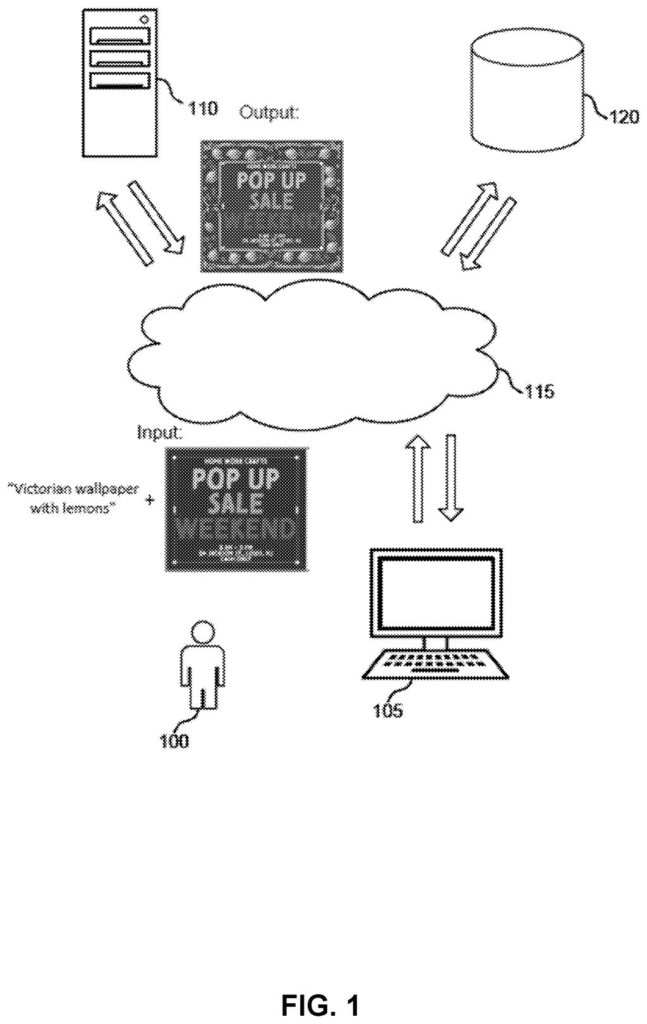
Type 'Victorian wallpaper with lemons' and Adobe's patent filing describes software that wraps your text box in a matching pattern, shaped to fit it.
- Publication number
- US 2026/0360050 A1(US20260360050A1)
- Applicant
- ADOBE INC.
- Filed · Published
- Jul 20, 2026 · Nov 12, 2026
- Inventors
- Adrian-Stefan Ungureanu-Contes, Andrei-Mario Dinu, Nicu-Razvan Stancioiu, Ionut Mironica
- Status when we published
- Waiting for an examiner
- Document
- 17 claims
- US classification
- 345/629
- Parent application
- Continuation of 18/788,964 (filed Jul 30, 2024)(18788964)
What Adobe's AI text-box decorator actually does
Right now, decorating a text box on a flyer or invitation usually means placing pre-made shapes, images or patterns around it by hand. That takes time, and it takes a designer's eye to make the result look good. Adobe's filing describes a way to skip most of that work.
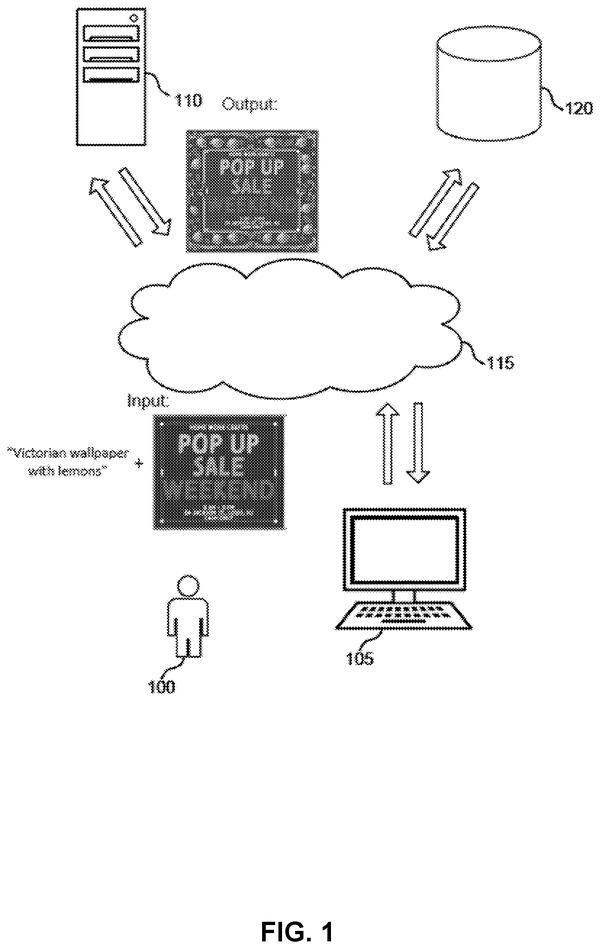
You would give the software a text box and a short description, like Victorian wallpaper with lemons. It works out the area around your box, fills that area with a repeating pattern in the style you asked for, and polishes the artwork so it fits the box's shape and size. Then it cuts away the background and places the result around your original text.
You also get some dials: a strength setting for how heavily the style is applied, and a way to edit the area the decoration covers. A multi-page document can reuse the same look on every page, with each page's decoration fitted to its own text.
… generating a decoration mask based on the document element, wherein the decoration mask indicates a location for the decoration element …
Translation: The software maps out the exact spot where the custom artwork should wrap around your text.
How Adobe builds a decoration around a text box
The system starts with two inputs: a document element (a text box, shape or image) and a text prompt describing the decoration. It builds a decoration mask, a stencil marking the region around the element where decoration is allowed. The mask's size and shape can follow the element's width, height and margins, and the user can edit it.
Next, a diffusion model (an image generator that starts from random noise and cleans it up step by step) paints the decoration. In the main example, a small black-and-white motif, such as a fleuron (an ornament from medieval manuscripts), is repeated across the masked region first, and the model then restyles that tiled pattern using the prompt. The claims call for mixing two editing methods, SDEdit and DiffEdit in the example, with a stylization strength setting controlling the blend.
A segmentation step then removes the background. One version asks for a black background and drops pixels close to that color. Another uses a fine-tuned network, because off-the-shelf ones expect a centered object and can mistake the decoration's interior for the subject. The cleaned decoration is aligned and blended with the original element.
With a prompt, an advanced mode generates styles from it. Without one, a classic mode produces variations of a classic pattern.
… obtaining a document element and an input prompt, wherein the input prompt describes a decoration element for the document element …
Translation: The system takes your text box and a text description of the style you want.
What this means for flyers and invitations
If this reached an editing app, the change you would notice is time. Instead of hand-placing clip art around a headline or an invitation, you would type a sentence and get a pattern already shaped to your text box, with a dial for how heavily it is styled. A multi-page document could keep one look across pages while each page's pattern fits its own text.
For Adobe, this puts image-generating AI in the middle of everyday design work, where the output has to sit neatly beside real content. The filing says the system could be added to online design tools, though it names no product. It is also a continuation of an application filed in July 2024, and a filing is not a release.
Adobe's 46th filing we've tracked since May in controllable AI images adds to earlier applications covering letters turned into editable art and longer AI videos that stay coherent.
Source: US 2026/0360050 A1 at the USPTO (PDF). Full patent text and figures are in the official publication.
Get our take in your Top Stories
Liked this breakdown? Add Patentlyze as a preferred source on Google, and our plain-English take shows up more often in your Top Stories the next time Adobe patent news breaks.
Add Patentlyze on Google
One click.
There are more where this came from
We read every patent application Big Tech publishes and send you the ones worth knowing. Plain English, free, every week.
The drawings · 9 sheets
9 drawing sheets from US 2026/0360050 A1 · click any drawing to enlarge


Show the other 1 sheets

More from Adobe
All 264 Adobe patents →
More in AI / ML
All 2,637 AI / ML patents →
Google
Google Patents an AI That Turns a Vague Request Into a Full Social Media Campaign
Google
Google Patents an AI That Reads Text by Looking at It as a Picture
Google
Google Files Patent for an AI That Erases Text From Photos for Translation
Microsoft
No comments yet