
Adobe's New Patent Turns a Single Description Into a Finished, Ready-to-Use Page
You type a brief description of what you need, and Adobe's system picks a layout, writes the copy, and assembles every content component automatically. The interesting part is that it uses two separate AI models in sequence, one to plan and one to build.
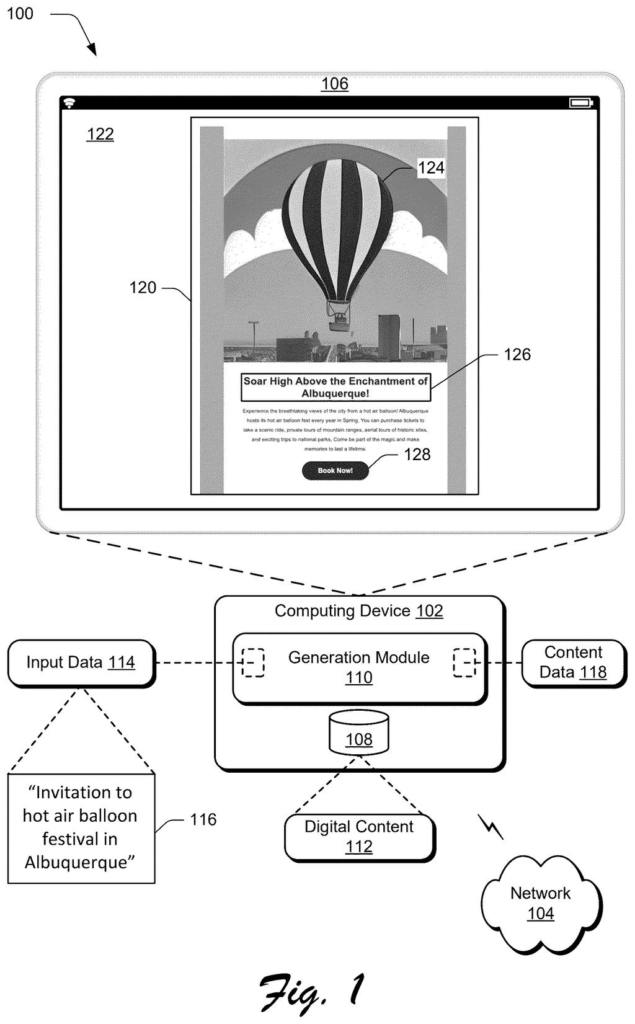
What Adobe's auto-layout content generator actually does
You're putting together a promotional banner or a social post and you have a rough idea of what you want but no time to lay it all out manually. You type something like "summer sale, bold visuals, short text" and Adobe's system takes it from there.
The system first searches a library of existing layouts to find the ones that are the closest match to what you described. It picks the best layout based on past performance data, not just guesswork. Then it uses that layout as a blueprint, passes your description through a language model to write the actual copy for each section, and finally sends that copy through a second AI model to generate the finished content pieces in the right order.
The result is a fully assembled piece of digital content built around your single input. You get a structured design with real copy, not a blank template waiting for you to fill it in.
… identifying, by the processing device, a set of a plurality of candidate layouts by comparing a vector representation of the user input in an embedding space with vector representations of candidate layouts for the digital content; …
Translation: It matches what you typed against a library of possible designs using AI math.
How the two AI models split the design and writing work
The system takes a user's plain-text description of what they want and runs it through two AI models in sequence, each doing a distinct job.
First, a layout selection step: the system converts the user's input into a numerical representation (called a vector embedding, a way of measuring how "close" two ideas are mathematically) and compares it against stored vector embeddings for known layout templates. It picks a shortlist of candidate layouts, then chooses the best one based on performance data (essentially, which layouts have worked well in the past for similar requests).
Second, a text generation step: the selected layout, a corresponding content strategy, and the original user input are all fed to a language model. That model generates structured text describing each content component (headline, subhead, call-to-action button, image caption, and so on) in the order the layout demands.
Third, a content generation step: that structured text is handed to a second generative model, which produces the actual finished components, visual or textual, in the correct sequence. The patent covers the full chain from raw user prompt to assembled, display-ready content.
The generation system generates the digital content component by processing the output text using a second machine learning model.
Translation: A second AI model builds the actual visual pieces based on the text.
What this means for people who make marketing content fast
For anyone who produces digital content at volume, like a marketing team turning around daily social posts or a small business owner who isn't a designer, the manual part of this process is the bottleneck. You usually have to pick a template, write copy to fit it, and then check that everything makes sense together. This system compresses those three steps into one.
The performance-data angle is worth paying attention to. Rather than just matching your prompt to a template that looks similar, the system is supposed to favor layouts that have actually performed well. That shifts the quality bar from "does this look right" to "does this tend to work," which is a more useful standard for anyone whose content has a concrete goal like clicks or conversions. Adobe's interest in AI-assisted content creation shows up across several recent filings, and this one adds a feedback loop that most template tools skip entirely.
Adobe's fourth filing we've tracked since July in our AI models working together watchlist, following one splitting image questions and one catching AI misreads, adds another layer to how models share work.
The practical shift here is that you stop wrestling with whether your headline will fit the space you picked. The system figures out the right structure for your content first, then writes into it, so the copy and the layout arrive as a matched pair.
For anyone who has stared at a blank template wondering why nothing looks right, that order of operations matters. The old failure, where you write something and then discover it spills awkwardly out of the design, gets cut off before it starts.
Adobe is doing real engineering work to solve a problem that slows ordinary people down every day, and the result is a smoother, faster path from "I need to make something" to a finished piece that actually holds together.
There are more where this came from
We read every patent application Big Tech publishes and send you the ones worth knowing. Plain English, free, every week.
The drawings
12 drawing sheets from US 2026/0289189 A1 · click any drawing to enlarge


Want this weekly breakdown for a company we don't cover? Patentlyze Pro →
Be the first to weigh in