
Adobe Patents an AI That Selects Photo Materials at Two Levels With One Click
Clicking on marble in a photo usually means choosing between selecting the whole surface or just the dark veins running through it. Adobe's new patent lets a single click hand you both options at once.
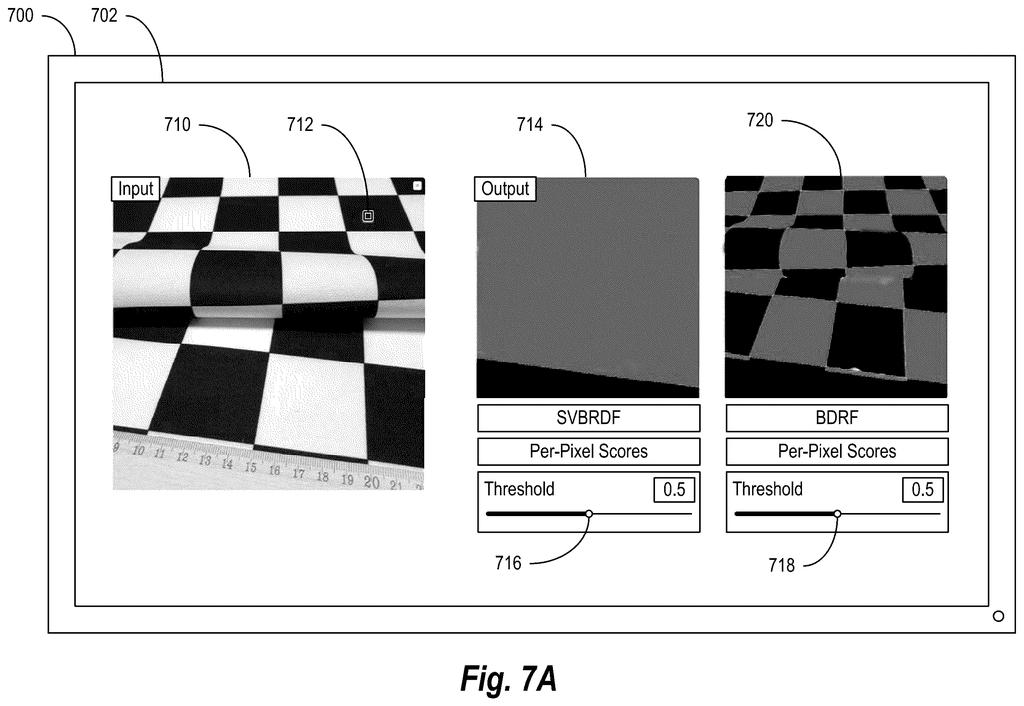
What Adobe's two-level material selection actually does
Today, selecting a material in a photo editing app is a blunt instrument. Click on a marble countertop and you get the whole slab, veins and all. If you only want the grey swirls, you have to start over with a different tool and a lot of manual brushwork.
Adobe wants to change that with a system that recognizes, in one go, that marble is a material and that its dark veining is a distinct sub-material inside it. When you click a single spot, the software offers you two ready-made selections: one that covers every marble pixel in the image, and one that isolates just the veined portion.
You choose which level of detail fits your edit. Want to swap the color of all the marble? Use the broad selection. Want to darken only the veins? Use the narrow one. The AI does the visual analysis; you just decide what to do with it.
How the neural network separates material from sub-material
The system displays a digital image through a graphical user interface and waits for the user to click a location on that image. At that click point, a material detection neural network (a type of AI trained to recognize textures and surfaces) runs two analyses in parallel.
The first analysis produces a broad material selection: every pixel in the image that belongs to the same general material class as the clicked spot, for example, all marble pixels regardless of their visual variation.
The second analysis produces a narrow sub-material selection: only the pixels that match the specific visual variant at the exact click location, for example, just the dark veining in that marble rather than the lighter background stone.
Both selections are surfaced simultaneously in the UI, giving the user a choice of operating scope without requiring a second click or a different tool. The patent covers the method, the system, and the software media that implement it, with the neural network doing the heavy lifting of distinguishing material type from material variant in a single inference pass.
What this means for photo editing and Photoshop's future
For designers and photo editors working in tools like Photoshop, material selection is one of the most time-consuming parts of compositing or retouching. A system that automatically offers two resolution levels collapses what is normally a multi-step, multi-tool workflow into a single gesture, which has real practical value for anyone editing product photography, architectural renders, or textured backgrounds.
The harder question is how well the neural network handles genuinely ambiguous cases, like a fabric with a print pattern where the boundary between "material" and "sub-material" is not obvious. Adobe's image editing patents are among this week's Big Tech patents worth watching for clues about where AI-assisted selection tools are heading across the creative software market.
That makes this Adobe filing the 26th we've tracked since May in the AI photo editing race, a group that includes their work on filling 3D model holes and scoring video edit flow.
Locking the system into exactly two selection levels (the whole material, then one layer beneath it) is a deliberate bet that most editing jobs fit that shape. For marble or fabric with a single dominant sub-texture, the bet pays off cleanly.
The cost shows up at the edges: a weathered surface with three or four overlapping textures, or iridescent material that shifts depending on the angle, may not sort neatly into two buckets. Users working with those surfaces could find the tool stops short of where they actually need to go. Still, the alternative, letting users dial in how many levels they want, adds enough friction to undermine the whole appeal of a one-click selection.
Two levels is the right default for most everyday work, and the more pressing question is whether the underlying model was trained on enough unusual textures to handle anything beyond stone and wood.
Get our take in your Top Stories
Liked this breakdown? Add Patentlyze as a preferred source on Google, and our plain-English take shows up more often in your Top Stories the next time Adobe patent news breaks.
There are more where this came from
We read every patent application Big Tech publishes and send you the ones worth knowing. Plain English, free, every week.
The drawings
16 drawing sheets from US 2026/0253406 A1 · click any drawing to enlarge


Want this weekly breakdown for a company we don't cover? Patentlyze Pro →
Be the first to weigh in