
Adobe
Adobe · Software · Filed May 15, 2025 · USPTO published Nov 19, 2026 · This week's release
Adobe Files Patent for Rainbow Text Made by Laying Colors Over Letters
Giving one word several colors in a design program usually means cutting up every letter by hand. Adobe's patent application describes a shortcut: lay a colored shape over the text and let the software do the painting.
- Publication number
- US 2026/0368955 A1(US20260368955A1)
- Applicant
- Adobe Inc.
- Filed · Published
- May 15, 2025 · Nov 19, 2026
- Inventors
- Vinod Kumar Gambhir, Manojkumar Santubhai Jain
- Status when we published
- Examiner raised objections; the company can respond
- Document
- 20 claims
- US classification
- 345/594
- Examiner
- LE, MICHAEL (Art Unit 2614)
What Adobe's color-effects patent actually does
Every time you try to give a single word more than one color in a design program, you end up slicing it into pieces and lining up the colors by hand. Change your mind about a shade later, and you often start over.
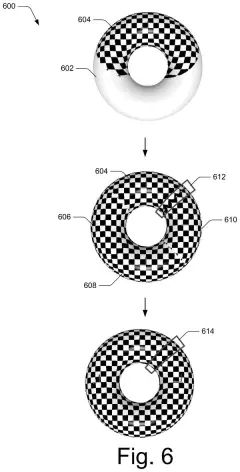
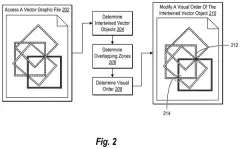
Adobe's patent application describes a shortcut. You make your word, then draw a separate shape on top of it, such as a square split into five colored stripes. The software works out where the two overlap and paints the letters with the colors sitting above them, so you get a rainbow word without cutting anything.
The two pieces stay linked. Move the stripes, swap a color, or edit the text, and the colored result updates itself. The filing's own example is a café owner who spends over an hour fighting a 'good vibes' rainbow and finally gives up.
determining, by a processing device, an overlap region of a first artwork and a second artwork, the first artwork including one or more color effects and positioned to intersect at least a portion of the second artwork …
Translation: The software finds where the colorful design crosses over the text or shapes beneath it.
How Adobe finds where the colors meet the letters
The claims cover a simple setup with two pieces of artwork. The first artwork (called the source) carries the colors or other visual effects. It is positioned over a second artwork (called the target), such as lettering. The software finds the overlap, builds a version of the source pieces that lines up with the target, and produces a modified target that carries the colors.
To find the overlap, the system uses a path intersection tool (a drawing-program feature that detects where two outlines cross). It marks segmentation points, which are dots along the crossing edges, and stores them with the matching regions. Those points slice both artworks into segments.
Then each piece gets placed:
- Reference points in the target act as anchors for where each segment goes.
- Each segment is positioned, and can be scaled or rotated to fit its matching segment.
- The filing describes simple matrix math (a small grid of numbers that stretches, turns or shifts coordinates) for this step.
The source and target are also tied together by a constraint, a saved link between them. Several sources can be grouped with several targets, and editing any one of them updates the result automatically. In one example, the segmentation points show up as handles a designer can drag, such as widening a fir tree so it fills more of the word 'Christmas.'
… generates a transformed region of the first artwork to align with the corresponding region of the second artwork …
Translation: It reshapes the color effect so it fits precisely onto the letters or shapes it is covering.
Why this matters for anyone designing a flyer
If you make flyers, holiday cards or social posts, multicolor text is a common wish and a common headache. The filing describes a version where colors live in a separate layer you can reshape at any time, so trying a new look takes a drag instead of a redo. It names graphics applications, including vector graphics apps, as the setting.
That is a small convenience, not a new kind of art tool. Where it ends up depends on Adobe's product choices, and the examiner's first review rejected the claims as filed, which is routine at this stage and usually followed by amendments.
That makes this Adobe application the 268th we've tracked in our Adobe coverage since May, adding to work like the letter-styling filing and the face-and-outfit one.
Source: US 2026/0368955 A1 at the USPTO (PDF). Full patent text and figures are in the official publication.
Get our take in your Top Stories
Liked this breakdown? Add Patentlyze as a preferred source on Google, and our plain-English take shows up more often in your Top Stories the next time Adobe patent news breaks.
Add Patentlyze on Google
One click.
There are more where this came from
We read every patent application Big Tech publishes and send you the ones worth knowing. Plain English, free, every week.
The drawings · 9 sheets
9 drawing sheets from US 2026/0368955 A1 · click any drawing to enlarge


Show the other 1 sheets

More from Adobe
All 270 Adobe patents →
More in Software
All 814 Software patents →
Sony
Sony Patents a System That Reads On-Screen Text So You Don't Have To
Microsoft
Microsoft Wins a Patent for Picking the Best Shortcuts to Search Text and Images Together
IBM
IBM Files Patent to Swap Blurry Screen Shares for Readable Text When Your Connection Drops
Sony
No comments yet