
Adobe Files Patent to Turn Emails From Other Tools Into Editable Pieces
Email built in someone else's tool is usually a locked tangle of code. Adobe's filing describes software that reads that tangle, figures out which part is a button, and hands you something you can click and edit.
What Adobe's email-converting patent does
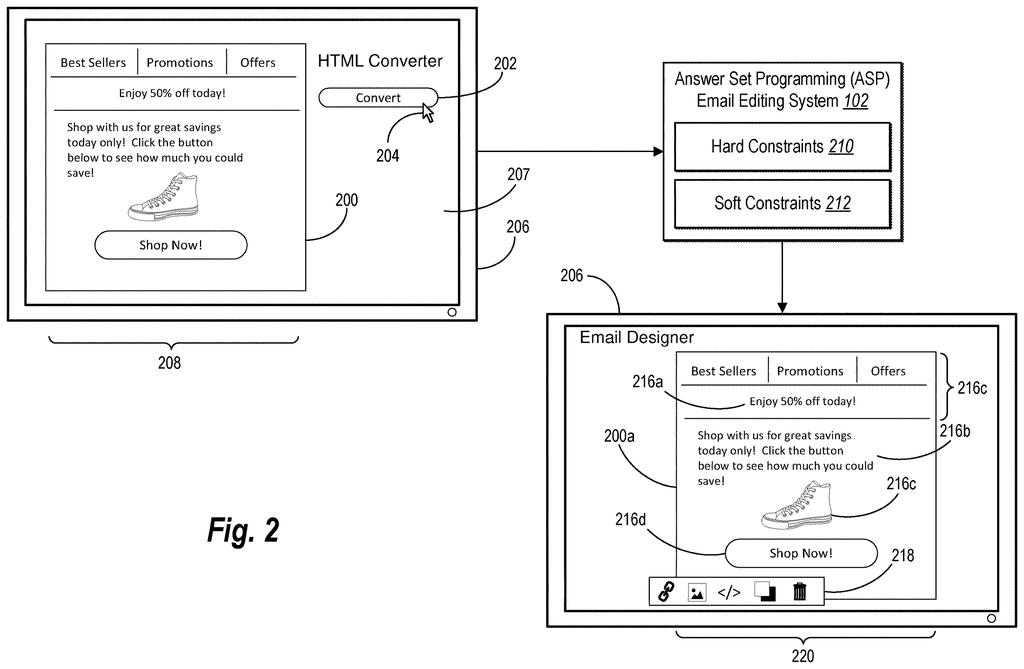
A designer opens a holiday sale email that was built in someone else's email tool. It looks fine on screen, but underneath it's a pile of code, and the editor can't tell which part is a button, which is a headline, and which is a photo. If you've ever tried to tweak a file that came from a different program, you know the feeling.
Adobe's filing describes a way for its email software to work that out on its own. First it splits the email into rows and columns using strict layout rules, such as no two rows can overlap. Then it scores each piece against weighted hints: several images in one spot point toward a slideshow-style carousel, while a link with light-colored text points toward a button.
The weights are learned from past emails instead of tuned by hand, yet the rules stay readable. Once a piece is labeled, you get the right tools for it, like font options for text or cropping for images.
generating a set of Answer Set Programming (ASP) soft constraints of an ASP model for detecting email component elements in one or more email files; …
Translation: The system sets up logical rules to identify different parts of an email.
How Adobe sorts email pieces by weighted hints
The claims center on training. The system starts with a set of soft constraints: weighted rules that tie one feature of an email piece (say, more than one image) to one possible type (say, a carousel). It receives training samples, meaning email fragments, their features, and the correct labels. Then it adjusts each weight with gradient descent (a method that nudges numbers a little at a time to cut errors) until its guesses match the right answers.
Before any labeling, the system turns an email's code into simple facts such as width, height, font size and tag type. It reads them from the style sheet, from a browser rendering, or with computer vision software (programs that analyze the picture of the email). Those facts feed Answer Set Programming (ASP), a rule-based method that searches for answers fitting a set of constraints.
Hard constraints are the strict rules used to find rows and columns: no overlapping rows, and each item belongs to only one row. Soft constraints then total up the weights for each type. In the filing's sample, the weight for a link feature on buttons moved from -1 to -26 after training.
Last, the system swaps the labels from the original tool for ones a second email editing application understands, and shows editing options that match each type.
… determine rows or columns defining cells of the email file utilizing ASP hard constraints defined by a first set of ASP atoms corresponding to the facts.
Translation: It figures out the layout structure like rows and columns using strict logical rules.
Why email teams switching tools should care
If your team ever moves from one email tool to another, old templates are the headache. This approach would let Adobe's software import an email from a competing tool and break it into pieces you can edit, so you don't rebuild it from scratch. The filing names Adobe Experience Cloud and Journey Optimizer as software it can work with.
Adobe also pitches speed and clarity. It reports processing almost 1000 emails in under 15 seconds, and says training lifted accuracy on some component types from 25% to 88% over hand-set weights. Because the rules are readable, a developer can see why a piece was labeled a button and adjust it.
That makes this Adobe's 230th filing in our Adobe coverage since May, a set that includes applications on reading actions in compressed video and previewing email version splits.
If you work in email marketing, the benefit is plain: a template an agency or colleague built in another tool opens as separate pieces you can click and change, instead of a locked block of code. You would notice it the first time you import something and it simply works.
For everyone else, there is little to see. The emails you receive look identical either way. The readable rules mostly help the people maintaining the system: when it mislabels a button, a developer can read why and adjust a rule.
The open question is how well the labeling holds up on messy real-world emails. The 88% figure covers only some component types, so expect some manual cleanup.
Get our take in your Top Stories
Liked this breakdown? Add Patentlyze as a preferred source on Google, and our plain-English take shows up more often in your Top Stories the next time Adobe patent news breaks.
There are more where this came from
We read every patent application Big Tech publishes and send you the ones worth knowing. Plain English, free, every week.
The drawings
12 drawing sheets from US 2026/0342758 A1 · click any drawing to enlarge


Show the other 4 sheets


Want this weekly breakdown for a company we don't cover? Patentlyze Pro →
Be the first to weigh in