Get the newsletter
Apple · Software · Filed May 15, 2026 · USPTO published Nov 19, 2026 · This week's release

Apple Patents a Browser That Sorts Your Open Tabs Into Groups Without Being Asked

Your tab bar could tidy itself: Apple's new patent describes a browser that spots related tabs and bundles them into a group without you touching a menu. A language model can even write the group's name.
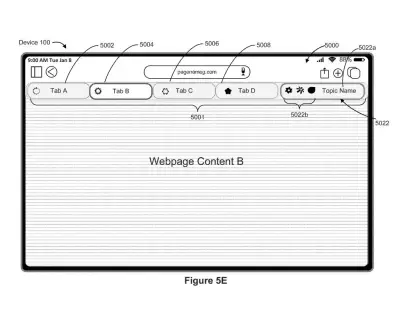
A tablet web browser groups related open web pages into a single labeled topic tab to reduce clutter. Drawing from patent filing US 2026/0367762 A1.
A tablet web browser groups related open web pages into a single labeled topic tab to reduce clutter.All 70 drawings ↓
Publication number
US 2026/0367762 A1(US20260367762A1)
Applicant
Apple Inc.
Filed · Published
May 15, 2026 · Nov 19, 2026
Inventors
Jonathan R. DASCOLA
Status when we published
Waiting for an examiner
Document
26 claims
US classification
715/765
Parent application
Claims priority from a provisional application 63807370 (filed May 16, 2025)

What Apple's self-sorting browser tabs actually do

You're looking for the one recipe tab you opened an hour ago, but your tab bar is a row of tiny slivers with no readable names. You squint, click the wrong one, and start over.

Apple's patent filing describes a browser that tidies this up on its own. When you open a new page, close a tab, or click a link, the browser checks whether some of your tabs are about the same thing. If they are, it bundles them into a tab group, shown as one container, and can slide the related tabs next to each other.

When you click away, the group shrinks into a single labeled tab, and a language model (an AI that writes text) can come up with the name. Click it again and the tabs spread back out. You never open a menu or pick tabs by hand.

From the filing · CLAIM 1
… automatically displaying, via the display generation component, an indication of a system-generated grouping, in one or more system-generated tab groups, of a subset of the plurality of tabs.

Translation: The browser sorts your open tabs into organized groups on its own.

How the browser decides which tabs belong together

The browser shows a normal row of tabs. It then watches for a tab-usage event, meaning something you do to your tabs: opening a new one, closing one, editing them, clicking a link that loads a new page, or switching from one tab to another. When one of those happens and grouping criteria (the rules for deciding which tabs belong together) are met, the browser automatically shows a system-generated group covering some of your tabs.

The filing lists several ways to judge that. Rules can compare page content, such as topic and title similarity. Trained machine learning models (software that learns patterns from examples) can guess whether you are shopping or researching. Other rules look at tabs opened from the same parent tab, tabs opened within a few minutes of each other, or tabs on the same website. A minimum number of related tabs can be required.

Once a group forms, the filing describes several behaviors:

  • Tabs merge into one container tab, which can be highlighted when it first appears.
  • Related tabs can slide next to each other with an animation, right away or after the tabs sit idle for a set time.
  • A control can let you accept the grouping, or only preview a suggested one without moving anything.
  • A new tab opens after the last tab in the active group, then can jump to another group if it fits better.
  • Clicking away collapses a group into a labeled tab, and a language model can write the label.

Why a self-tidying tab bar could change browsing

If you keep dozens of tabs open, this could save you the chore of sorting them. The browser does the tidying when you open, close or switch tabs, so you never hunt through menus to build a group. Because related tabs collapse into one labeled tab, a crowded tab bar on a phone screen could shrink to a handful of items you can actually read.

For Apple, the filing shows effort to make the browser feel organized without adding more buttons. The description says automatic grouping cuts the number of inputs and keeps the screen uncluttered, and it names iPhone, iPad and desktop computers as possible devices. It is a patent application, so nothing here says when, or whether, you would see it.

That makes this Apple's 733rd filing we've tracked in our Apple coverage since May, adding to work like the pinch gesture tweak and self-sorting browser tabs.

Source: US 2026/0367762 A1 at the USPTO (PDF). Full patent text and figures are in the official publication.

Get our take in your Top Stories

Liked this breakdown? Add Patentlyze as a preferred source on Google, and our plain-English take shows up more often in your Top Stories the next time Apple patent news breaks.

There are more where this came from

We read every patent application Big Tech publishes and send you the ones worth knowing. Plain English, free, every week.

The drawings · 70 sheets

70 drawing sheets from US 2026/0367762 A1 · click any drawing to enlarge

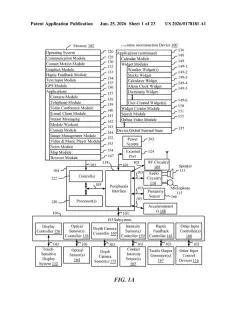
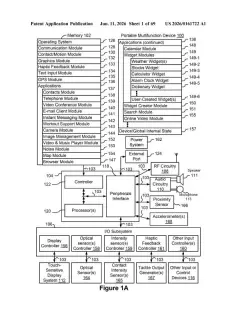
Hardware parts inside a touchscreen phone that run the browser, drawing sheet 1 from US 2026/0367762 A1
Sheet 1 Hardware parts inside a touchscreen phone that run the browser
Parts that send screen taps to apps, drawing sheet 2 from US 2026/0367762 A1
Sheet 2 Parts that send screen taps to apps
A smartphone screen sensing touches from fingers and a stylus, drawing sheet 3 from US 2026/0367762 A1
Sheet 3 A smartphone screen sensing touches from fingers and a stylus
Computer components that support touchpads, mice, and web apps, drawing sheet 4 from US 2026/0367762 A1
Sheet 4 Computer components that support touchpads, mice, and web apps
An app sharing collected details with the system, drawing sheet 5 from US 2026/0367762 A1
Sheet 5 An app sharing collected details with the system
An app taking action directly after gathering information, drawing sheet 6 from US 2026/0367762 A1
Sheet 6 An app taking action directly after gathering information
Links that let an app reach system tools, drawing sheet 7 from US 2026/0367762 A1
Sheet 7 Links that let an app reach system tools
How an app requests tasks from the operating system, drawing sheet 8 from US 2026/0367762 A1
Sheet 8 How an app requests tasks from the operating system
Show the other 52 sheets
Software parts trading data to complete a task, drawing sheet 9 from US 2026/0367762 A1
Sheet 9 Software parts trading data to complete a task
Home screen layout for launching mobile apps, drawing sheet 10 from US 2026/0367762 A1
Sheet 10 Home screen layout for launching mobile apps
Moving fingers apart on a trackpad to zoom in, drawing sheet 11 from US 2026/0367762 A1
Sheet 11 Moving fingers apart on a trackpad to zoom in
Browser start screen showing open tabs and bookmarked sites, drawing sheet 12 from US 2026/0367762 A1
Sheet 12 Browser start screen showing open tabs and bookmarked sites
Loading a new webpage alongside existing tabs, drawing sheet 13 from US 2026/0367762 A1
Sheet 13 Loading a new webpage alongside existing tabs
Automatically splitting open tabs into two separate clusters, drawing sheet 14 from US 2026/0367762 A1
Sheet 14 Automatically splitting open tabs into two separate clusters
Tapping an inactive tab in the first group, drawing sheet 15 from US 2026/0367762 A1
Sheet 15 Tapping an inactive tab in the first group
Collapsing grouped tabs under a single shared topic name, drawing sheet 16 from US 2026/0367762 A1
Sheet 16 Collapsing grouped tabs under a single shared topic name
Tapping the collapsed group expands its related webpages, drawing sheet 17 from US 2026/0367762 A1
Sheet 17 Tapping the collapsed group expands its related webpages
Selecting the collapsed group dims the current page, drawing sheet 18 from US 2026/0367762 A1
Sheet 18 Selecting the collapsed group dims the current page
Expanding the second group reveals its individual tabs, drawing sheet 19 from US 2026/0367762 A1
Sheet 19 Expanding the second group reveals its individual tabs
Choosing a tab within the expanded group opens it, drawing sheet 20 from US 2026/0367762 A1
Sheet 20 Choosing a tab within the expanded group opens it
Merging all tabs into one row when space permits, drawing sheet 21 from US 2026/0367762 A1
Sheet 21 Merging all tabs into one row when space permits
Isolating an ungrouped tab away from sorted clusters, drawing sheet 22 from US 2026/0367762 A1
Sheet 22 Isolating an ungrouped tab away from sorted clusters
Tucking inactive tabs into a background layer, drawing sheet 23 from US 2026/0367762 A1
Sheet 23 Tucking inactive tabs into a background layer
Shifting background tabs behind active browsing tabs, drawing sheet 24 from US 2026/0367762 A1
Sheet 24 Shifting background tabs behind active browsing tabs
Moving extra open tabs alongside an existing tab group, drawing sheet 25 from US 2026/0367762 A1
Sheet 25 Moving extra open tabs alongside an existing tab group
Merging loose tabs into a new cluster, drawing sheet 26 from US 2026/0367762 A1
Sheet 26 Merging loose tabs into a new cluster
Naming tab collections based on the topics of their pages, drawing sheet 27 from US 2026/0367762 A1
Sheet 27 Naming tab collections based on the topics of their pages
Opening a start page while grouped tabs stay organized, drawing sheet 28 from US 2026/0367762 A1
Sheet 28 Opening a start page while grouped tabs stay organized
Loading a recipe tab beside unrelated active groups, drawing sheet 29 from US 2026/0367762 A1
Sheet 29 Loading a recipe tab beside unrelated active groups
Collapsing a hotel group to make room for new pages, drawing sheet 30 from US 2026/0367762 A1
Sheet 30 Collapsing a hotel group to make room for new pages
Expanding the recipe group to reveal every saved page inside, drawing sheet 31 from US 2026/0367762 A1
Sheet 31 Expanding the recipe group to reveal every saved page inside
Adding a matching recipe tab directly into that group, drawing sheet 32 from US 2026/0367762 A1
Sheet 32 Adding a matching recipe tab directly into that group
Selecting an email tab from inside an expanded hotel group, drawing sheet 33 from US 2026/0367762 A1
Sheet 33 Selecting an email tab from inside an expanded hotel group
Collapsing hotel tabs into a single button after switching topics, drawing sheet 34 from US 2026/0367762 A1
Sheet 34 Collapsing hotel tabs into a single button after switching topics
Browsing a related web page alongside ungrouped tabs, drawing sheet 35 from US 2026/0367762 A1
Sheet 35 Browsing a related web page alongside ungrouped tabs
Grouping related nightlife pages together with an overflow count, drawing sheet 36 from US 2026/0367762 A1
Sheet 36 Grouping related nightlife pages together with an overflow count
Hiding an unrelated tab to make room for active links, drawing sheet 37 from US 2026/0367762 A1
Sheet 37 Hiding an unrelated tab to make room for active links
Moving the active tab bar into a unified cluster, drawing sheet 38 from US 2026/0367762 A1
Sheet 38 Moving the active tab bar into a unified cluster
Shifting unrelated pages back to the side of the group, drawing sheet 39 from US 2026/0367762 A1
Sheet 39 Shifting unrelated pages back to the side of the group
Confirming the automatically assembled group of pages, drawing sheet 40 from US 2026/0367762 A1
Sheet 40 Confirming the automatically assembled group of pages
Prompting the user to bundle related bar tabs together, drawing sheet 41 from US 2026/0367762 A1
Sheet 41 Prompting the user to bundle related bar tabs together
Reordering the tab bar to keep related pages adjacent, drawing sheet 42 from US 2026/0367762 A1
Sheet 42 Reordering the tab bar to keep related pages adjacent
Opening a start page showing frequently visited sites, drawing sheet 43 from US 2026/0367762 A1
Sheet 43 Opening a start page showing frequently visited sites
Choosing whether to group tabs automatically while browsing, drawing sheet 44 from US 2026/0367762 A1
Sheet 44 Choosing whether to group tabs automatically while browsing
How the browser detects tab activity and clusters related pages, drawing sheet 45 from US 2026/0367762 A1
Sheet 45 How the browser detects tab activity and clusters related pages
Showing multiple open tabs on a desktop web browser, drawing sheet 46 from US 2026/0367762 A1
Sheet 46 Showing multiple open tabs on a desktop web browser
Suggesting a named group for sports tabs you have open, drawing sheet 47 from US 2026/0367762 A1
Sheet 47 Suggesting a named group for sports tabs you have open
Managing a newly created tab group from a contextual menu, drawing sheet 48 from US 2026/0367762 A1
Sheet 48 Managing a newly created tab group from a contextual menu
Menu options for setting how tabs get organized, drawing sheet 49 from US 2026/0367762 A1
Sheet 49 Menu options for setting how tabs get organized
Tapping the button to open a new tab, drawing sheet 50 from US 2026/0367762 A1
Sheet 50 Tapping the button to open a new tab
Choosing a saved bookmark from the start page, drawing sheet 51 from US 2026/0367762 A1
Sheet 51 Choosing a saved bookmark from the start page
Opening a recipe page outside of the sports group, drawing sheet 52 from US 2026/0367762 A1
Sheet 52 Opening a recipe page outside of the sports group
Collapsing the sports tab cluster into a single button, drawing sheet 53 from US 2026/0367762 A1
Sheet 53 Collapsing the sports tab cluster into a single button
Typing a new address to search for football gear, drawing sheet 54 from US 2026/0367762 A1
Sheet 54 Typing a new address to search for football gear
Loading a sports shop page as an unorganized tab, drawing sheet 55 from US 2026/0367762 A1
Sheet 55 Loading a sports shop page as an unorganized tab
Merging the sports gear tab into the sports cluster, drawing sheet 56 from US 2026/0367762 A1
Sheet 56 Merging the sports gear tab into the sports cluster
Tapping the share button on an active webpage, drawing sheet 57 from US 2026/0367762 A1
Sheet 57 Tapping the share button on an active webpage
Selecting a bookmark from the browser start page, drawing sheet 58 from US 2026/0367762 A1
Sheet 58 Selecting a bookmark from the browser start page
Opening a weather page inside an existing tab group, drawing sheet 59 from US 2026/0367762 A1
Sheet 59 Opening a weather page inside an existing tab group
Reorganizing open tabs automatically into a weather group, drawing sheet 60 from US 2026/0367762 A1
Sheet 60 Reorganizing open tabs automatically into a weather group

Sheets 61 to 70 are in the full USPTO filing.

Patent filing page

Reader comments

No comments yet

Start the discussion

Real name or a handle, either is fine. Comments are read by a person before they appear, so allow a little time. Keep it about the filing.