Get the newsletter
Apple · AR / VR · Filed Jul 24, 2026 · USPTO published Nov 19, 2026 · This week's release

Apple Patents a Hand Gesture to Fine-Tune Where Your Pinch Lands in a Headset

Looking at something in a headset is easy. Looking at exactly the right spot on it is harder. Apple's filing describes a finger gesture that locks in where you were looking, then lets your hand slide the selection point into place before you pinch.
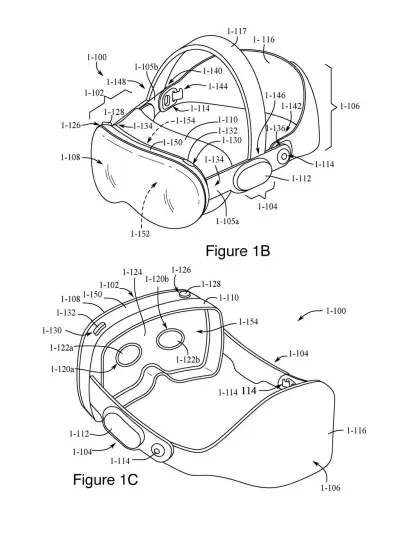
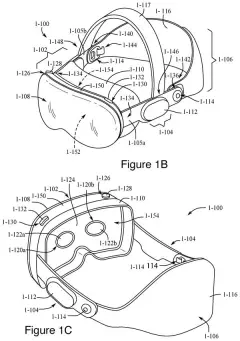
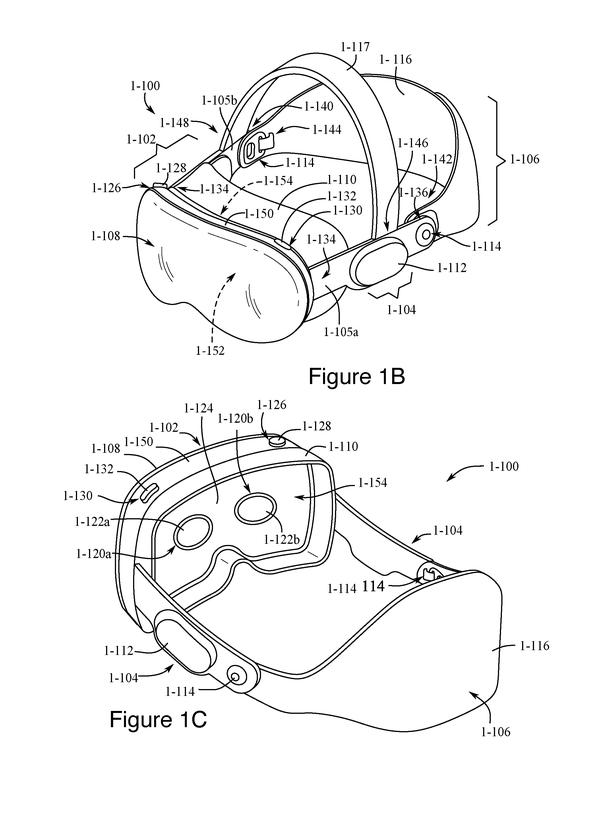
An Apple mixed reality headset viewed from the front and back, complete with lenses, sensors, and an adjustable strap. Drawing from patent filing US 2026/0367771 A1.
An Apple mixed reality headset viewed from the front and back, complete with lenses, sensors, and an adjustable strap.All 48 drawings ↓
Publication number
US 2026/0367771 A1(US20260367771A1)
Applicant
Apple Inc.
Filed · Published
Jul 24, 2026 · Nov 19, 2026
Inventors
Daniel J. BREWER, Julian K. SHUTZBERG, Chase B. LORTIE, David J. MEYER
Status when we published
Waiting for an examiner
Document
26 claims
US classification
715/849
Parent application
Continuation of 18/472,073 (filed Sep 21, 2023)(18472073)

What Apple's nudge-your-pinch gesture does

Today, picking something in a headset usually means looking at it and pinching your fingers. Your eyes choose the target, so when the target is tiny or crowded, like one word in a paragraph, the pinch can land a little off.

Apple's filing describes a second, separate hand gesture that works like a fine-tuning dial. Make it while looking at something, and a small marker appears right where your attention was. From there, your eyes stop steering. Moving your hand slides the marker around instead.

When the marker sits where you want it, you pinch, and the pinch applies to that exact spot. The filing also describes a short time limit after you release the gesture, so a late, stray pinch doesn't count.

From the filing · THE ABSTRACT
… facilitates user input for displaying a selection refinement user interface object in an object within a three-dimensional environment, wherein the selection refinement user interface object indicates a location in the object at which the computer system performs a selection operation in response to further user input.

Translation: It shows a visual marker to help users pick tiny targets in 3D space.

How the hand takes over from your eyes

The claims cover a method, with matching system and storage-medium versions, for refining where a selection lands on something displayed in a 3D environment. The headset detects a first hand input (the first type) while your attention is on a spot in an object. It then turns on a selection refinement mode, which pins the interaction point (the spot where your next action will land) to that location.

From there, the steps run like this:

  • Activate: an air gesture (a hand movement made in open space and picked up by cameras, with no touching). The claims give examples such as fingers held in a set shape and then curled toward the palm, or one finger sliding against another while they touch.
  • Adjust: moving your hand moves the interaction point to a new spot in the object, and a marker shows where it is. If your hand drifts past the object's edge, the point stays inside the object.
  • Confirm: a second, different input, such as an air pinch, performs the action at the new spot.
  • Exit: ending the first gesture, or doing it again in the opposite direction, switches the mode off.

While the mode is on, glancing around inside the same object does not drag the point away; only your hand moves it. Looking at a different object moves the point there instead. Outside the mode, a plain pinch still selects wherever you are looking.

Why headset selection needs a finer touch

If you've used a look-and-pinch headset, you know the tradeoff: eyes are fast but fuzzy. A refinement gesture would matter most for small jobs like placing a text cursor, picking a single word, or hitting a tiny control, where a near miss means undoing and trying again. The filing says approaches like this cut the number of inputs and avoid cluttering the screen with extra on-screen controls.

The filing is a continuation of an application first filed in 2023, and it treats the hand gestures as one option among several. It notes that a button press or a touch on a handheld controller could stand in for them. As with any patent application, nothing here says when or whether it ships in a product.

This is the 55th Apple filing we've tracked since May on eye and hand controls, building on floating 3D assistant and pinch-and-drag grouping.

Source: US 2026/0367771 A1 at the USPTO (PDF). Full patent text and figures are in the official publication.

Get our take in your Top Stories

Liked this breakdown? Add Patentlyze as a preferred source on Google, and our plain-English take shows up more often in your Top Stories the next time Apple patent news breaks.

There are more where this came from

We read every patent application Big Tech publishes and send you the ones worth knowing. Plain English, free, every week.

The drawings · 48 sheets

48 drawing sheets from US 2026/0367771 A1 · click any drawing to enlarge

A person holding a handheld device in a physical room, drawing sheet 1 from US 2026/0367771 A1
Sheet 1 A person holding a handheld device in a physical room
Front and inner views of the mixed reality headset, drawing sheet 2 from US 2026/0367771 A1
Sheet 2 Front and inner views of the mixed reality headset
Detachable headband, light seal, and lenses for the headset, drawing sheet 3 from US 2026/0367771 A1
Sheet 3 Detachable headband, light seal, and lenses for the headset
Internal display and frame components layered inside the headset, drawing sheet 4 from US 2026/0367771 A1
Sheet 4 Internal display and frame components layered inside the headset
Inside parts including the sensors and lenses, drawing sheet 5 from US 2026/0367771 A1
Sheet 5 Inside parts including the sensors and lenses
Front glass cover with openings for tracking cameras, drawing sheet 6 from US 2026/0367771 A1
Sheet 6 Front glass cover with openings for tracking cameras
Exploded assembly showing how the outward display attaches, drawing sheet 7 from US 2026/0367771 A1
Sheet 7 Exploded assembly showing how the outward display attaches
External sensor and camera layouts across the headset visor, drawing sheet 8 from US 2026/0367771 A1
Sheet 8 External sensor and camera layouts across the headset visor
Show the other 40 sheets
Front and bottom views of sensor arrays on a headset, drawing sheet 9 from US 2026/0367771 A1
Sheet 9 Front and bottom views of sensor arrays on a headset
Internal motorized lens adjusters and structural frames inside a headset, drawing sheet 10 from US 2026/0367771 A1
Sheet 10 Internal motorized lens adjusters and structural frames inside a headset
Individual lens housing showing built in eye cameras and displays, drawing sheet 11 from US 2026/0367771 A1
Sheet 11 Individual lens housing showing built in eye cameras and displays
Core computing chips and memory handling hand and eye tracking, drawing sheet 12 from US 2026/0367771 A1
Sheet 12 Core computing chips and memory handling hand and eye tracking
Internal parts managing virtual screen rendering and outward cameras, drawing sheet 13 from US 2026/0367771 A1
Sheet 13 Internal parts managing virtual screen rendering and outward cameras
Desk camera turning hand gestures into virtual hands, drawing sheet 14 from US 2026/0367771 A1
Sheet 14 Desk camera turning hand gestures into virtual hands
Infrared lights and cameras positioned to monitor a wearer's eyes, drawing sheet 15 from US 2026/0367771 A1
Sheet 15 Infrared lights and cameras positioned to monitor a wearer's eyes
How the headset follows eye glints to calculate gaze direction, drawing sheet 16 from US 2026/0367771 A1
Sheet 16 How the headset follows eye glints to calculate gaze direction
Looking at two apps while holding hands ready to gesture, drawing sheet 17 from US 2026/0367771 A1
Sheet 17 Looking at two apps while holding hands ready to gesture
Lowering an index finger to target an on-screen link, drawing sheet 18 from US 2026/0367771 A1
Sheet 18 Lowering an index finger to target an on-screen link
Holding the pinch gesture reveals a precise targeting cursor, drawing sheet 19 from US 2026/0367771 A1
Sheet 19 Holding the pinch gesture reveals a precise targeting cursor
Wearing a headset while using the precise pinch gesture, drawing sheet 20 from US 2026/0367771 A1
Sheet 20 Wearing a headset while using the precise pinch gesture
Raising the finger confirms the chosen link and opens it, drawing sheet 21 from US 2026/0367771 A1
Sheet 21 Raising the finger confirms the chosen link and opens it
Scrolling a loaded web page using a hand gesture, drawing sheet 22 from US 2026/0367771 A1
Sheet 22 Scrolling a loaded web page using a hand gesture
Choosing to select directly or show a target cursor, drawing sheet 23 from US 2026/0367771 A1
Sheet 23 Choosing to select directly or show a target cursor
Checking how you adjust your mid-air pinch before letting go, drawing sheet 24 from US 2026/0367771 A1
Sheet 24 Checking how you adjust your mid-air pinch before letting go
Rules for detecting fingers pulling into your palm, drawing sheet 25 from US 2026/0367771 A1
Sheet 25 Rules for detecting fingers pulling into your palm
Moving your hand to drag and release an item, drawing sheet 26 from US 2026/0367771 A1
Sheet 26 Moving your hand to drag and release an item
Distinguishing a standard pinch from a clicker pose, drawing sheet 27 from US 2026/0367771 A1
Sheet 27 Distinguishing a standard pinch from a clicker pose
Angles and finger positions that define the clicker pose, drawing sheet 28 from US 2026/0367771 A1
Sheet 28 Angles and finger positions that define the clicker pose
Scrolling an item instead of opening the targeting tool, drawing sheet 29 from US 2026/0367771 A1
Sheet 29 Scrolling an item instead of opening the targeting tool
Placing and moving the targeting pointer with your hand, drawing sheet 30 from US 2026/0367771 A1
Sheet 30 Placing and moving the targeting pointer with your hand
Changing visual feedback as your fingers complete a pinch, drawing sheet 31 from US 2026/0367771 A1
Sheet 31 Changing visual feedback as your fingers complete a pinch
Showing a cursor or highlight to refine a pick, drawing sheet 32 from US 2026/0367771 A1
Sheet 32 Showing a cursor or highlight to refine a pick
Tracking where your eyes look across multiple virtual windows, drawing sheet 33 from US 2026/0367771 A1
Sheet 33 Tracking where your eyes look across multiple virtual windows
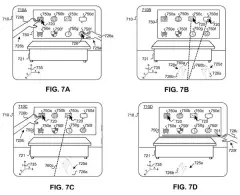
Moving a hand activates fine-tuning for your target window, drawing sheet 34 from US 2026/0367771 A1
Sheet 34 Moving a hand activates fine-tuning for your target window
Inside the headset view during two-handed gesture targeting, drawing sheet 35 from US 2026/0367771 A1
Sheet 35 Inside the headset view during two-handed gesture targeting
Shifting your gaze while keeping your hand positioned to aim, drawing sheet 36 from US 2026/0367771 A1
Sheet 36 Shifting your gaze while keeping your hand positioned to aim
Finger gestures nudge the selection point onto small buttons, drawing sheet 37 from US 2026/0367771 A1
Sheet 37 Finger gestures nudge the selection point onto small buttons
Completing a selection opens content in another window, drawing sheet 38 from US 2026/0367771 A1
Sheet 38 Completing a selection opens content in another window
How the system switches into precision targeting mode, drawing sheet 39 from US 2026/0367771 A1
Sheet 39 How the system switches into precision targeting mode
Distinguishing air gestures from a final pinch click, drawing sheet 40 from US 2026/0367771 A1
Sheet 40 Distinguishing air gestures from a final pinch click
Timing rules for triggering actions after adjusting a selection, drawing sheet 41 from US 2026/0367771 A1
Sheet 41 Timing rules for triggering actions after adjusting a selection
How moving your hand keeps an on-screen cursor within bounds, drawing sheet 42 from US 2026/0367771 A1
Sheet 42 How moving your hand keeps an on-screen cursor within bounds
Moving your gaze jumps the selector to another item, drawing sheet 43 from US 2026/0367771 A1
Sheet 43 Moving your gaze jumps the selector to another item
Letting hand movement override gaze drift while fine-tuning, drawing sheet 44 from US 2026/0367771 A1
Sheet 44 Letting hand movement override gaze drift while fine-tuning
Recognizing specific finger poses that enter precision mode, drawing sheet 45 from US 2026/0367771 A1
Sheet 45 Recognizing specific finger poses that enter precision mode
Detecting fingers rubbing together to trigger fine control, drawing sheet 46 from US 2026/0367771 A1
Sheet 46 Detecting fingers rubbing together to trigger fine control
Reversing a finger slide to exit precision mode, drawing sheet 47 from US 2026/0367771 A1
Sheet 47 Reversing a finger slide to exit precision mode
Ending precision mode when your fingers release or tap again, drawing sheet 48 from US 2026/0367771 A1
Sheet 48 Ending precision mode when your fingers release or tap again
Patent filing page

Watchlists this filing belongs to

All watchlists →
Reader comments

No comments yet

Start the discussion

Real name or a handle, either is fine. Comments are read by a person before they appear, so allow a little time. Keep it about the filing.