
Apple
Apple · Software · Filed Nov 14, 2025 · USPTO published Nov 19, 2026 · This week's release
Apple Patents a Callback Reminder Built Into Your Phone's Recent Calls List
You missed a call and told yourself you'd ring back later. Apple's patent turns that good intention into a reminder that lives right inside your call history.
- Publication number
- US 2026/0367940 A1(US20260367940A1)
- Applicant
- Apple Inc.
- Filed · Published
- Nov 14, 2025 · Nov 19, 2026
- Inventors
- Bryn BOWMAN, Jae Woo CHANG, Dominic DAVIES, Jarrett A. FORD, Tara MANN, Gabriella ROSSI
- Status when we published
- Waiting for an examiner
- Document
- 25 claims
- US classification
- 715/764
- Parent application
- Claims priority from a provisional application 63807177 (filed May 16, 2025)
What Apple's callback reminder actually does
A missed call sits in your phone's Recents list, with a voicemail transcript underneath: “Calling to see if you're free this Sunday.” You mean to call back. Then the day gets busy, and the call slides down the list under newer ones.
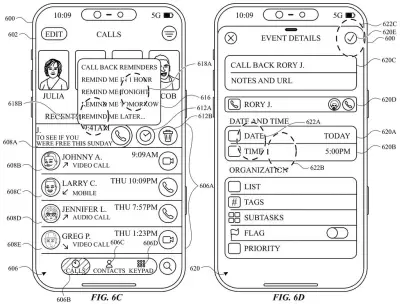
This Apple patent adds a reminder option right there. Swipe the call to the left, and a clock button and a trash button appear. Tap the clock, pick a time, and the call gets a reminder that shows up in its own section at the top of the same screen, apart from your regular call history.
Tap the reminder later and you can call the person back. And if you reach out some other way first, the reminder can mark itself done and disappear, so you aren't nagged about a call you already made.
… selecting a representation of a particular communication provides options for creating a reminder based on the selected communication, and a representation of the created reminder is displayed in the communication user interface in a different section from the representations of the communications.
Translation: Choosing a call lets you set a reminder, which then appears in its own special section on the screen.
How a swipe turns a missed call into a reminder
The claims cover a phone-style communication interface: the list of recent calls, video calls, voicemails and messages. When you make a first gesture on one entry (in the description, a swipe to the left), the screen shows a reminder option. The entry slides partly off screen with an animation, and a clock icon (reminder) and a trash can icon (delete) take its place.
After you tap the reminder option, the system shows several reminder time options. Choosing one creates the reminder. It is drawn in a first region of the screen, which one dependent claim places above the second region holding the regular list of communications. Several reminders can sit there at once, ordered by their reminder times, each showing the contact's picture.
Once a reminder exists, the claims describe a few things you can do with it:
- Tap a button on it to start a call or other session with that contact.
- Swipe it a short distance to reveal options to modify or delete it.
- Swipe it past a set distance to remove it from view.
The reminder can also complete itself. If a later communication with the same contact meets a completion rule, the reminder's status flips to completed and it stops being shown. The claims give examples: starting an active session, an outgoing communication of at least a set length, or content that references the earlier one. The reminder also appears in a separate reminders screen.
Why your missed calls may stop getting buried
Anyone who has looked at a missed-call badge and thought “I'll deal with that later” knows the problem. The filing says existing ways to set reminders take too many steps and too much time. This design keeps the whole job inside the call list: swipe, pick a time, done. The filing also says fewer taps means a little less battery use.
The self-completing part is the piece you'd feel most. A reminder that clears when you actually call or text the person back keeps your list from filling with stale items. The patent describes a phone application on a device like an iPhone, but it names no product or release date.
That makes this Apple's 721st filing we've tracked in our Apple coverage since May, adding to work like on-device AI output formatting and voicemail-to-calendar parsing.
Source: US 2026/0367940 A1 at the USPTO (PDF). Full patent text and figures are in the official publication.
Get our take in your Top Stories
Liked this breakdown? Add Patentlyze as a preferred source on Google, and our plain-English take shows up more often in your Top Stories the next time Apple patent news breaks.
Add Patentlyze on Google
One click.
There are more where this came from
We read every patent application Big Tech publishes and send you the ones worth knowing. Plain English, free, every week.
The drawings · 21 sheets
21 drawing sheets from US 2026/0367940 A1 · click any drawing to enlarge


Show the other 13 sheets


More from Apple
All 748 Apple patents →
More in Software
All 814 Software patents →
Samsung
Samsung Files Patent for a Recent-Apps Screen That Lists Your Chats, Files and Searches
Samsung
Samsung Patents a Clock Screen That Adjusts Your Medication Reminders Automatically
Samsung
Samsung Files Patent for Dragging One Recent App Onto Another to Split Your Screen
Samsung
No comments yet