
Apple
Apple · Software · Filed Dec 31, 2025 · USPTO published Nov 19, 2026 · This week's release
Apple Files Patent for Voicemail Transcripts That Offer to Add Calendar Events
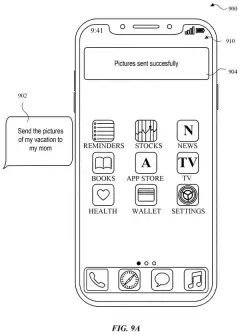
Apple is describing a phone that notices the date or address buried in a voicemail transcript and offers to act on it, while the message stays right there on screen.
- Publication number
- US 2026/0367947 A1(US20260367947A1)
- Applicant
- Apple Inc.
- Filed · Published
- Dec 31, 2025 · Nov 19, 2026
- Inventors
- Bryn BOWMAN, Jae Woo CHANG, Gencer CILI, Ashwin REVO, Aditya P. TIRTHAHALLI
- Status when we published
- Waiting for an examiner
- Document
- 20 claims
- US classification
- 715/764
- Parent application
- Claims priority from a provisional application 63808540 (filed May 19, 2025)
What Apple's voicemail suggested-actions patent does
Every time a voicemail tells you to meet someone Thursday at 3 at the clinic, you face the same chore: read it, memorize it, then switch to your calendar and type it all in again.
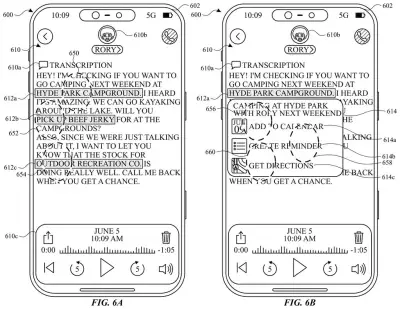
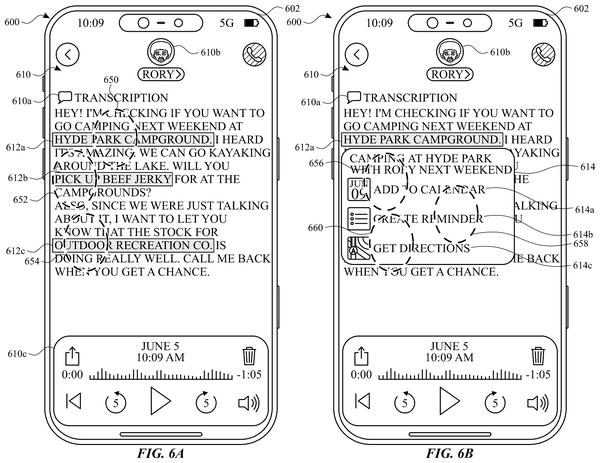
Apple's patent application describes a phone that does the noticing for you. When text on screen contains something you could act on, such as a date, a place or a task, the phone shows a small indicator like an underline or a highlight. The claims single out a voicemail transcript as one example. Tap the indicator and a second panel opens alongside the message, with details pulled from the text.
You confirm, and the action happens while the transcript is still sitting in view. A second version of the idea also lets you change an action after it has been done.
The present disclosure generally relates to user interfaces for performing suggested actions. In some embodiments, methods and user interfaces for performing suggested actions while displaying at least a portion of a respective user interface are described.
Translation: Apple's patent describes user interfaces that let people complete context-based tasks on screen.
How the tap-to-preview suggestion sheet works
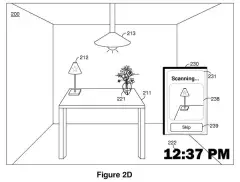
The claims cover a screen that shows some text plus an indication that suggested actions related to that text have been found. When you tap to start one, a second interface opens while at least part of the first stays visible. A second input then carries out the action, and the original screen remains on display.
The filing and its dependent claims add a lot of detail:
- The indication can be an underline, a highlight, a color change or a small animation, and it can change appearance over time.
- It sits near the part of the text it relates to, chosen by the type of text or by semantic similarity (matching on meaning, not just keywords).
- Text it looks for includes people, places, dates, times, numbers, activities and events.
- Actions include adding a calendar event or appointment, setting a reminder, showing directions, making a note, updating a list and viewing information.
One claim has two AI models working in sequence: the first proposes suggested actions and the second refines that list. Another has the original screen show an indication that the action was performed.
A separate embodiment in the description changes the button depending on state. If nothing has been done yet, it opens options for performing the action. If something has been done, it opens options for modifying it.
Why a calendar prompt in your voicemail matters
The practical gain is fewer app switches. Today, acting on a voicemail usually means listening, remembering the details, leaving the message and typing them into Calendar or Reminders. Under this filing, you would tap a highlighted phrase, check a prefilled panel and confirm, with the transcript still in view so you can compare the details against what was said.
The claims are not limited to voicemail. They cover any screen with text, and the listed actions include reminders, directions, notes and list updates. That means the same behavior could, in principle, apply wherever an Apple device shows text. The filing also frames it as saving you time and saving battery power, since there are fewer taps to get the job done.
That makes this Apple's 11th filing we've tracked since July in our AI agents acting for you watchlist, building on work like calling other apps to answer you and suggesting what to do with photos.
Source: US 2026/0367947 A1 at the USPTO (PDF). Full patent text and figures are in the official publication.
Get our take in your Top Stories
Liked this breakdown? Add Patentlyze as a preferred source on Google, and our plain-English take shows up more often in your Top Stories the next time Apple patent news breaks.
Add Patentlyze on Google
One click.
There are more where this came from
We read every patent application Big Tech publishes and send you the ones worth knowing. Plain English, free, every week.
The drawings · 28 sheets
28 drawing sheets from US 2026/0367947 A1 · click any drawing to enlarge


Show the other 20 sheets


More from Apple
All 748 Apple patents →
More in Software
All 814 Software patents →
Microsoft
Microsoft Files Patent for an AI That Suggests Your Next Move in Work Apps
Salesforce
Salesforce Files Patent for an AI That Writes Hidden Text to Lift Search Rankings
IBM
IBM's New Patent Covers a Chatbot That Spins Up New AI Assistants Mid-Conversation
Google
No comments yet