
A New Apple Patent Gives Each Room Its Own Screen When You Add a Smart Device
Add a smart lightbulb to your kitchen and your phone could show you the kitchen's page, with the new bulb's control already sitting there. Apple's filing ties the setup moment directly to the room you choose.
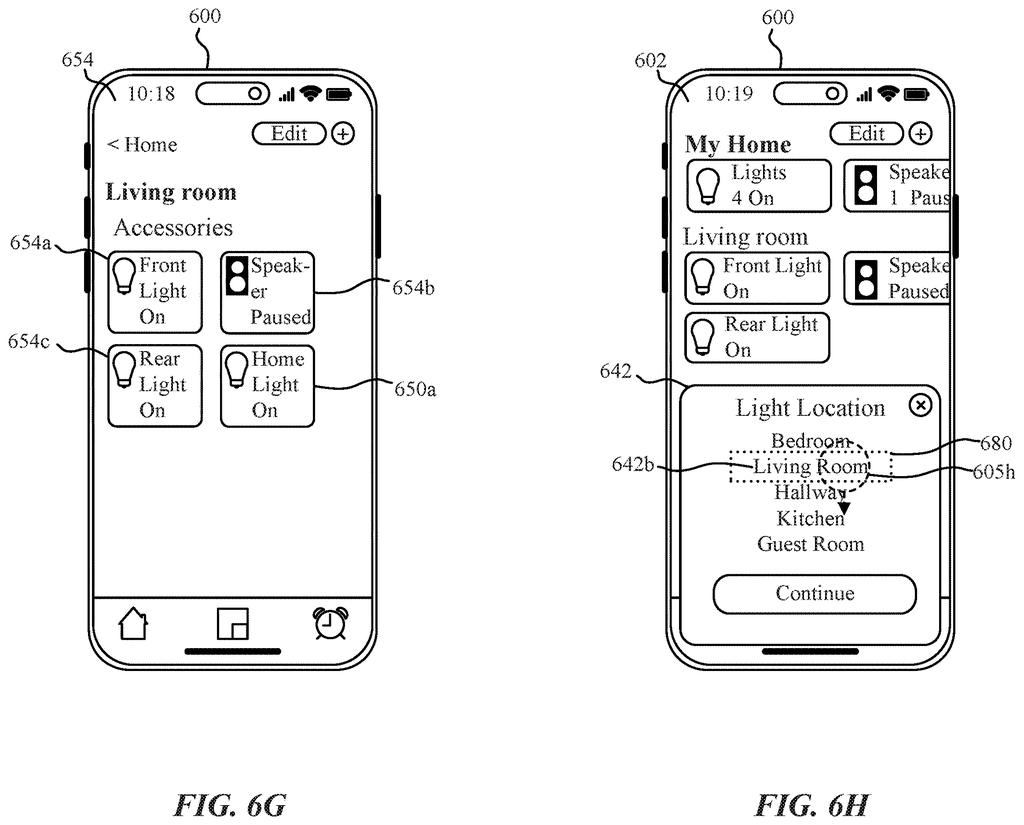
What Apple's room-based accessory setup does
Ever bought a smart lightbulb, finally gotten it paired, and then wondered where on earth its on/off switch ended up? Setting up smart home gadgets often ends with a hunt through menus.
Apple's filing describes a fix. When you add a gadget and tell your phone which room it belongs in, the app shows you that room's own screen, with a control for the new gadget right on it. Pick the living room and you see the living room. Pick the kitchen and you see the kitchen, with whatever else you already put there.
If you add a second gadget to the same room, it gets its own separate control on that same screen, next to the first one.
How the Home app reacts to the room you pick
The claims cover a method run by a computer system (a phone, in the main examples) with a screen and some way to take input, such as touch, voice, gaze or hand gestures. First, the system detects a request to add an accessory (a smart light, speaker, thermostat or similar) to a particular portion of an environment, such as a room in a home.
Then it checks which room you picked. If it's the first room, it shows a screen for that room with a control for the accessory. If it's a different room, it shows a different screen for that room, again with a control for the same accessory.
The filing describes several details around this:
- A scanner screen that uses the camera to read a QR code on the device, followed by a setup flow and a list of rooms to choose from (bedroom, living room, hallway, kitchen, guest room).
- Other ways to start setup, such as tapping an NFC tag (a short-range wireless chip) or detecting the device nearby over Bluetooth, Wi-Fi or Thread.
- Room screens that can show the room's name, readings from sensors in that room, and put each accessory in a section based on its type.
- Tapping a control can open more settings or send a request to the accessory to change its state, such as switching a light on.
The main example is a smart home app, with all the screens inside a single application.
Why smart home setup could get less tedious
If you own a few smart home devices, you know the setup routine: scan, name it, pick a room, then go find it again later. This filing points to a flow where finishing setup drops you where the device lives, with its control ready to use. That means fewer taps and less hunting.
It also says something about how Apple thinks of a home: as a set of rooms, not a flat list of gadgets. Apple says the aim is fewer steps, less wasted time and less battery use. The filing doesn't name a specific product, and it reads as a polish to an existing home app rather than a new feature.
This is the 608th Apple patent application we've tracked in our Apple coverage since May, adding to work like the app-picking voice assistant and the eye-scan nudge system.
The trade here is that the room becomes the organizing idea for everything. That works well if your home maps neatly onto rooms. It works less well for devices that don't belong to one place, such as a whole-house thermostat, a hallway-and-porch light pair, or a portable speaker that moves around.
It also gives up some simplicity of setup. Each room has its own screen, so the app has more screens to build and keep consistent, and you may have to choose a room before you can do anything with a new gadget.
Still, for most households, finding a device by where it sits is how people already think. The trade is worth it, though this is a modest interface refinement and a lot of the claim language describes steps most smart home apps already approximate.
Get our take in your Top Stories
Liked this breakdown? Add Patentlyze as a preferred source on Google, and our plain-English take shows up more often in your Top Stories the next time Apple patent news breaks.
There are more where this came from
We read every patent application Big Tech publishes and send you the ones worth knowing. Plain English, free, every week.
The drawings
21 drawing sheets from US 2026/0339490 A1 · click any drawing to enlarge


Show the other 13 sheets


Want this weekly breakdown for a company we don't cover? Patentlyze Pro →
Be the first to weigh in