Get the newsletter
Google · AI / ML · Filed Jul 21, 2026 · USPTO published Nov 12, 2026 · This week's release

Google Files Patent for Saving Any Piece of Your Screen Into AI-Sorted Collections

Google's patent application describes a circle-to-save feature for your phone that clips part of any screen, remembers where it came from, and lets an AI sort your clips into collections for you.
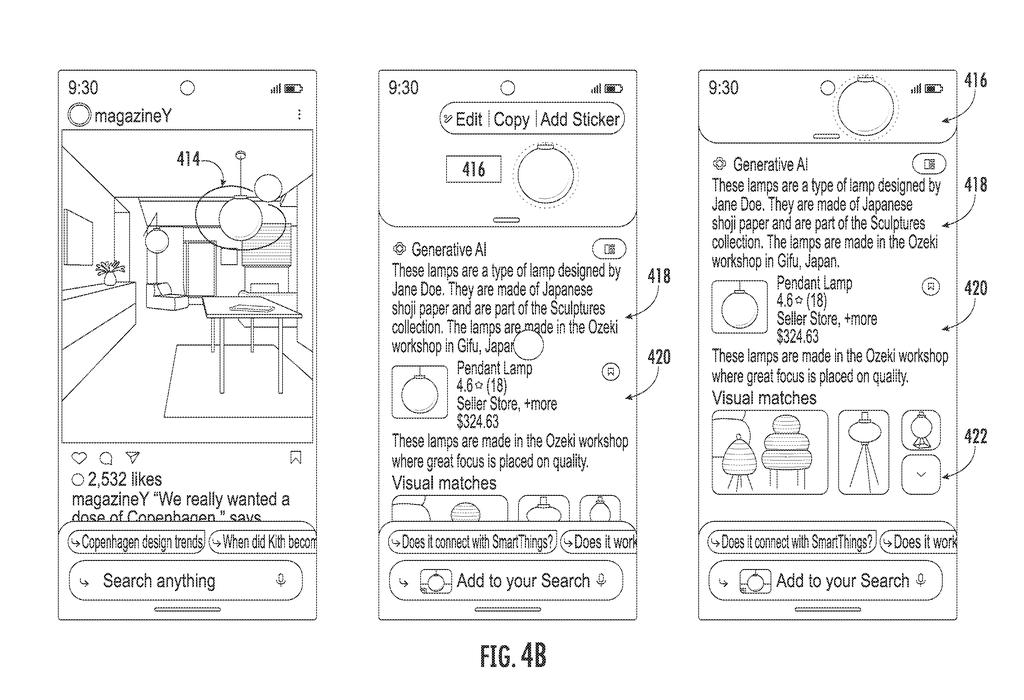
A phone screen lets someone circle an object in a photo to extract it and get AI-generated product details and recommendations. Drawing from patent filing US 2026/0359368 A1.
A phone screen lets someone circle an object in a photo to extract it and get AI-generated product details and recommendations.All 39 drawings ↓
Publication number
US 2026/0359368 A1(US20260359368A1)
Applicant
Google LLC
Filed · Published
Jul 21, 2026 · Nov 12, 2026
Inventors
Erin Shea Lynch, Clement Dickinson Wright, Rosemary Margaret La Prairie
Status when we published
Waiting for an examiner
Document
20 claims
US classification
707/722
Parent application
Continuation of 18/591,514 (filed Feb 29, 2024)(18591514)

What Google's circle-and-save snippets do

Ever screenshotted a pair of boots, a recipe, or a travel tip, then lost it in a camera roll full of other images? Google's patent application goes after that mess.

You would open an overlay that sits on top of any app on your phone, then circle or scribble over just the thing you care about. The phone saves that cutout along with where it came from, such as a web address or the app, so one tap later takes you back to the original spot.

Then an AI model looks at everything you have saved and groups related items together. All your boot finds could land in one collection with a label. The AI can also decide when to bring a saved snippet back, for example when your location, recent searches, or a calendar event suggest it is relevant.

From the filing · CLAIM 1
obtaining, via an overlay interface at an operating system level of a user computing device, a user input and display data descriptive of content provided for display, wherein the user input is descriptive of a selection of a sub-portion of the content …

Translation: The system uses a systemwide screen overlay to let you highlight any piece of what you are looking at.

How the overlay captures a snippet and its source

The claims describe an overlay interface that runs at the operating system level (the core software that runs the phone), so it works across many different apps instead of just one. You select part of what is on screen with a tap, a lasso (circling it), or a scribble.

The system then builds a selected content dataset with two pieces. The visual piece is a small image of the cutout, which can be a bitmap, made with a segmentation model (software that outlines an object pixel by pixel). The source piece records where the content came from, such as a web address and an API call (a standard instruction that lets one program talk to another) for navigating back.

Next, the system pulls in your other saved snippets and feeds them, along with the new one, to a generative model (the same family of AI as large language models). The model produces a content grouping: the new snippet plus related older ones, tied together by a shared topic, task, or entity such as a particular product. The group appears in a collection interface, optionally with a label.

The filing also describes using context like time, location, and recent searches. The model could infer a proactive candidate search intent (a search you are predicted to want next) and surface a matching snippet or fresh results. Other variations tune a personalization model on your saved clips.

From the filing · THE ABSTRACT
A generative model can be leveraged to categorize the content snippet, determine similar content, and determine when to surface the content snippet to a user.

Translation: An AI model automatically organizes your saved snippets and decides when to show them to you again.

Why this could replace your screenshot pile

The practical payoff is for anyone who saves things from their phone and never sees them again. Instead of a cropped screenshot with no context, you would get a clip that remembers its source and arrives already filed with similar finds. Sharing could also get lighter: the filing says a friend sees the picture first, then taps through to the original page, which avoids sending a whole web page.

It also shows how Google wants generative AI to work on your personal stuff, not just on web search. The tradeoff is data. The filing describes storing groupings alongside your search and browsing history, so the convenience comes with a more detailed picture of your interests.

Google's 94th filing in the AI assistant and agent patents we've tracked since May follows filings like cheaper long-document processing and on-device heat scaling.

Source: US 2026/0359368 A1 at the USPTO (PDF). Full patent text and figures are in the official publication.

Get our take in your Top Stories

Liked this breakdown? Add Patentlyze as a preferred source on Google, and our plain-English take shows up more often in your Top Stories the next time Google patent news breaks.

There are more where this came from

We read every patent application Big Tech publishes and send you the ones worth knowing. Plain English, free, every week.

The drawings · 39 sheets

39 drawing sheets from US 2026/0359368 A1 · click any drawing to enlarge

An AI model groups saved screen snippets into topics, drawing sheet 1 from US 2026/0359368 A1
Sheet 1 An AI model groups saved screen snippets into topics
How the phone extracts screen details and assigns tags, drawing sheet 2 from US 2026/0359368 A1
Sheet 2 How the phone extracts screen details and assigns tags
Placing the search tool across every app on the phone, drawing sheet 3 from US 2026/0359368 A1
Sheet 3 Placing the search tool across every app on the phone
Distributing search tasks between your phone and cloud servers, drawing sheet 4 from US 2026/0359368 A1
Sheet 4 Distributing search tasks between your phone and cloud servers
Steps for turning selected screen content into a saved collection, drawing sheet 5 from US 2026/0359368 A1
Sheet 5 Steps for turning selected screen content into a saved collection
Surfacing relevant saved snippets based on what you are doing, drawing sheet 6 from US 2026/0359368 A1
Sheet 6 Surfacing relevant saved snippets based on what you are doing
Merging a new screen cutout with existing saved items, drawing sheet 7 from US 2026/0359368 A1
Sheet 7 Merging a new screen cutout with existing saved items
Activating the screen search mode while browsing an app, drawing sheet 8 from US 2026/0359368 A1
Sheet 8 Activating the screen search mode while browsing an app
Show the other 31 sheets
Circling an item on screen reveals prices and details, drawing sheet 9 from US 2026/0359368 A1
Sheet 9 Circling an item on screen reveals prices and details
Tapping a follow-up query brings up smart home compatibility details, drawing sheet 10 from US 2026/0359368 A1
Sheet 10 Tapping a follow-up query brings up smart home compatibility details
Typing questions helps you discover alternative shapes and styles, drawing sheet 11 from US 2026/0359368 A1
Sheet 11 Typing questions helps you discover alternative shapes and styles
Selecting text specs finds matching lightbulbs to buy nearby, drawing sheet 12 from US 2026/0359368 A1
Sheet 12 Selecting text specs finds matching lightbulbs to buy nearby
Turning searched product details into an instant text message, drawing sheet 13 from US 2026/0359368 A1
Sheet 13 Turning searched product details into an instant text message
Asking for matching furniture right from an order confirmation screen, drawing sheet 14 from US 2026/0359368 A1
Sheet 14 Asking for matching furniture right from an order confirmation screen
Drafting an email containing items found during your visual search, drawing sheet 15 from US 2026/0359368 A1
Sheet 15 Drafting an email containing items found during your visual search
AI scans your emails to create a budget shopping list, drawing sheet 16 from US 2026/0359368 A1
Sheet 16 AI scans your emails to create a budget shopping list
Swapping out shopping items to fit your target budget, drawing sheet 17 from US 2026/0359368 A1
Sheet 17 Swapping out shopping items to fit your target budget
Finding local stores that sell items from your shopping list, drawing sheet 18 from US 2026/0359368 A1
Sheet 18 Finding local stores that sell items from your shopping list
Turning a shopping list into a shared calendar invite, drawing sheet 19 from US 2026/0359368 A1
Sheet 19 Turning a shopping list into a shared calendar invite
Planning a walking route between furniture stores, drawing sheet 20 from US 2026/0359368 A1
Sheet 20 Planning a walking route between furniture stores
Translating text shown inside an instruction manual, drawing sheet 21 from US 2026/0359368 A1
Sheet 21 Translating text shown inside an instruction manual
Asking AI to find video steps for on-screen instructions, drawing sheet 22 from US 2026/0359368 A1
Sheet 22 Asking AI to find video steps for on-screen instructions
How your phone and cloud servers analyze screen content, drawing sheet 23 from US 2026/0359368 A1
Sheet 23 How your phone and cloud servers analyze screen content
Recommending relevant apps based on what is on screen, drawing sheet 24 from US 2026/0359368 A1
Sheet 24 Recommending relevant apps based on what is on screen
How the AI suggests apps based on your visual search, drawing sheet 25 from US 2026/0359368 A1
Sheet 25 How the AI suggests apps based on your visual search
Steps for answering questions using data pulled from your apps, drawing sheet 26 from US 2026/0359368 A1
Sheet 26 Steps for answering questions using data pulled from your apps
Combining content from multiple apps into one structured AI answer, drawing sheet 27 from US 2026/0359368 A1
Sheet 27 Combining content from multiple apps into one structured AI answer
Hardware that connects your personal devices to search servers, drawing sheet 28 from US 2026/0359368 A1
Sheet 28 Hardware that connects your personal devices to search servers
On-device tools that turn camera images into search results, drawing sheet 29 from US 2026/0359368 A1
Sheet 29 On-device tools that turn camera images into search results
Circling specific parts of furniture to refine shopping searches, drawing sheet 30 from US 2026/0359368 A1
Sheet 30 Circling specific parts of furniture to refine shopping searches
Selecting grid squares over clothing to find matching fashion items, drawing sheet 31 from US 2026/0359368 A1
Sheet 31 Selecting grid squares over clothing to find matching fashion items
Searching the web using hand-drawn selections on an image, drawing sheet 32 from US 2026/0359368 A1
Sheet 32 Searching the web using hand-drawn selections on an image
Matching visual search results to an object and its details, drawing sheet 33 from US 2026/0359368 A1
Sheet 33 Matching visual search results to an object and its details
Hardware parts that send camera queries to visual search servers, drawing sheet 34 from US 2026/0359368 A1
Sheet 34 Hardware parts that send camera queries to visual search servers
Saving snippets from web pages into shareable collections, drawing sheet 35 from US 2026/0359368 A1
Sheet 35 Saving snippets from web pages into shareable collections
Adding a newly captured quote directly into a visual collection, drawing sheet 36 from US 2026/0359368 A1
Sheet 36 Adding a newly captured quote directly into a visual collection
Tapping a saved card jumps back to the original article, drawing sheet 37 from US 2026/0359368 A1
Sheet 37 Tapping a saved card jumps back to the original article
Searching the web also surfaces cards from your saved collections, drawing sheet 38 from US 2026/0359368 A1
Sheet 38 Searching the web also surfaces cards from your saved collections
Bundling saved web clips with links and search tags, drawing sheet 39 from US 2026/0359368 A1
Sheet 39 Bundling saved web clips with links and search tags
Patent filing page

More in AI assistant & agent

All 413 AI assistant & agent patents →
Reader comments

No comments yet

Start the discussion

Real name or a handle, either is fine. Comments are read by a person before they appear, so allow a little time. Keep it about the filing.