
Meta Patents AR Glasses That Let You Type on Any Flat Surface
Meta is filing a patent for AR glasses with a dedicated downward-facing camera that watches your hands, so you could type on a desk, a knee, or thin air without touching a single key.
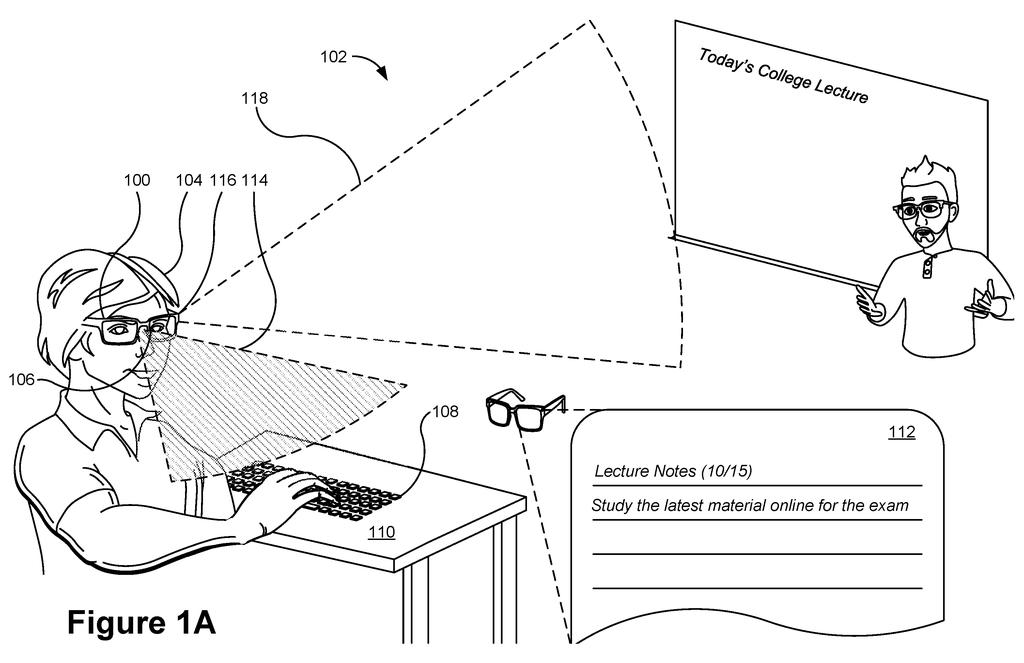
How Meta's AR glasses turn any surface into a keyboard
You're wearing AR glasses and you need to send a message, but there's no keyboard in front of you. You tap your fingers on the nearest table anyway, and the glasses understand exactly what you typed.
That's the core idea in this Meta patent. The glasses carry three cameras: two that face outward to see the world around you and feed an AI assistant, and one that points downward, directly watching your hands and fingers. The downward camera is the piece that makes surface typing possible, recognizing gestures and finger positions even when you're not holding any device.
The AI assistant built into the system uses all that camera data to answer your questions with awareness of your surroundings, not just what you say out loud. So the same hardware that helps you type in mid-air also helps the glasses understand what you're looking at and what you might need.
… a downward-facing camera configured to capture gestures within a second FOV of the augmented-reality head-wearable system.
Translation: A camera pointed downward to track your hand movements.
How the three-camera setup tracks hands and reads depth
The patent describes an AR headset with three distinct cameras, each doing a different job.
- First outward-facing camera: handles object tracking, meaning it identifies and follows things in your environment, like your hands, nearby objects, or people.
- Second outward-facing camera: runs at higher resolution and handles depth sensing, figuring out how far away objects are in three dimensions. Both outward cameras feed data to an onboard AI assistant that can answer questions about what the system sees.
- Downward-facing camera: points toward your lap or any surface below the glasses. It captures a separate field of view (the area it can see) specifically to recognize hand gestures and finger movements for typing input.
The split between two fields of view is important. The outward cameras cover what's in front of you, while the downward camera covers what's below, so the system can simultaneously understand your environment and your input gestures without one task interfering with the other.
The AI assistant layer ties it together. Rather than just detecting keystrokes, the system is built to use environmental context, what the cameras see around you, to make the AI's answers more relevant to your actual situation at that moment.
… a second outward-facing camera configured to provide second image data for depth sensing, wherein the second outward-facing camera has a higher resolution than the first outward-facing camera …
Translation: A sharper exterior camera handles depth perception.
What surface typing means for AR glasses as daily tools
Typing has been one of the stubborn, unsolved problems for AR and mixed-reality headsets. Voice input doesn't work everywhere, and hand-tracking systems have historically been too unreliable for the rapid, small movements typing requires. A dedicated downward camera specifically optimized for close-up gesture capture is a direct attempt to fix that.
For you as a potential user, the gap this closes is real: AR glasses that can't accept quick text input aren't useful as daily tools. If Meta can make surface typing reliable, it removes one of the main reasons people still reach for their phone mid-task. the pattern in Meta's AR input filings points toward glasses that eventually replace the phone as a communication device, and this camera arrangement is a concrete step in that direction.
Meta's 67th filing we've tracked since May in the AR glasses race builds on earlier applications like hand-tracking lighting and audio zone mapping.
Typing on AR glasses today means either speaking out loud in public or fumbling with tiny virtual keyboards that float in space with no physical anchor. That friction is not a minor inconvenience; it is the reason most people leave these devices in a drawer.
Pointing a camera at your hands resting on any real surface, a desk, your lap, a tabletop, and reading where your fingers land is a physically grounded workaround to a problem that has blocked everyday adoption for years. The cost of getting this wrong is an AR device that remains a curiosity rather than a tool.
How well finger-position tracking can keep up with actual typing speed on a shifting camera view is the hard question this patent does not yet answer. But the problem it is attacking is real, and the approach is at least aimed at the right target.
There are more where this came from
We read every patent application Big Tech publishes and send you the ones worth knowing. Plain English, free, every week.
The drawings
7 drawing sheets from US 2026/0288249 A1 · click any drawing to enlarge


Want this weekly breakdown for a company we don't cover? Patentlyze Pro →
Be the first to weigh in