
Microsoft
Microsoft · Software · Filed Feb 21, 2025 · USPTO published Aug 27, 2026 · Aug 27 release
Microsoft Patents a Coding Tool That Hides the Parts of Your Code You Don't Need Right Now
Microsoft has filed a patent for a coding environment that automatically figures out which parts of a file are relevant to what you're doing right now and hides everything else, so large, sprawling source files feel more manageable.
- Publication number
- US 2026/0252316 A1(US20260252316A1)
- Applicant
- MICROSOFT TECHNOLOGY LICENSING, LLC
- Filed · Published
- Feb 21, 2025 · Aug 27, 2026
- Inventors
- Ion TODIREL, Bogdan Ionut MIHALCEA
- Status when we published
- Waiting for an examiner
- Document
- 20 claims
- US classification
- 717/106
What Microsoft's context-aware code view actually does
A programmer opens a file that's thousands of lines long, looking for the one section they actually need to change. Everyone else in the file is irrelevant noise.
Microsoft's patent describes a tool built into a code editor that reads what you're currently working on and collapses everything else out of view. It figures out the context (what task you're doing) and the scope (how wide a net to cast), then shows you a cleaned-up version of the file that only includes the relevant pieces. The rest of the code is still there on disk; it just isn't cluttering your screen.
The result is something like a custom reading view for your code. Instead of scrolling through hundreds of unrelated functions to find the one you care about, the editor does the filtering for you and presents a coherent, logical view of just what matters for your current task.
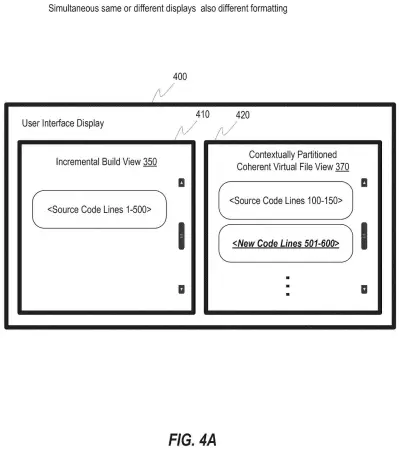
… partitioning the code to identify partitioned code segments of the code that are determined to be relevant to the defined context and within the defined scope for generating a contextually partitioned coherent virtual file view of the partitioned code segments …
Translation: The system figures out which parts of the code matter for your current task and groups them together.
How the IDE maps and filters code segments dynamically
The system works inside an IDE (integrated development environment, the software app developers use to write and edit code). When you open a file or start editing, the IDE identifies a defined context (for example, you're fixing a bug in a payment function) and a defined scope (how broadly to look, such as just this file, or related files too).
Based on those two inputs, the system partitions the code: it categorizes each section of the file as either relevant or less relevant to your current task. It then builds a memory mapping, essentially a lookup table that records exactly which lines of code belong to each relevant segment and where those lines live in the real file.
Using that mapping, the IDE renders a contextually partitioned coherent virtual file view: a display that looks like a normal file but silently omits the sections flagged as low-relevance. The underlying file on disk is unchanged.
Key components:
- Context identification: determining what the developer is currently trying to accomplish
- Scope identification: setting boundaries for how much of the codebase to consider
- Memory mapping: tracking which real line numbers correspond to which displayed segments
- Virtual file view: a filtered display that stitches the relevant segments together without gaps or broken references
The partitioned view can help facilitate navigation and editing efficiencies during code development, particularly for large source files.
Translation: This view makes it faster and easier to move around and edit huge files without getting distracted.
What this means for developers working in huge codebases
For a developer working inside a large, legacy codebase, the practical payoff here is real. Scrolling past thousands of lines of unrelated code raises the chance you make an edit in the wrong place or miss context that sits nearby but stays out of view. A view that automatically surfaces only what is relevant to your current task removes a class of errors that come from cognitive overload, not incompetence.
The patent fits squarely inside Microsoft's push to make Visual Studio and VS Code more AI-assisted, joining features like GitHub Copilot that already try to anticipate what a developer needs next. This filing on automatic source-view partitioning sits within the broader stream of plain-English patent summaries we publish tracking how Microsoft is rethinking the editor experience from the ground up, with particular attention to the tooling decisions that shape how developers navigate and edit code at scale.
This is the 337th Microsoft filing in our Microsoft coverage since May, adding to work like smarter AI prompt data selection and secure cloud-to-local transfers.
Source: US 2026/0252316 A1 at the USPTO (PDF). Full patent text and figures are in the official publication.
Get our take in your Top Stories
Liked this breakdown? Add Patentlyze as a preferred source on Google, and our plain-English take shows up more often in your Top Stories the next time Microsoft patent news breaks.
Add Patentlyze on Google
One click.
There are more where this came from
We read the new patents from Big Tech, carmakers and more and send you the ones worth knowing. Plain English, free, every week.
The drawings · 10 sheets
10 drawing sheets from US 2026/0252316 A1 · click any drawing to enlarge


Show the other 2 sheets


More from Microsoft
All 681 Microsoft patents →
More in Software
All 816 Software patents →
Apple
Apple Patents a Photos Interface That Surfaces Albums Based on What You're Doing Right Now
Adobe
Adobe Patents a System That Turns UI Designs Into Reusable Code Automatically
Nvidia
Nvidia Patent Routes Compiled Code Dynamically to Different Processor Targets at Runtime
IBM